
5 BEST Instagram Photo Downloaders (2026)
 Editorial Team
I spent over 140 hours researching and testing 35+ Instagram photo downloader tools to curate this guide. After extensive hands-on evaluation, I shortlisted the 6 best tools backed by my firsthand experience on their performance, usability, and reliability. In this article, I shall take you through their key features, pros and cons, and pricing. My goal is to provide full transparency so you can make the right choice. Please read the complete article to find the tool that suits your needs best.

PeekViewer is an Instagram photo downloader designed to help you download Instagram content like photos and videos, even from private profiles. It handles HD-quality downloads without forcing complicated steps.
Best Instagram Photo Downloader Tools: Top Picks!
| Tool Name | Key Features | Free Trial | Link |
|---|---|---|---|
PeekViewer |
• Private account access • HD image quality |
14-day refund policy | Learn More |
 4K Stogram |
• Saved and tagged photos • Full account backup |
It’s a free software | Learn More |
 Inflact |
• Cross-device compatibility • Influencer search |
7-day paid trial for $3 | Learn More |
 Zeemo |
• Ad-free experience • Unlimited downloads |
7-day free trial | Learn More |
 EaseUS Video Downloader |
• No watermark • Filter for quick search |
Free version | Learn More |
1) PeekViewer
PeekViewer is an Instagram photo downloader designed to help you download Instagram content like photos and videos, even from private profiles. I particularly liked how easily it handled my HD-quality downloads without forcing complicated steps. Hence, making it useful even for saving Reels, Stories, and carousel posts with just a link or username.
It works smoothly for situations where quick content access matters—like when I needed to save a carousel post and a Story archive for reference during a content research session. The platform focuses on fast download speed, original-quality files, and browser-based convenience. Overall, it is great software for both casual users and content creators, making it beginner-friendly.

Features:
- HD Photo Download: This feature helped me store Instagram photo downloads locally. It saves posts in high quality, which matters because screenshots usually blur details slightly. As for review-style archiving or visual inspiration boards, the cleaner output makes the posts more usable.
- Story and Reel Saving: The user will like how this tool goes beyond basic photo download. It also supports stories, reels, tagged images, and regular posts. Hence, I found the all-in-one viewing and downloading capability versatile for different purposes and users.
- Anonymous Downloading: What stands out here is the PeekViewer privacy since it never notifies the account owner about your actions. The downloads happen without login, and it never logs these activities. That makes it a better fit for discreet research and quiet parental monitoring.
- Watermark-Free Saves: I noticed that a lot of downloaders ruin the experience by adding a watermark to the downloaded items. On the other hand, PeekViewer makes you feel like you solely own the saved files, making them watermark-free. Additionally, for professionals, this makes the images more reusable. It also matters when you are downloading your own images to repost them.
- Cross-Use Research Value: This feature is less about one-click photo saving and more about why someone would keep using the tool. Apart from downloading, PeekViewer also offers market insights, influencer research, parental monitoring, and offline archiving.
Pros
Cons
Pricing:
PeekViewer offers a 14-day refund policy and a free demo. Here are the plans offered by PeekViewer:
| 1 Month | 3 Months | 12 Months |
|---|---|---|
| $50.99 | $30.03 | $12.74 |
14-Days Refund Policy
2) 4K Stogram
4K Stogram is a desktop Instagram downloader designed for users who need to save large amounts of content efficiently. It allowed me to store the Instagram media directly on my computer in a well-organized format. One of its most useful features, as per my review, is its automatic downloading feature. It captures posts in their original quality and neatly groups them by account.
The tool is especially helpful when you want to maintain a continuous archive of Instagram activity. For example, you can configure it to automatically collect new content from specific profiles for later reference or analysis. The best part is that it supports HD downloads and bulk downloads of hashtags entirely.

Features:
- Date-Range Download Filter: This feature is great when you only need content from a specific campaign window or posting period. I was able to start and end dates directly in the in-app calendar. Hence, it makes the content research more targeted and much less messy.
- Full Instagram Account Backup: It helps make a complete backup of your own Instagram profile, including posts, current stories, and Highlights. In fact, I was even able to save captions and comments along with metadata using 4K Stogram. As a content creator, if you are scared of losing your account, you can use it to create a local backup.
- Saved and Tagged Post Collection: It pulls together posts you have saved and pictures where you are tagged. The fact that 4K Stogram helps you find saved content makes it a truly useful tool for business organizations. I suggest using this feature when your saved folder starts turning into digital attic chaos, and you want a more organized folder.
- Private Account Saving: It lets you view and download private Instagram posts from accounts you already follow, which is useful for personal archiving. You still get original quality downloads for the offline access. I like that it keeps the experience straightforward instead of forcing awkward workarounds.
- Username, Hashtag, and Location: This feature makes large Instagram grabs feel surprisingly simple. You simply have to use a username, hashtag, or location and download all the posts at once. Thus, making it suitable for businesses that want broader content tracking instead of saving one post at a time.
Pros
Cons
Pricing:
It is free software
Download for Free
3) Inflact
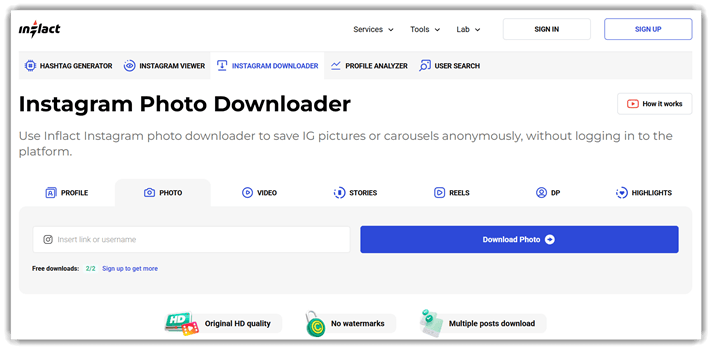
Inflact’s downloader is built for bulk and profile-based downloads. This allowed me to collect multiple images, videos, and Stories from a single profile at once. It saved alot of my time since instead of copying links individually, I could paste a profile URL and download entire albums or media collections in high resolution. This is particularly useful when analyzing content or gathering reference material for creative projects as a social media manager or a digital marketer.
Another advanced capability is its automatic media detection system. It quickly identifies all downloadable content within a provided link and prepares files in their original quality. This reduces the time spent locating individual media files and ensures the downloads remain crisp and uncompressed.
Features:
- Fast Download Speed: I like that this downloader is optimized for speed, which is noticeable when pulling multiple files. Even larger video downloads start almost instantly after the link is processed. In my experience, this reduces waiting time significantly during multiple content saving sessions.
- No Login Required: One major advantage is that you don’t need to sign into Instagram to download media. This keeps your account credentials secure and eliminates unnecessary steps when accessing the tool. Overall, its browser-based workflow makes everything quick and privacy-friendly.
- Cross-Device Compatibility: Inflact works smoothly across desktops, tablets, and smartphones. You can download Instagram photos or videos regardless of the device you’re using. I tested it on both a laptop and an Android phone, and the experience stayed consistent throughout.
- Profile Analytics and Insights: Beyond downloading, Inflact provides profile analytics that give insights into engagement rates, audience behavior, and content performance. Marketing and Analytics teams can evaluate which types of posts generate the most interaction and use that information to refine their content strategies.
- Influencer Search: Using Inflact, you can directly look for IG users using their username, keyword, categories, and countries. It shows their posts, number of followers, and more. I could then add them to my list to access their contact information easily from my dashboard, without signing in to Instagram.
Pros
Cons
Pricing:
It offers a 7-day paid trial for $3 and a 30-day money-back guarantee for paid plans. Here are its paid plans:
| Research | Pro | Custom |
|---|---|---|
| $19 | $79 | Request Pricing |
30-Days Money-back Guarantee
4) Zeemo
Zeemo is an Instagram Photo Downloader that also doubles as a versatile solution for Instagram video download tasks. Built as part of Zeemo’s AI-powered content toolkit, it focuses on quick copy-link downloads and preserving HD or original quality while keeping the process simple and login-free. I found the interface surprisingly smooth, since all I had to do was paste the Instagram link, and the media appeared ready for download within seconds.
While working on repurposing social media assets, I used it to quickly grab a carousel post and a Reel in original quality for offline reference. The tool handled photo download and video download equally well. Therefore, meme page owners can save content, analyze formats, or build inspiration libraries without dealing with complicated steps or slow download speeds.

Features:
- Secure and Clean Download: Security matters when downloading online content, and this tool maintains a safe environment without unnecessary ads or malware risks. That’s because the downloads occur directly to your device, and it emphasizes safe processing so users can save media confidently.
- Unlimited Instagram Video Downloads: This feature allows you to download Instagram videos without any limits. It is especially useful for creators and marketers managing large content libraries. I have found unlimited access to Reels, stories, and other videos incredibly helpful when archiving multiple campaigns for later analysis.
- Ad-Free Download Experience: Instead of forcing you through pop-ups or video ads, this feature keeps the downloading workflow clean and distraction-free. It makes the process faster and smoother. Skipping ads significantly improves productivity when downloading several Instagram videos in one session, unlike other free tools that force ads on you.
- Free Video Subtitle Generation: This feature lets you automatically add subtitles to downloaded or uploaded videos at no cost. It improves accessibility and makes your content more engaging for various viewers, including differently abled users. I suggest enabling subtitles when repurposing Instagram clips for platforms like TikTok or YouTube Shorts.
- Free Video Content Translation: Zeemo’s other powerful capability is translating video subtitles into different languages automatically. This helps creators expand their reach to international audiences. While testing Zeemo, I noticed translated captions make short-form content far more shareable across global social media communities.
Pros
Cons
Pricing:
It offers a free version and has a 7-day free trial for paid versions:
| Pro | Expert | Business |
|---|---|---|
| $6.67 | $13.33 | $15.99 |
7-Days Free Trial
5) EaseUS Video Downloader
EaseUS Video Downloader is a powerful multimedia downloader that supports Instagram post downloads in original quality. Known for its reliable desktop software ecosystem, EaseUS provides a streamlined experience that helped me download Instagram content directly by pasting a link. I appreciate how the software prioritizes stable download performance and maintains clear video quality as well.
During a workflow that required archiving multiple Instagram posts, I used it to download several photos and reels in HD quality without interruptions. Additionally, it offers a batch download approach with good, consistent speed, which saves your time and makes it a great tool for urgent projects.

Features:
- Preview While Downloading: This feature lets you watch or preview the Instagram media while the file is still downloading. It saves your time because you can confirm the content quality instantly. I used the preview during bulk downloads to verify clips before organizing them in my offline content library.
- Ad-Free and No Watermark: One thing you will appreciate is that EaseUS offers a clean downloading experience without intrusive ads or watermarks. My saved Instagram photos are in their original visual form and can be reused easily. This makes the files much more suitable for inspiration boards or content research.
- Filter Content for Quick Search: It includes a smart Quick Search feature that allows you to filter and locate images by name inside the downloader. This helps you when managing a growing collection of Instagram downloads. Using this feature significantly speeds up my search for specific photos and videos.
- Live Video Download Support: This feature allows you to capture live video streams from supported platforms before they disappear. Not many tools can download live video, and I truly enjoyed using this feature for gathering rare content. I recommend enabling the download early during a stream to avoid missing any important segments.
Pros
Cons
Pricing:
It offers a free version and a 30-day money-back guarantee for paid plans. Here are its pricing for individual users:
| 1 Month | 1 Year | Lifetime |
|---|---|---|
| $12.99 | $23.99 | $39.99 |
Downloader for Free
Feature Comparison: Best Instagram Photo Downloader
Here is a simple feature comparison table for Instagram Photo Downloader:
| Feature | PeekViewer | 4K Stogram | Inflact | Zeemo |
| Download Instagram Photos | ✔ | ✔ | ✔ | ✔ |
| Download Multiple Photos (Carousel Posts) | ✔ | ✔ | ✔ | Limited |
| Bulk Photo Download (Entire Profile) | ✔ | ✔ | ✔ | Limited |
| Download Private Account Photos | ✔ | ✔ | Limited | Limited |
| Anonymous Download | ✔ | ✔ | ✔ | ✔ |
| Download Photos by Username | ✔ | ✔ | ✔ | ✔ |
| Download Photos by Hashtag | ✔ | ✔ | ✔ | ✔ |
| Original HD Photo Quality | ✔ | ✔ | ✔ | ✔ |
What is an Instagram Photo Downloader & How Does it Work?
An Instagram photo downloader is an online tool or app that allows users to save photos from Instagram directly to their devices. Normally, Instagram does not provide a built-in option to download other users’ photos. These Insta downloader tools solve that limitation by letting users copy the link of a public Instagram post and retrieve the image file for offline use.
It works by processing the URL of the Instagram post. Hence, when a user pastes the link into the downloader, the tool accesses the public media data from Instagram’s servers and extracts the image file. The tool then generates a downloadable version of the photo, allowing users to save it in high quality on their phone or computer.
How to Use Instagram Photo Downloader?
Now that you know what Instagram reels or photo downloader apps and sites are, here’s how you can use them (I am using Peekviewer for this demo):
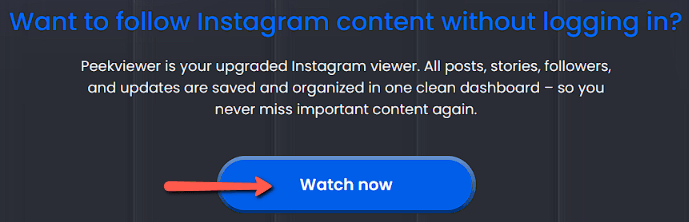
Step 1) First, visit Peekviewer and tap on Watch Now.
Step 2) This will take you to a page where you can choose the type of account you want to access– an Open or a Private account for viewing and downloading the photos, and click Next.

Step 3) Now, enter the Instagram URL or the username of the person in the search field.

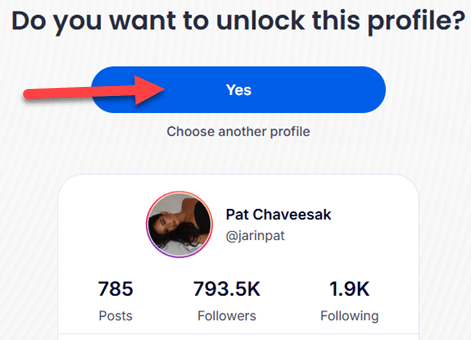
Step 4) Then click on Yes and view the profile of the person, and click on the posts to download them.
14-Days Refund Policy
How to Troubleshoot the Common Issues of the Instagram Photo Downloader?
It is common for an app or a site to malfunction at times, after all, they are all software and may need some tweaking from time to time. Hence, here’s how you can solve the common issues of the Instagram photo downloader:
- Issue: Your download keeps failing or never starts, even after pasting a correct post link.
Solution: I suggest refreshing the page, checking your internet stability, and then updating the app if it’s required. You might also have to try a different app if the current tool doesn’t respond. - Issue: Single photos download, but the carousel posts fail midway.
Solution: Carousels usually take a few seconds longer than a single post to download, since they might include videos as well. If you do not have a strong internet connection, the app might fail to save it. - Issue: The saved images appear blurry, pixelated, or noticeably lower quality than the original post.
Solution: You must choose the tools offering HD quality options, always select the original resolution, and avoid screenshot methods. I also suggest staying away from platforms that aggressively compress media. - Issue: When you attempt to save the content from private or restricted profiles, the app repeatedly shows errors or black files.
Solution: You must confirm if you follow the account and log in where it’s required. Overall, it is best to use tools like Peekviewer that allow access to both public and private accounts. - Issue: The downloader page becomes unresponsive and is stuck loading, or it shows nothing after inserting the profile URL.
Solution: I suggest clearing the browser or the app cache, reloading the tool, checking for recent updates, and if problems persist, you should opt for a more reliable and actively maintained site. - Issue: You may face excessive pop-ups, misleading buttons, and intrusive ads appearing around the download interface.
Solution: Always choose clean and trusted platforms and use an ad blocker to avoid fake “Download” buttons and immediately leave the site that looks suspicious. - Issue: Sometimes the download speed is extremely slow, especially if it’s a high-resolution file or a carousel.
Solution: You should test your internet and avoid downloading multiple files simultaneously. I suggest trying again during the off-peak hours or moving to a different tool with faster servers.
How to Download an Instagram Photo Without Third-Party Tools?
If you do not want to use third-party sites to download Instagram photos, you can use the following methods instead.
1. Instagram Download Button:
Using Instagram’s Download button, you can save posts directly from the app. However, you should either be following the account or the profile owner should have enabled the download option in their posts. Moreover, the major drawback is that instead of photos, you will be able to download reels alone in this manner.
Here’s how you can download an IG Reel using the app itself:
Step 1) First, go to the person or brand’s profile and open the Reel you want to download.
Step 2) Now, tap on the Send or Paperplane button. This will show many options to send to different users and platforms. Here, you will find a downward-facing arrow button, which is the Download feature.
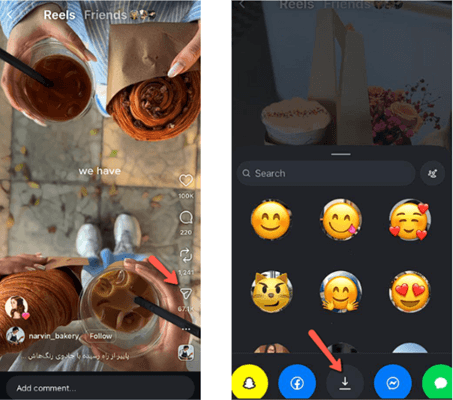
Step 3) Just tap on this download button, and Instagram will allow you to save the reel locally on your device. Although the post will have a watermark of the person’s username.
2. Export Account Data:
This method is recommended for users who want to download their own account photos and videos but are unable to do so. This could be because the reel or the post was uploaded before Instagram provided the download feature. Additionally, I noticed that some of these old posts do get downloaded, but the file doesn’t open in the device gallery. Hence, follow the given steps below for a better download experience.
Step 1) Start by going to your profile and tapping on the burger menu (☰).
Step 2) This will lead you to the Accounts Center. Now, click on Account Center, then tap on the option Your Information and permissions.
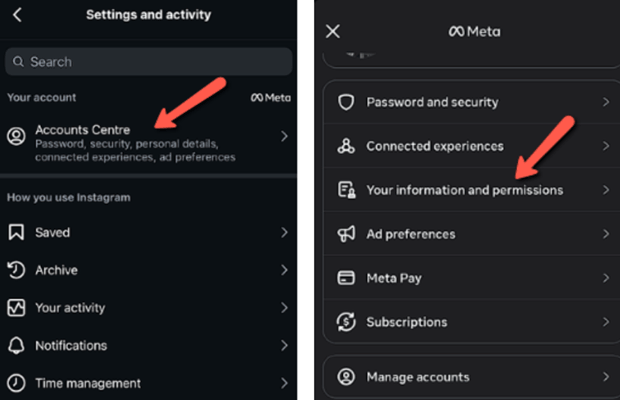
Step 3) Next, go to Export your information, which will lead you to your account’s IG login page, to ensure you are the one requesting the data.
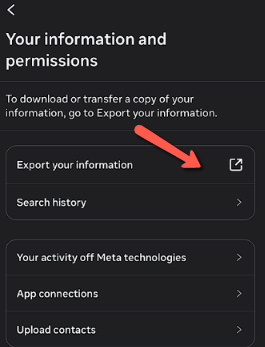
Step 4) Once logged in, you can choose the data range, media quality, etc., and request a download. Instagram will then send a Zip file that will contain all the media, comments, messages, etc.
3. Story Upload:
If you are unable to download a photo or grab someone else’s post because the paperplane option doesn’t lead to a download option, then just use the story upload trick. No, you do not have to upload it to your story. All you have to do is use the paper plane/send option to lead the post to your story and use the download button that is available before posting. If it is a carousel post, choose the slide you want to download, take it to your story, and then save it.
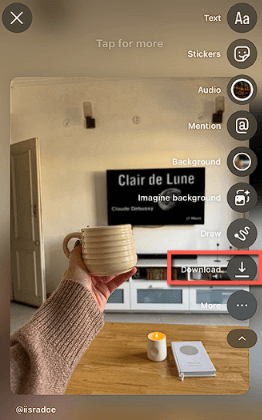
You can do the same with video posts and reels. However, the quality of the post might be compromised, and the length of the reel could sometimes be cut short (maximum of 15 seconds). Although sometimes IG allows you to download the whole duration of the reel, in this trick.
4. Google Image Download:
If you do not own an Instagram account, the Google image download method is the best option for you. However, it works only for public accounts. Although you might find a few old pictures of a private account that could have been indexed by Google when the user kept their profile open. All you have to do is go to Google, type the person’s name, add the word Instagram, and then tap on photos to find their IG posts.

5. Screenshot
The last and final option is for anyone who wants a direct, immediate result with no third-party or any process– so go ahead and take that screenshot. Yes, the quality won’t be as expected, but we are in times where the pictures are of extremely high quality; therefore, a screenshot cannot do much harm.
Verdict
During the review process, I found all of the above tools highly reliable and robust. These sites and applications not only offer image download, but also include advanced features that enhance the user experience. However, to simplify your selection, here are the top tools that truly stood out to me and why:
- PeekViewer: Its ability to access both private and public IG accounts without any workarounds makes it one of my top choices. PeekViewer also offers highly anonymous access and downloads the posts in their original quality.
- 4k Stogram: This is an impressive free tool that offers secure downloads without asking for login credentials and has a high download speed. Moreover, its desktop version provides automatic media detection for easy downloads and backups.
- Inflact: It saves images within a second without any watermarks. Additionally, its bulk download feature is remarkable and offers easy user search using filters.
FAQs
PeekViewer is an Instagram photo downloader designed to help you download Instagram content like photos and videos, even from private profiles. It handles HD-quality downloads without forcing complicated steps.
