
What is Hypervisor in Cloud Computing? Types & Examples
 Editorial Team
⚡ Smart Summary
Hypervisor is virtualization software that lets a single physical machine run multiple operating systems as isolated virtual machines, allocating processor, memory, and storage to each guest while keeping them separated for security, efficiency, and hardware utilization.
What is Hypervisor?
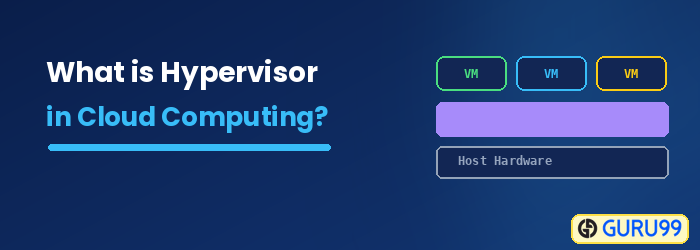
Hypervisor is a program that allows multiple operating systems to share a single physical hardware. Each operating system shares the host’s processor, memory, file storage, and other resources. The hypervisor controls the host processor and resources, allocating what is needed to each operating system. This ensures that the guest operating systems (called virtual machines) cannot interrupt each other.
Since hypervisors help create and manage virtual machines (VMs), they are also known as Virtual Machine Monitors, or VMMs.
Hypervisors help you retain control over a cloud environment’s processes and infrastructure, protect sensitive data, and make cloud-based applications accessible in a virtual environment.

Types of Hypervisors
There are two types of hypervisors, as detailed below:
Type 1 Hypervisor
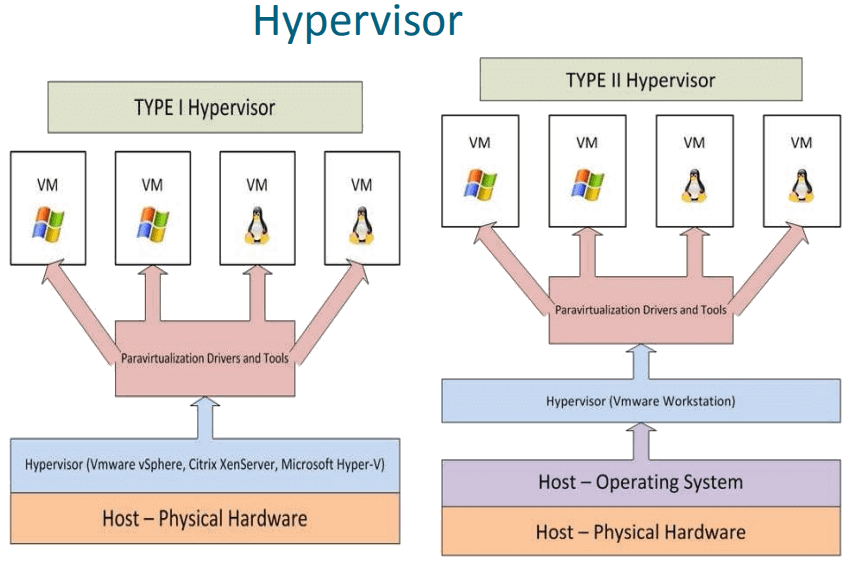
Type 1 Hypervisor is installed directly on the physical server, so it is also called a “bare metal” hypervisor. It has direct access to the server’s resources, which makes it highly effective. Furthermore, its design is highly secure, limiting the attack surface and potential for compromise.
Type 1 Hypervisors are the most common enterprise choice, offering strong security, stability, and performance.
Popular Type 1 hypervisors are Nutanix AHV, VMware ESXi, and Citrix Hypervisor, amongst others.
Type 2 Hypervisor
Type 2 Hypervisors run as applications on a physical server’s pre-existing OS. The host operating system sits between the physical server and the hypervisor, so it is also called a “hosted” hypervisor.
However, Type 2 Hypervisors are not ideal for server environments, as they have higher latency and risk exposure than Type 1. They are easy to install and work well in specific cases, such as individual PC users running only one OS, where performance and security are not principal concerns.
Example: Installing Linux over Windows using VirtualBox.
What is a Cloud Hypervisor?
A Cloud Hypervisor is a software solution that enables you to share the physical computing and memory resources of a cloud provider across multiple virtual machines (VMs).
It was created for mainframe computers in the 1960s. Cloud hypervisors gained worldwide popularity with the introduction of VMware for industry-standard servers in the 1990s.
A Cloud Hypervisor allows a single physical server to run multiple guest virtual machines. Each VM has its own operating system that runs independently and is logically separated from the others. Because of this, problems or crashes in one guest VM do not affect the other VMs, their OSs, or their applications.
Why do you need a Cloud Hypervisor?
Suppose you own a company with multiple servers providing various services to customers over the internet. In that situation, it is not easy to centrally manage them, particularly those running different operating systems.
A hypervisor lets you virtualize these servers and manage them all from one physical machine, making them more efficient. It also helps you control the data flow into the virtual machines it manages.
The hypervisor also acts as a storage center where all the data is stored virtually.
How does a Cloud Hypervisor work?
The following three modules are used in a hypervisor:
- Dispatcher: This module acts as an entry point for the virtual monitor. It reroutes all the virtual machine instructions to one or both modules listed below.
- Allocator: The allocator decides the system resources to be provided to the virtual machine instance. In other words, the dispatcher invokes the allocator whenever a virtual machine executes an instruction that changes the machine resources associated with that virtual machine.
- Interpreter: The interpreter module contains routines that execute whenever a virtual machine runs specific privileged instructions.
Benefits of a Cloud Hypervisor
Here are some important advantages of a Cloud Hypervisor:
- Portability: Applications with spikes in demand can connect additional machines to scale, because hypervisors allow workloads to move between virtual machines.
- Efficiency: One physical server can be used more effectively when multiple virtual machines run on a single machine’s resources.
- Utilization: Multiple virtual machines run on a single physical server and share resources, increasing utilization while saving on power, cooling, and more.
- Hardware neutral: Hypervisor-based replication is hardware neutral, meaning duplicate data can easily be stored on any device.
- Flexibility: The hypervisor runs guest VMs and OSs on a wide range of hardware.
- Time to use: Cloud hypervisors turn virtual machines up or down instantly, so projects launch and teams start work the same day.
- Reliability: Hardware failures can be remedied by moving virtual machines to different machines.
Container vs. Hypervisor
Containers and hypervisors both help make applications faster and more efficient, but they achieve this goal differently.
Here are some important differences between a container and a hypervisor:

| Containers | Hypervisor |
|---|---|
| Containers as a service is a type of infrastructure primarily geared toward running a single application. | A hypervisor, also called a virtual machine monitor, is software that creates and runs virtual machines (VMs). |
| It can run on any operating system. The only requirement is a corresponding container engine. | It shares virtual computing, storage, and memory resources. |
| It allows applications to run without the need for an operating system. | It allows an OS to run independently from the underlying hardware using virtual machines. |
| They are extremely portable because an application contains everything it requires to run. | It can run on multiple operating systems or be installed on the standard operating system. |
How to choose the right Hypervisor?
Here are important things to consider when selecting the right hypervisor:
- The cost of a hypervisor: The most significant factor should be striking the right balance between cost and functionality. Several entry-level solutions are free but lack the necessary features.
- Virtual machine performance: Virtual systems should meet or even exceed the performance of their physical counterparts, so everything beyond this benchmark is undoubtedly profitable.
- Ecosystem: Selecting a hypervisor with a strong ecosystem is essential. It is desirable to have documentation, support, training, third-party developers, and consultancies available for your chosen hypervisor.
- Test yourself: You can run various hypervisor systems to determine which one is right. It can be tested on your existing desktop or laptop.
- Performance: It should deliver enough performance to support your mission-critical applications.
- OS Support: Check whether it supports popular guest operating systems like Microsoft, SUSE, Red Hat, Ubuntu, and CentOS.
Example of Hypervisor
Here are some famous examples of hypervisors:
- KVM: KVM is virtualization software that provides virtualization infrastructure and a processor-specific module. It enables you to run multiple virtual machines on unmodified images on Windows or Linux operating systems. It also helps with scheduling and resource control.
- vSphere: VMware vSphere is a server virtualization software application from VMware. IT departments can run application workloads on the most efficient and cost-effective computer resources. It offers an effective central management system for hosting multiple machines or servers using virtualization.
- XenServer: Citrix XenServer is an open-source server virtualization platform based on the Xen Hypervisor. This hypervisor platform enables the creation and management of virtualized server infrastructure.
