
SAP RSBTCDEL2: How to Delete a Background Job
 Editorial Team
⚡ Smart Summary
SAP RSBTCDEL2 is the standard report used to delete old background jobs and their logs in SAP. Removing obsolete jobs frees system space, prevents TemSe inconsistencies, and keeps the job overview clean and manageable for administrators.
Background jobs and their logs pile up over time and consume valuable space in an SAP system. This guide shows two reliable ways to delete them: a bulk cleanup with report RSBTCDEL2 and a single-job deletion from SM37.
Why Delete Background Job?
Old jobs occupy space on the system. To avoid any inconsistencies within the system normally we delete the logs. Because if the file system gets full, your SAP system will crash!
You can delete jobs in two ways:-
- Multiple jobs at once.
- Single job deletion.
How to Delete Multiple Jobs at once
The best way to do this is use report RSBTCDEL2(New version of RSBTCDEL). Old job logs will be deleted and will not show in the job overview.
Step 1) Execute T-code SE38.
In the first step, Execute T-code SE38.

Step 2) Add Program Name
Now, Put the program name in the field as RSBTCDEL2.

Step 3) Fill the proper details.
- Which job do you want to delete?If you put * means all jobs. If you want to delete jobs from a specific user, give UserName.
- Specify Status of Job to be deleted. Specify time period of Deletion. For instance, delete jobs older than 14 days.NOTE: Once the job is inactive status, it is impossible to delete them.
- Specify Commit. Commit value is proportional to program performance. If the commit value is high then job deletion will run faster. Recommended value is >= 1000.
- Check Test run to simulate the deletion. Jobs will not be deleted. Once you are sure only then uncheck the Test run.
- Press Execute.

Single job deletion
You can also delete a single job from SM37.
Step 1) Execute SM37.

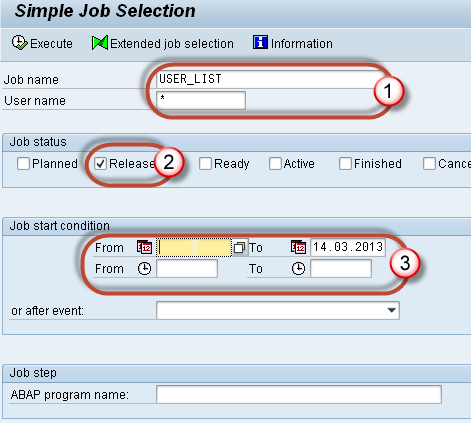
Step 2) Fill your criteria.
- Job name and username
- Status of the job.
- Select the date range.
Step 3) Select the job you want to delete

Step 4) Goto Job-> Delete.

You can also delete the jobs from OS level under directory
/usr/sap/<SID>/SYS/global/<CLNT>JOBLG. Folder.
But deletion from OS level may cause Temse inconsistency issue.To remove inconsistencies goto SP12-> Consistency check.Once you get the list , delete the objects.
Normally, Job- SAP_REORG_JOBS (Program to Delete old background jobs) must be scheduled within the system with program RSBTCDEL2 at the daily frequency.
How to Schedule Automatic Job Cleanup with SAP_REORG_JOBS
Manual deletion works, but a healthy system removes old jobs automatically. SAP delivers the standard job SAP_REORG_JOBS, which runs report RSBTCDEL2 on a schedule so logs never accumulate to a dangerous level.
- Execute transaction SM36 to define a new background job.
- Give the job the name SAP_REORG_JOBS and set the class and target server.
- Add a step with the ABAP program RSBTCDEL2 and a variant that specifies the status and minimum age of the jobs to delete.
- Define the start condition as a daily period so the cleanup repeats every day.
- Save and release the job; SAP then reorganizes finished jobs automatically.
Running this reorganization daily keeps the TemSe and spool tables lean, protects the file system from filling up, and removes the need for repeated manual deletion during peak workloads.
Best Practices for Deleting Background Jobs
A disciplined housekeeping routine keeps job administration safe and predictable. Follow these best practices:
- Always simulate first: Run RSBTCDEL2 with the Test run flag before deleting anything permanently.
- Keep a retention window: Delete only jobs older than an agreed age, such as 14 days, to preserve recent logs for auditing.
- Automate the cleanup: Schedule SAP_REORG_JOBS daily rather than relying on manual runs.
- Avoid OS-level deletion: Delete through SAP transactions to prevent TemSe inconsistencies; use SP12 if they occur.
- Tune the commit value: Set the commit value to 1000 or higher for faster processing of large deletions.
