How to assign a Job & Cost Center to a Position in SAP
 Editorial Team
⚡ Smart Summary
How to assign a Job and Cost Center to a Position in SAP is shown as a short PPOME workflow. This resource links a position to a job classification through the basic data tab and to a master cost center through account assignment.
Steps to Assign a Job & Cost Center to a Position
Step 1) While in SAP transaction PPOME.
Step 2) In the Overview section, select the Position you want to assign a Job to.

Step 3) In the details section, under the basic data tab, select Job Search. Enter the Name of the Job and click the Check Mark.

Step 4) Select the desired Job from the search results. Click the Save button.

The Job is assigned to the position.

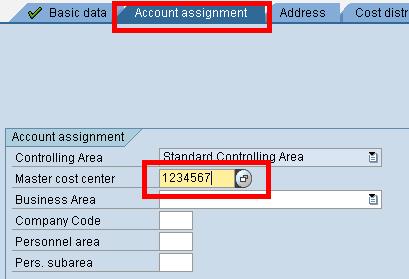
Step 5) To assign a cost center to a position, select the Account Assignment tab and enter the Master Cost Center information.