
Exception Handling in Oracle PL/SQL (Examples)
 Editorial Team
⚡ Smart Summary
Exception handling in Oracle PL/SQL captures run-time errors that stop a block from executing, letting the engine transfer control to an EXCEPTION section where predefined, user-defined, and OTHERS handlers respond, raise, or propagate errors safely.

What is Exception Handling in PL/SQL?
An exception occurs when the PL/SQL engine encounters an instruction it cannot execute because of an error that arises at run-time. These errors are not detected at compile time and therefore must be handled only at run-time.
For example, if the PL/SQL engine receives an instruction to divide a number by zero, it raises the error as an exception. The exception is raised only at run-time by the PL/SQL engine.
An exception stops the program from executing further, so to avoid such a condition the error needs to be captured and handled separately. This process is called exception handling, in which the programmer handles the error that can occur at run-time.
Exception-Handling Syntax
Exceptions are handled at the block level. Once an exception occurs in a block, control leaves the execution part of that block, and the exception is then handled in the exception-handling part of the block. After the exception is handled, control cannot return to the execution section of that same block.
The illustration below shows how the execution section and the exception-handling section sit inside a single PL/SQL block:
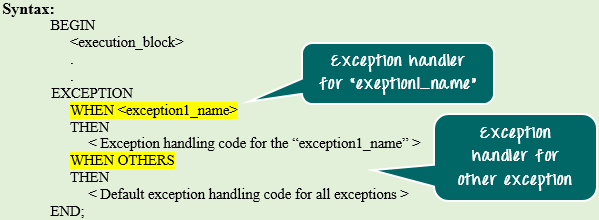
The syntax below explains how to catch and handle an exception.
BEGIN
<execution block>
.
.
EXCEPTION
WHEN <exceptionl_name>
THEN
  <Exception handling code for the “exception 1 _name’' >
WHEN OTHERS
THEN
  <Default exception handling code for all exceptions >
END;
Syntax Explanation:
- In the syntax above, the exception-handling block contains a series of WHEN conditions to handle exceptions.
- Each WHEN condition is followed by an exception name that is expected to be raised at run-time.
- When an exception is raised at run-time, the PL/SQL engine searches the exception-handling part for that particular exception, starting from the first WHEN clause and moving sequentially.
- If it finds a handler for the exception that was raised, it executes that particular handler code.
- If no WHEN clause matches the raised exception, the PL/SQL engine executes the WHEN OTHERS part, if present. This handler is common to all exceptions.
- After the handler runs, control leaves the current block.
- Only one exception handler can execute for a block at run-time. After it runs, the engine skips the remaining handlers and leaves the current block.
Note: WHEN OTHERS should always be placed last in the sequence. Any handler written after WHEN OTHERS never runs, because control exits the block once WHEN OTHERS has executed.
Types of Exception
There are two types of exceptions in PL/SQL.
- Predefined exceptions
- User-defined exceptions
Predefined Exceptions
Oracle has predefined some common exceptions. Each predefined exception has a unique name and error number, and all of them are declared in the STANDARD package in Oracle. In code, you can use these predefined exception names directly to handle the corresponding errors. Many of them map directly to common SQL errors you meet every day.
Below are a few predefined exceptions:
| Exception | Error Code | Exception Reason |
|---|---|---|
| ACCESS_INTO_NULL | ORA-06530 | Assigning a value to the attributes of an uninitialized object |
| CASE_NOT_FOUND | ORA-06592 | None of the WHEN clauses in a CASE statement is satisfied and no ELSE clause is specified |
| COLLECTION_IS_NULL | ORA-06531 | Using collection methods (except EXISTS) or accessing collection attributes on an uninitialized collection |
| CURSOR_ALREADY_OPEN | ORA-06511 | Trying to open a cursor that is already open |
| DUP_VAL_ON_INDEX | ORA-00001 | Storing a duplicate value in a database column that is constrained by a unique index |
| INVALID_CURSOR | ORA-01001 | Illegal cursor operations, such as closing an unopened cursor |
| INVALID_NUMBER | ORA-01722 | Conversion of a character to a number failed because of an invalid numeric character |
| NO_DATA_FOUND | ORA-01403 | A SELECT statement that contains an INTO clause fetches no rows |
| ROW_MISMATCH | ORA-06504 | The cursor variable data type is incompatible with the actual cursor return type |
| SUBSCRIPT_BEYOND_COUNT | ORA-06533 | Referring to a collection by an index number larger than the collection size |
| SUBSCRIPT_OUTSIDE_LIMIT | ORA-06532 | Referring to a collection by an index number outside the legal range (for example, -1) |
| TOO_MANY_ROWS | ORA-01422 | A SELECT statement with an INTO clause returns more than one row |
| VALUE_ERROR | ORA-06502 | An arithmetic or size-constraint error (for example, assigning a value larger than the variable size) |
| ZERO_DIVIDE | ORA-01476 | Dividing a number by zero |
User-defined Exception
Besides the predefined exceptions above, a programmer can create custom exceptions and handle them. They are created at the subprogram level in the declaration part and are visible only inside that subprogram. An exception defined in a package specification is a public exception and is visible wherever the package can be accessed.
Syntax: At subprogram level
DECLARE
<exception_name> EXCEPTION;
BEGIN
<Execution block>
EXCEPTION
WHEN <exception_name> THEN
<Handler>
END;
- In the syntax above, the variable ‘exception_name’ is defined as the EXCEPTION type.
- It can then be used in the same way as a predefined exception.
Syntax: At package specification level
CREATE PACKAGE <package_name>
 IS
<exception_name> EXCEPTION;
.
.
END <package_name>;
- In the syntax above, the variable ‘exception_name’ is defined as the EXCEPTION type in the package specification of <package_name>.
- It can be used across the database wherever the package ‘package_name’ can be called.
PL/SQL Raise Exception
All predefined exceptions are raised implicitly whenever the corresponding error occurs. User-defined exceptions, however, must be raised explicitly using the keyword RAISE. RAISE can be used in the ways shown below.
If RAISE is used on its own inside a handler, it propagates the already-raised exception to the parent block. It can be used only inside an exception block, as shown below.
The screenshot below shows RAISE used alone to re-raise an exception to the enclosing block:

CREATE [ PROCEDURE | FUNCTION ]
 AS
BEGIN
<Execution block>
EXCEPTION
WHEN <exception_name> THEN
             <Handler>
RAISE;
END;
Syntax Explanation:
- In the syntax above, the keyword RAISE is used inside the exception-handling block.
- Whenever the program encounters the exception ‘exception_name’, the exception is handled and completes normally.
- The keyword RAISE in the handler then propagates that same exception to the parent program.
Note: When raising an exception to the parent block, the exception being raised must also be visible in the parent block; otherwise Oracle throws an error.
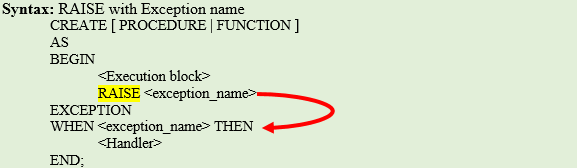
You can also use the keyword RAISE followed by an exception name to raise that particular user-defined or predefined exception. This form can be used in both the execution part and the exception-handling part.
The screenshot below shows RAISE followed by an exception name to raise a specific exception:
CREATE [ PROCEDURE | FUNCTION ]
AS
BEGIN
<Execution block>
RAISE <exception_name>
EXCEPTION
WHEN <exception_name> THEN
<Handler>
END;
Syntax Explanation:
- In the syntax above, the keyword RAISE is used in the execution part, followed by the exception ‘exception_name’.
- This raises that particular exception at run-time, and it then needs to be handled or raised further.
Example 1: In this example, we will see:
- How to declare an exception
- How to raise the declared exception
- How to propagate it to the main block
The screenshot below shows the complete block that declares sample_exception, raises it inside a nested block, and propagates it to the main block:
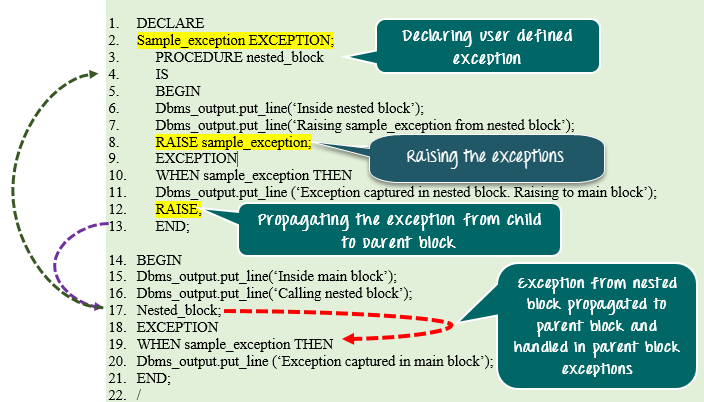
The following screenshot shows the same example continued, where the main block finally captures the propagated exception:

DECLARE
Sample_exception EXCEPTION;
PROCEDURE nested_block
IS
BEGIN
Dbms_output.put_line('Inside nested block');
Dbms_output.put_line('Raising sample_exception from nested block');
RAISE sample_exception;
EXCEPTION
WHEN sample_exception THEN
Dbms_output.put_line ('Exception captured in nested block. Raising to main block');
RAISE;
END;
BEGIN
Dbms_output.put_line('Inside main block');
Dbms_output.put_line('Calling nested block');
Nested_block;
EXCEPTION
WHEN sample_exception THEN
Dbms_output.put_line ('Exception captured in main block');
END;
/
Code Explanation:
- Code line 2: Declaring the variable ‘sample_exception’ as an EXCEPTION type.
- Code line 3: Declaring the procedure nested_block.
- Code line 6: Printing the statement “Inside nested block”.
- Code line 7: Printing the statement “Raising sample_exception from nested block”.
- Code line 8: Raising the exception using ‘RAISE sample_exception’.
- Code line 10: Exception handler for the exception sample_exception in the nested block.
- Code line 11: Printing the statement “Exception captured in nested block. Raising to main block”.
- Code line 12: Raising the exception to the main block (propagating it).
- Code line 15: Printing the statement “Inside main block”.
- Code line 16: Printing the statement “Calling nested block”.
- Code line 17: Calling the nested_block procedure.
- Code line 19: Exception handler for sample_exception in the main block.
- Code line 20: Printing the statement “Exception captured in main block”.
Important points to note in Exception
- In a function, an exception should always either return a value or raise the exception further; otherwise Oracle throws a ‘Function returned without a value’ error at run-time.
- Transaction control statements can be issued inside the exception-handling block.
- SQLERRM and SQLCODE are built-in functions that return the exception message and the exception code respectively.
- If an exception is not handled, then by default all active transactions in that session are rolled back.
- RAISE_APPLICATION_ERROR (-<error_code>, <error_message>) can be used instead of RAISE to raise an error with a custom code and message. The error code must be between -20000 and -20999.
