
Python DateTime, TimeDelta, Strftime(Format) with Examples
 Editorial Team
⚡ Smart Summary
Python datetime, along with the date, time, and timedelta classes, handles dates, times, and intervals as objects. The datetime module formats output with strftime(), parses strings, and calculates future or past moments using timedelta arithmetic.
In Python, date, time and datetime classes provide a number of functions to deal with dates, times and time intervals. Date and datetime in Python are objects, so when you manipulate them, you are actually manipulating objects and not strings or timestamps. Whenever you manipulate dates or time, you need to import the datetime module.
The datetime classes in Python are categorized into 5 main classes.
- date – Manipulate just date ( Month, day, year)
- time – Time independent of the day (Hour, minute, second, microsecond)
- datetime – Combination of time and date (Month, day, year, hour, second, microsecond)
- timedelta— A duration of time used for manipulating dates
- tzinfo— An abstract class for dealing with time zones
How to Use Date & DateTime Class
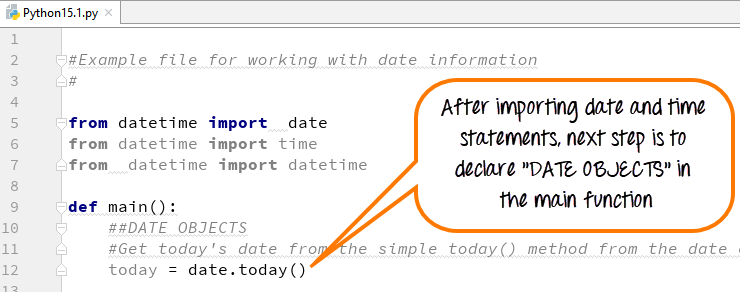
Step 1) Before you run the code for datetime format in Python, it is important that you import the Python date time modules as shown in the screenshot below.
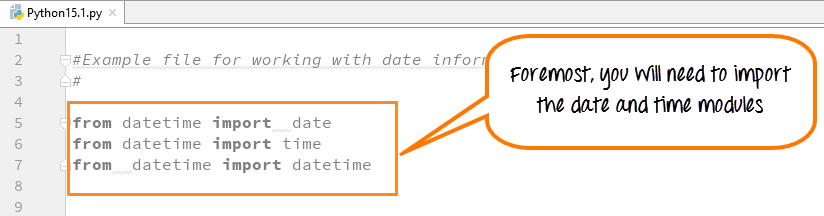
These import statements are pre-defined pieces of functionality in the Python library that let you manipulate dates and times, without writing any code.
Consider the following points before executing the Python datetime format code
from datetime import date
This line tells the Python interpreter to import the date class from the datetime module in Python. We are not writing the code for this date functionality but are simply importing it for our use.
Print Date using date.today()
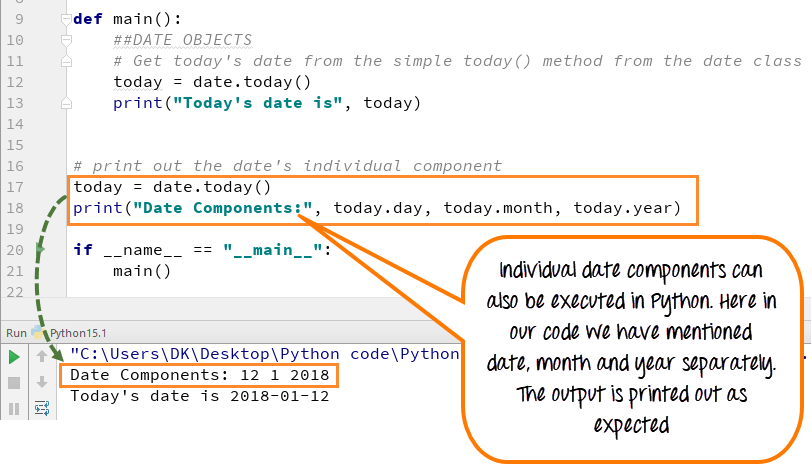
The date.today() function has several properties associated with it. We can print the individual day/month/year and many other things.
Let’s see an example
Today’s Weekday Number
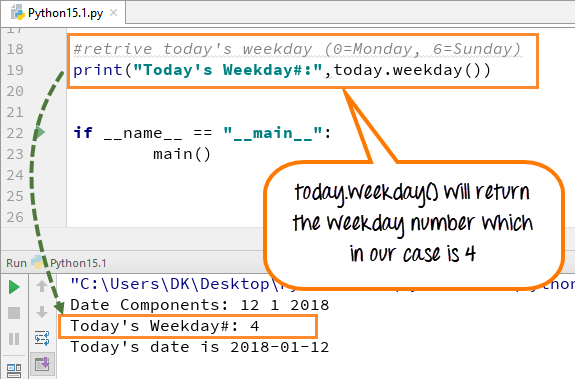
The date.today() function also gives you the weekday number. Here is the Weekday Table which starts with Monday as 0 and Sunday as 6.
| Day | WeekDay Number |
|---|---|
| Monday | 0 |
| Tuesday | 1 |
| Wednesday | 2 |
| Thursday | 3 |
| Friday | 4 |
| Saturday | 5 |
| Sunday | 6 |
Weekday Number is useful for arrays whose index is dependent on the Day of the week.
Step 2) Next, we create an instance of the date object.
Step 3) Next, we print the date and run the code.
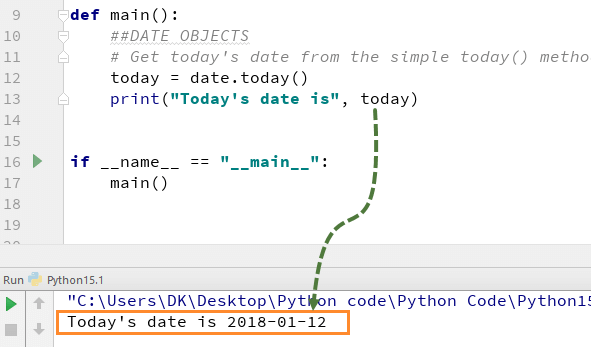
The output is as expected.
Python Current Date and Time: now() today()
Step 1) Like Date Objects, we can also use “DATETIME OBJECTS” in Python. Python date and time objects give date along with time in hours, minutes, seconds and milliseconds.
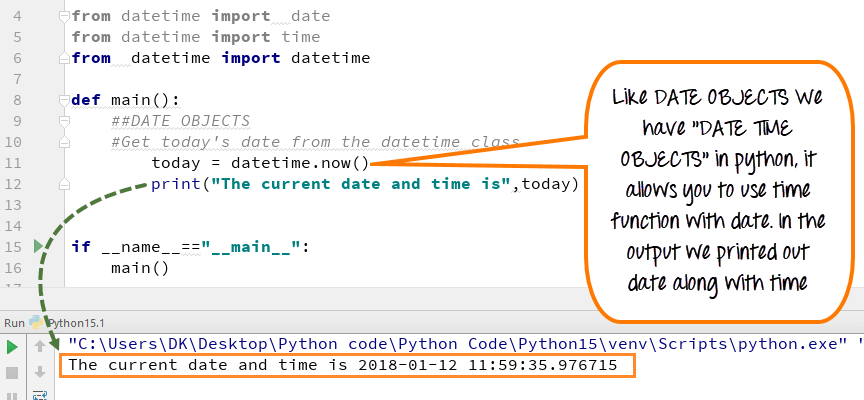
When we execute the code for datetime, it gives the output with current date and time.
Step 2) With “DATETIME OBJECT”, you can also call the time class. Suppose we want to print just the current time without the date.
t = datetime.time(datetime.now())
- We had imported the time class. We will be assigning it the current value of time using datetime.now()
- We are assigning the value of the current time to the variable t.
And this will give me just the time. So let’s run this program.
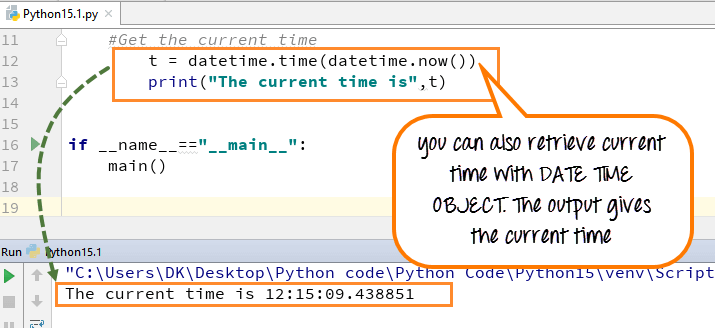
Okay, so you can see that here I got the date and time. And then the next line, I’ve got just the time by itself.
Step 3) We will apply our weekday indexer to our weekday’s array list to know which day is today.
- Weekdays operator (wd) is assigned the number from (0-6) depending on what the current weekday is. Here we declared the array of the list for days (Mon, Tue, Wed…Sun).
- Use that index value to know which day it is. In our case, it is #2, and it represents Wednesday, so in the output it will print out “Which is a Wednesday.”
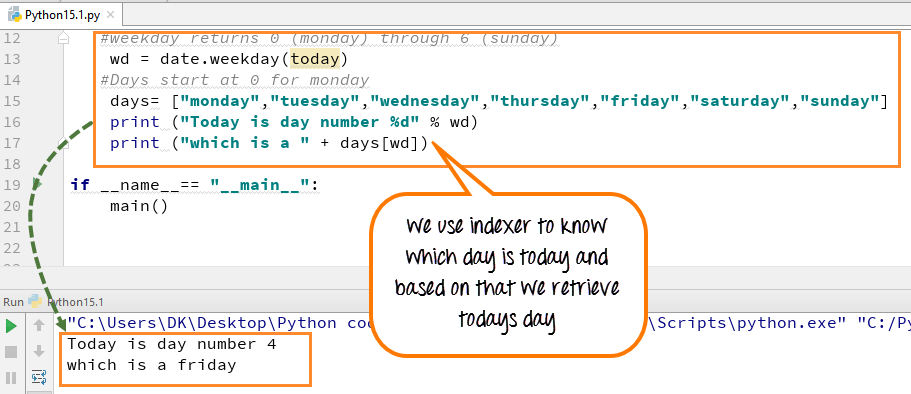
Here is the complete code to get current date and time using datetime now
from datetime import date
from datetime import time
from datetime import datetime
def main():
    ##DATETIME OBJECTS
    #Get today's date from datetime class
    today=datetime.now()
    #print (today)
    # Get the current time
    #t = datetime.time(datetime.now())
    #print "The current time is", t
    #weekday returns 0 (monday) through 6 (sunday)
    wd=date.weekday(today)
    #Days start at 0 for monday
    days= ["monday","tuesday","wednesday","thursday","friday","saturday","sunday"]
    print("Today is day number %d" % wd)
    print("which is a " + days[wd])

if __name__== "__main__":
    main()
How to Format Date and Time Output with Strftime()
So far, we have learned how to use datetime and date object in Python. We will advance a step further and learn how to use a formatting function to format Time and Date.
Step 1) First we will see a simple step of how to format the year. It is better to understand with an example.

- We used the “strftime function” for formatting.
- This function uses different control code to give an output.
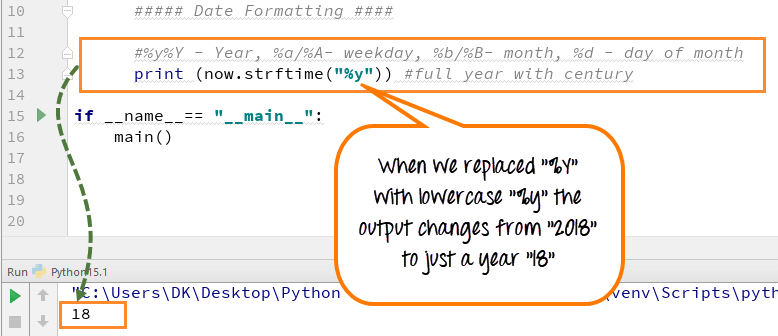
- Each control code resembles different parameters like year, month, weekday and date [(%y/%Y – Year), (%a/%A- weekday), (%b/%B- month), (%d – day of month)] .
- In our case, it is (“%Y”) which resembles year, it prints out the full year with the century (e.g., 2018).
Step 2) Now if you replace (“%Y”) with lowercase, i.e., ( “%y) and execute the code the output will display only (18) and not (2018). The century of the year will not display as shown in the screenshot below
Step 3) Strf function can declare the date, day, month and year separately. Also with small changes in the control code in strftime function you can format the style of the text.
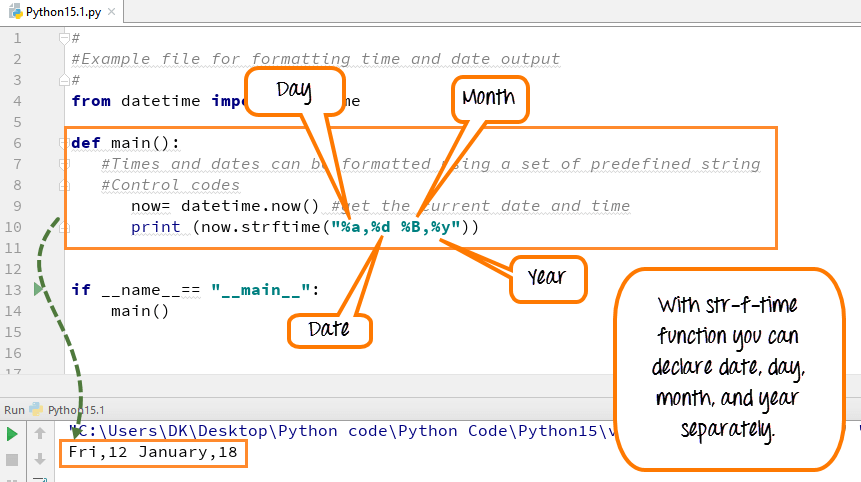
Inside the strftime function if you replace (%a) with capital A, i.e., (%A) the output will print out as “Friday” instead of just an abbreviation “Fri”.

Step 4) With the help of “Strftime” function we can also retrieve local system time, date or both.
- %C- indicates the local date and time
- %x- indicates the local date
- %X- indicates the local time
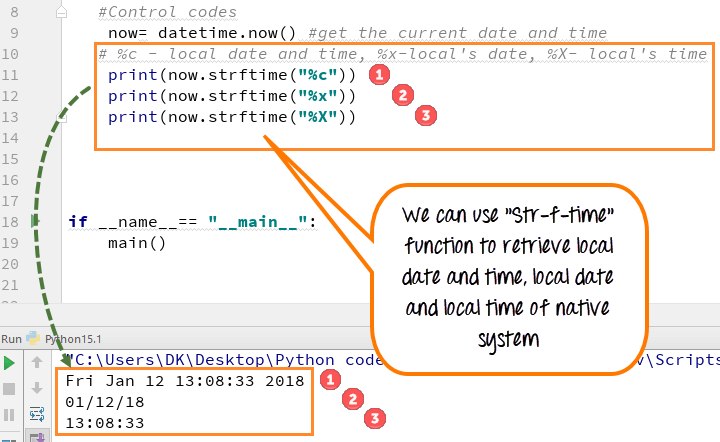
In the output, you can see the result as expected
Step 5) The “strftime function” allows you to call the time in any format 24 hours or 12 hours.
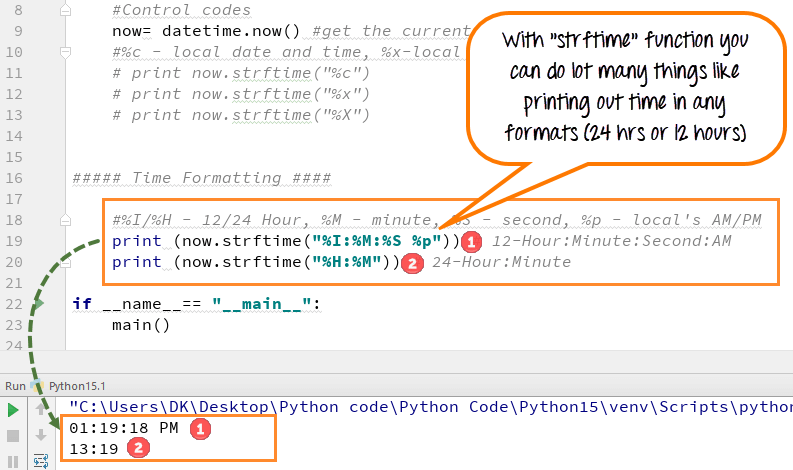
Just by defining control code like %I/H for hour, % M for minute, %S for second, one can call time for different formats
12 hours time is declared [print now.strftime(“%I:%M:%S %p) ]
24 hours time is declared [print now.strftime(“%H:%M”)]
Here is the complete code to convert datetime to String object.
#
#Example file for formatting time and date output
#
from datetime import datetime
def main():
   #Times and dates can be formatted using a set of predefined string
   #Control codes
      now= datetime.now() #get the current date and time
      #%c - local date and time, %x-local's date, %X- local's time
      print(now.strftime("%c"))
      print(now.strftime("%x"))
      print(now.strftime("%X"))
##### Time Formatting ####
      #%I/%H - 12/24 Hour, %M - minute, %S - second, %p - local's AM/PM
      print(now.strftime("%I:%M:%S %p")) # 12-Hour:Minute:Second:AM
      print(now.strftime("%H:%M")) # 24-Hour:Minute

if __name__== "__main__":
    main()
What is Timedelta in Python?
Timedelta in Python is an object that represents the duration. It is mainly used to calculate the duration between two dates and times. It is also used for retrieving the object with some delta date and time. The timedelta object supports mathematical operations like additions, subtractions, multiplication, division etc.
How to use Timedelta Objects
With Python timedelta objects, you can estimate the time for both future and the past. In other words, it is a timespan to predict any special day, date or time.
Remember this function is not for printing out the time or date, but something to CALCULATE about the future or past. Let’s see a Python timedelta example to understand it better.
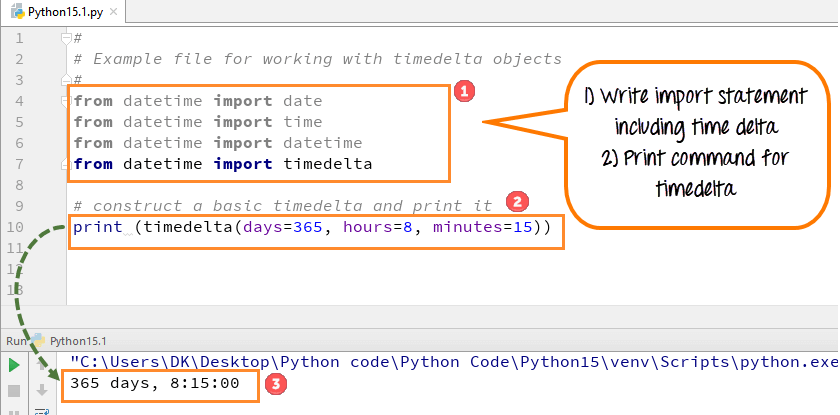
Step 1) To run Timedelta Objects, you need to declare the import statement first and then execute the code
- Write import statement for timedelta
- Now write the code to print out object from time delta as shown in screen shot
- Run the code. The timedelta represents a span of 365 days, 8 hrs and 15 minutes and prints the same
Confusing? Next step will help-
Step 2) Let’s get today’s date and time to check whether our import statement is working well. When code is executed, it prints out today’s date which means our import statement is working well

Step 3) We will see how we can retrieve date a year from now through delta objects. When we run the code, it gives the output as expected.
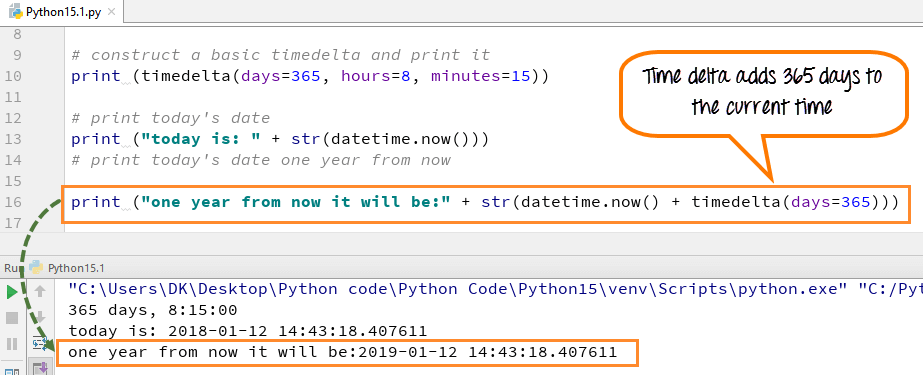
Step 4) Another example of how time delta can be used to calculate future date from current date and time

Step 5) Let’s look into a more complex example. I would like to determine how many days past the New Year. Here is how we will proceed
- Using today= date.today() we will get todays date
- We know the newyear is always on 1-Jan, but the year could be different. Using nyd= date(today.year,1,1) we store the new year in variable nyd
- if nyd < today: compares whether the current date is greater than the new year. If yes, it enters the while loop
- ((today-nyd).days) gives the difference between a current date and new year in DAYS
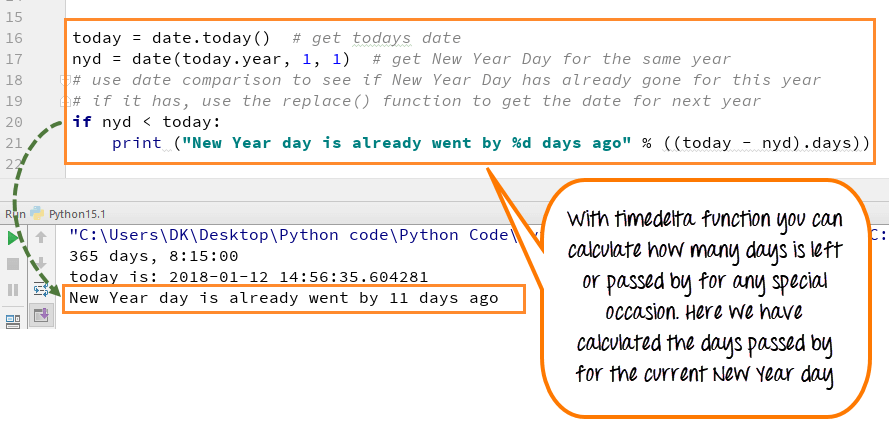
The output shows that “New Year Day already went by 11 days ago.”
Here is the complete working code
#
# Example file for working with timedelta objects
#
from datetime import date
from datetime import time
from datetime import datetime
from datetime import timedelta

# construct a basic timedelta and print it
print (timedelta(days=365, hours=8, minutes=15))
# print today's date
print ("today is: " + str(datetime.now()))
# print today's date one year from now
print ("one year from now it will be:" + str(datetime.now() + timedelta(days=365)))
# create a timedelta that uses more than one argument
# print (in one week and 4 days it will be " + str(datetime.now() + timedelta(weeks=1, days=4)))
# How many days until New Year's Day?
today = date.today()  # get todays date
nyd = date(today.year, 1, 1)  # get New Year Day for the same year
# use date comparison to see if New Year Day has already gone for this year
# if it has, use the replace() function to get the date for next year
if nyd < today:
    print ("New Year day is already went by %d days ago" % ((today - nyd).days))
Python 2 Example
The following examples show the same date and time operations written for Python 2, where print is a statement rather than a function. Use these versions only when maintaining legacy Python 2 code.
from datetime import date
from datetime import time
from datetime import datetime
def main():
 	##DATETIME OBJECTS
    #Get today's date from datetime class
	today=datetime.now()
	#print today
	# Get the current time
	#t = datetime.time(datetime.now())
	#print "The current time is", t
	#weekday returns 0 (monday) through 6 (sunday)
        wd = date.weekday(today)
	#Days start at 0 for monday
        days= ["monday","tuesday","wednesday","thursday","friday","saturday","sunday"]
        print "Today is day number %d" % wd
        print "which is a " + days[wd]

if __name__== "__main__":
    main()
#
#Example file for formatting time and date output
#
from datetime import datetime
def main():
   #Times and dates can be formatted using a set of predefined string
   #Control codes
      now= datetime.now() #get the current date and time
      #%c - local date and time, %x-local's date, %X- local's time
      print now.strftime("%c")
      print now.strftime("%x")
      print now.strftime("%X")
##### Time Formatting ####
      #%I/%H - 12/24 Hour, %M - minute, %S - second, %p - local's AM/PM
      print now.strftime("%I:%M:%S %p") # 12-Hour:Minute:Second:AM
      print now.strftime("%H:%M") # 24-Hour:Minute

if __name__== "__main__":
    main()
#
# Example file for working with timedelta objects
#
from datetime import date
from datetime import time
from datetime import datetime
from datetime import timedelta

# construct a basic timedelta and print it
print timedelta(days=365, hours=8, minutes=15)
# print today's date
print "today is: " + str(datetime.now())
# print today's date one year from now
print "one year from now it will be:" + str(datetime.now() + timedelta(days=365))
# create a timedelta that uses more than one argument
# print "in one week and 4 days it will be " + str(datetime.now() + timedelta(weeks=1, days=4))
# How many days until New Year's Day?
today = date.today()  # get todays date
nyd = date(today.year, 1, 1)  # get New Year Day for the same year
# use date comparison to see if New Year Day has already gone for this year
# if it has, use the replace() function to get the date for next year
if nyd < today:
    print "New Year day is already went by %d days ago" % ((today - nyd).days)
