
C++ Class and Object with Example
 Editorial Team
⚡ Smart Summary
Classes and objects in C++ form the foundation of object-oriented programming, where a class defines a blueprint of data and member functions, and an object is a concrete instance created from that blueprint.
What is a Class?
A C++ class combines data and methods for manipulating the data into one. Classes also determine the forms of objects. The data and methods contained in a class are known as class members. A class is a user-defined data type. To access the class members, we use an instance of the class. You can see a class as a blueprint for an object.
A class can be a prototype for a house. It shows the location and sizes of doors, windows, floors, etc. From these descriptions, we can construct a house. The house becomes the object. It is possible to create many houses from the prototype. Also, it is possible to create many objects from a class.

In the above figure, we have a single house prototype. From this prototype, we have created two houses with different features.
With the idea of a class as a blueprint in mind, the next step is to see how one is declared in code.
Class Declaration
In C++, a class is defined using the class keyword. This should be followed by the class name. The class body is then added between curly braces { }.
Syntax
class class-name
   {
   // data
   // functions
   };
- The class-name is the name to assign to the class.
- The data is the data for the class, normally declared as variables.
- The functions are the class functions.
Declaring the class name and body naturally raises the question of who may use each member.
Private and Public Keywords
You must have come across these two keywords. They are access modifiers.
Private:
When the private keyword is used to define a function or class, it becomes private. Such are only accessible from within the class.
Public:
The public keyword, on the other hand, makes data/functions public. These are accessible from outside the class.
After a class exists, objects can be created from it, much like variables are created from a data type.
Object Definition
Objects are created from classes. Class objects are declared in a similar way as variables are declared. The class name must come first, followed by the object name. The object is of the class type.
Syntax
class-name object-name;
- The class-name is the name of the class from which an object is to be created.
- The object-name is the name to be assigned to the new object.
This process of creating an object from a class is known as instantiation.
Once an object is created, its public members can be reached directly through a simple operator.
Accessing Data Members
To access public members of a class, we use the (.)dot operator. These are members marked with public access modifier.
Example 1
#include <iostream>
using namespace std;
class Phone {
public:
	double cost;
	int slots;
};
int main() {
	Phone Y6;
	Phone Y7;

	Y6.cost = 100.0;
	Y6.slots = 2;

	Y7.cost = 200.0;
	Y7.slots = 2;
	cout << "Cost of Huawei Y6 : " << Y6.cost << endl;
	cout << "Cost of Huawei Y7 : " << Y7.cost << endl;

	cout << "Number of card slots for Huawei Y6 : " << Y6.slots << endl;
	cout << "Number of card slots for Huawei Y7 : " << Y7.slots << endl;

	return 0;
}
Output:

Here is a screenshot of the code:

Code Explanation:
- Include the iostream header file in our code in order to use its functions.
- Including the std namespace in our code to use its classes without calling it.
- Declare a class named Phone.
- Using the public access modifier to mark the variables we are about to create as publicly accessible.
- Declare the variable cost of a double data type.
- Declare an integer variable named slots.
- End of the class body.
- Calling the main()function. The program logic should be added within its body.
- Create an object named Y6 of type Phone. This is called instantiation.
- Create an object named Y7 of type Phone. This is called instantiation.
- Access the variable/member cost of class Phone using the object Y6. The value is set to 100.0. The cost of Y6 is now set to 100.0.
- Access the variable/member slots of class Phone using the object Y6. The value is set to 2. The slots for Y6 is now set to 2.
- Access the variable/member cost of class Phone using the object Y7. The value is set to 200.0. The cost of Y7 is now set to 200.0.
- Access the variable/member slots of class Phone using the object Y7. The value is set to 2. The slots for Y7 is now set to 2.
- Print the cost of Y6 on the console alongside other text.
- Print the cost of Y7 on the console alongside other text.
- Print the number of slots for Y6 alongside other text.
- Print the number of slots for Y7 alongside other text.
- The program must return a value upon successful completion.
- End of the body of main() function.
Public members are open to outside code, but private members follow much stricter access rules.
What is a Private Class?
Class members marked as private can only be accessed by functions defined within the class. Any object or function defined outside the class cannot access such members directly. A private class member is only accessed by member and friend functions.
Example 2
#include <iostream>
using namespace std;
class ClassA {
public:
	void set_a(int val);
	int get_a(void);

private:
	int a;
};
int ClassA::get_a(void) {
	return a;
}
void ClassA::set_a(int val) {
	a = val;
}
int main() {
	ClassA a;
	a.set_a(20);
	cout << "Value of a is: " << a.get_a();
	return 0;
}
Output:

Here is a screenshot of the code:

Code Explanation:
- Include the iostream header file in our code to use its functions.
- Include the std namespace in our code to use its classes without calling it.
- Create a class named ClassA.
- Use the public access modifier to mark the class member to be created as publicly accessible.
- Create the function named set_a() that takes one integer value val.
- Create a function named get_a().
- Use the private access modifier to mark the class member to be created as privately accessible.
- Declare an integer variable named a.
- End of the class body.
- Use the class name and the scope resolution operator to access the function get_a(). We want to define what the function does when invoked.
- The function get_a() should return the value of variable a when invoked.
- End of the definition of the function get_a().
- Use the class name and the scope resolution operator to access the function set_a(). We want to define what the function does when invoked.
- Assigning the value of the variable val to variable a.
- End of definition of the function set_a().
- Call the main() function. The program logic should be added within the body of this function.
- Create an instance of ClassA and give it the name a.
- Use the above class instance and the function set_a() to assign a value of 20 to the variable a.
- Printing some text alongside the value of variable a on the console. The value of variable a is obtained by calling the get_a() function.
- The program must return value upon successful completion.
- End of the body of function main().
Protected members sit between private and public, adding one key capability for inheritance.
What is a Protected Class?
Class members marked as protected have an advantage over those marked as private. They can be accessed by functions within the class of their definition. Additionally, they can be accessed from derived classes.
Example 3
#include <iostream>
using namespace std;
class ParentClass {
protected:
	int value;
};
class ChildClass : public ParentClass {
public:
	void setId(int x) {
		value = x;
	}
	void displayValue() {
	cout << "Value is: " << value << endl;
	}
};
int main() {
	ChildClass c;
	c.setId(21);
	c.displayValue();
	return 0;
}
Output:

Here is a screenshot of the code:

Code Explanation:
- Include the iostream header file in our code to use its functions.
- Include the std namespace in our code to use its classes without calling it.
- Create a class named ParentClass.
- Use the protected access modifier to mark the class member to be created as protected.
- Create an integer variable named value.
- End of the class body.
- Create a new class named ChildClass that inherits the ParentClass.
- Use the protected access modifier to mark the class member to be created as accessible to child classes.
- Create the function named setId() that takes one integer value x.
- Assigning the value of the variable x to the variable value.
- End of definition of the function setId().
- Create a function named displayValue().
- Print the value of the variable named value on the console alongside other text.
- End of the body of the function displayValue().
- End of the body of the class named ChildClass.
- Call the main() function. The program logic should be added within the body of this function.
- Create an instance of ChildClass and give it the name c.
- Use the above class instance and the function setId() to assign a value of 21 to the variable x.
- Use the above class instance to call the function named displayValue().
- The program must return value upon successful completion.
- End of the body of function main().
Besides storing data, a class also groups the functions that operate on that data.
Class Member Functions
Functions help us manipulate data. Class member functions can be defined in two ways:
- Inside the class definition
- Outside the class definition
If a function is to be defined outside a class definition, we must use the scope resolution operator (::). This should be accompanied by the class and function names.
Example 4
#include <iostream>
#include <string>
using namespace std;
class Guru99
{
public:
	string tutorial_name;
	int id;
	void printname();
	void printid()
	{
		cout << "Tutorial id is: "<< id;
	}
};
void Guru99::printname()
{
	cout << "Tutorial name is: " << tutorial_name;
}
int main() {
	Guru99 guru99;
	guru99.tutorial_name = "C++";
	guru99.id = 1001;
	guru99.printname();
	cout << endl;
	guru99.printid();
	return 0;
}
Output:

Here is a screenshot of the code:
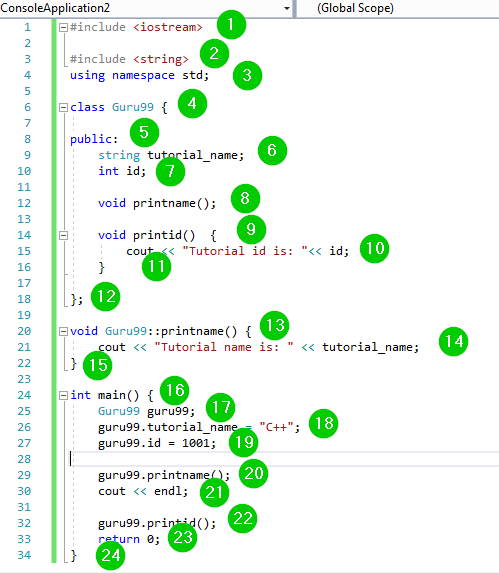
Code Explanation:
- Include the iostream header file in our program to use its functions.
- Include the string header file in our program to use its functions.
- Include the std namespace in our code to use its classes without calling it.
- Create a class named Guru99.
- Use the public access modifier to mark the class members we are about to create as publicly accessible.
- Create a string variable named tutorial_name.
- Create an integer variable named id.
- Create a function named printname(). This function is not defined within the class definition.
- Create a function named printid(). This function is defined within the class definition. Its body has been added within the class definition.
- Print the value of variable id alongside other text on the console. Note this has been added within the body of printid() function. It will only be executed when the printid() function is called.
- End of the body of function printid().
- End of the body of the class Guru99.
- The start of definition of the function printname().
- Print the value of variable tutorial_name on the console alongside other text. Note this has been added within the body of printname() function. It will only be executed when the printname() function is called.
- End of the definition of printname() function.
- Call the main() function. The program logic should be added within the body of this function.
- Create an instance of class Guru99 and giving it the name guru99.
- Use the above instance to assign a value of C++ to the variable tutorial_name.
- Use the guru99 instance to assign a value of 1001 to the variable id.
- Use the instance guru99 to call the function printname() .
- Call the end (end line) command to print a new blank line on the console.
- Use the instance guru99 to call the function printid().
- The program must return value upon successful completion.
- End of the body of main() function.
Two special member functions run automatically when an object is created and when it is destroyed.
Constructors and Destructors
What is a Constructor?
Constructors are special functions that initialize objects. The C++ compilers call a constructor when creating an object. The constructors help to assign values to class members. Of course, this is after they have been allocated some memory space.
What is a Destructor?
Destructors on the other hand help to destroy class objects.
The constructor name must be similar to the class name. Constructors do not have a return type.
The constructor can be defined inside or outside the class body. If defined outside the class body, it should be defined with the class name and the scope resolution operator (::).
Example 5
#include <iostream>
using namespace std;
class ClassA {
public:
	ClassA() {
		cout << "Class constructor called"<<endl;
	}
	~ClassA() {
		cout << "Class destructor called"<<endl;
	}
};

int main() {
	ClassA a;
	int p = 1;
		if (p) {
			ClassA b;
		}
}
Output:
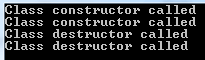
Here is a screenshot of the code:
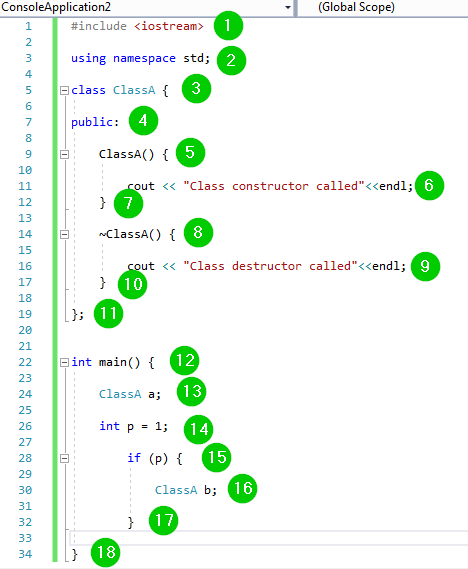
Code Explanation:
- Include the iostream header file into the code to use its functions.
- Include the std namespace in our code to use its classes without calling it.
- Create a class named ClassA.
- Use the public access modifier to mark the member we are about to create as publicly accessible.
- Create a constructor for the class.
- Text to print on the console when the constructor is called. The endl is a C++ keyword, which means end line. It moves the mouse cursor to the next line.
- End of the body of the class constructor.
- Create a destructor for the class.
- Text to print on the console when the destructor is called. The endl is a C++ keyword, which means end line. It moves the mouse cursor to the next line.
- End of the body of the destructor.
- End of the class body.
- Call the main() function. The program logic should be added within the body of this function.
- Create a class object and give it the name a. The constructor will be called.
- Create an integer variable named p and assign it a value of 1.
- Create an if statement block using the variable p.
- Create a class object and give it the name b. The destructor will be called.
- End of the body of the if statement.
- End of the body of the main() function.
