
C# Hashtable with Examples
 Editorial Team
⚡ Smart Summary
Hashtable in C# is a collection from the System.Collections namespace that stores data as key-value pairs, where each unique key maps to a value and the key provides fast lookup of that stored value.
What is Hashtable in C#?
A hash table is a special collection that is used to store key-value items. So instead of storing just one value like the stack, array list and queue, the hash table stores 2 values. These 2 values form an element of the hash table.
Below are some example of how values of a hash table might look like.
{ "001" , ".Net" }
{ "002" , ".C#" }
{ "003" , "ASP.Net" }
Above we have 3 key value pairs. The keys of each element are 001, 002 and 003 respectively. The values of each key value pair are “.Net“, “C#” and “ASP.Net” respectively.
Let’s look at the operations available for the Hashtable collection in more detail.
Declaration of the Hashtable
The declaration of a Hashtable is shown below. A Hashtable is created with the help of the Hashtable Datatype. The “new” keyword is used to create an object of a Hashtable. The object is then assigned to the variable ht.
Hashtable ht = new Hashtable()
Adding elements to the Hashtable
The Add method is used to add an element on to the queue. The general syntax of the statement is given below
HashTable.add("key","value")
Example 1:
Remember that each element of the hash table comprises of 2 values, one is the key, and the other is the value.
Now, let’s see this working at a code level. All of the below-mentioned code will be written to our Console application.
The code will be written to our Program.cs file. In the below program, we will write the code to see how we can use the above-mentioned methods.
For now in our example, we will just look at how we can create a hashtable , add elements to the hashtable and display them accordingly.
using System;
using System.Collections;
using System.Collections.Generic;
using System.Linq;
using System.Text;
using System.Threading.Tasks;

namespace DemoApplication
{
 class Program
 {
  static void Main(string[] args)
  {
   Hashtable ht = new Hashtable();
   ht.Add("001",".Net");
   ht.Add("002","C#");
   ht.Add("003","ASP.Net");

   ICollection keys = ht.Keys;

   foreach (String k in keys)
   {
    Console.WriteLine(ht[k]);
   }
    Console.ReadKey();
   }
 }
}
Code Explanation:-
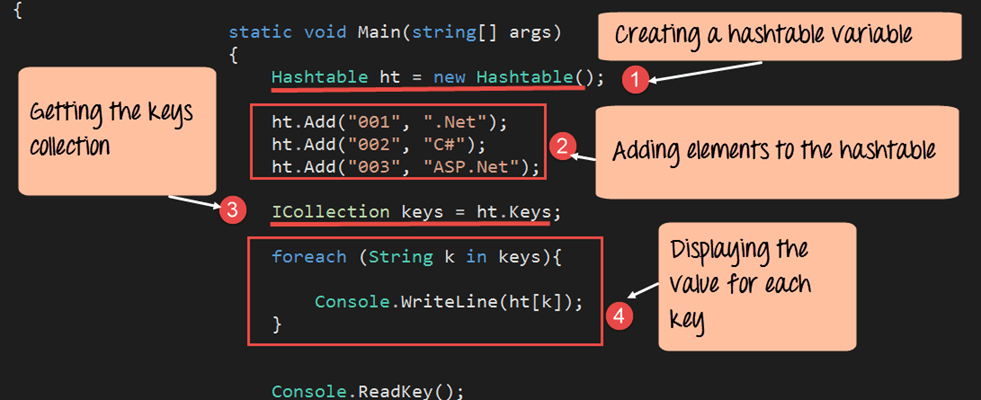
- First, we declare the hashtable variable using the Hashtable data type by using keyword “New.” The name of the variable defines is ‘ht’.
- We then add elements to the hash table using the Add method. Remember that we need to add both a key and value element when adding something to the hashtable.
- There is no direct way to display the elements of a hash table.
- In order to display the hashtable , we first need to get the list of keys (001, 002 and 003) from the hash table.
- This is done via the ICollection interface. This is a special data type which can be used to store the keys of a hashtable collections. We then assign the keys of the hashtable collection to the variable ‘keys’.
- Next for each key value, we get the associated value in the hashtable by using the statement ht[k].
If the above code is entered properly and the program is run the following output will be displayed.
Output:

Let’s look at some more methods available for hash tables.
ContainsKey
This method is used to see if a key is present in the Hashtable. Below is the general syntax of this statement. The statement will return true if the key exists, else it will return the value false.
Hashtable.Containskey(key)
ContainsValue
This method is used to see if a Value is present in the Hashtable. Below is the general syntax of this statement. The statement will return true if the Value exists, else it will return the value false.
Hashtable.ContainsValue(value)
Example 2:
Let’s change the code in our Console application to showcase how we can use the “Containskey” and “ContainsValue” method.
using System;
using System.Collections;
using System.Collections.Generic;
using System.Linq;
using System.Text;
using System.Threading.Tasks;

namespace DemoApplication
{
 class Program
 {
  static void Main(string[] args)
  {
   Hashtable ht = new Hashtable();
   ht.Add("001",".Net");
   ht.Add("002","C#");
   ht.Add("003","ASP.Net");

   Console.WriteLine(ht.ContainsKey("001"));
   Console.WriteLine(ht.ContainsValue("C#"));
   Console.ReadKey();
   }
 }
}
Code Explanation:-
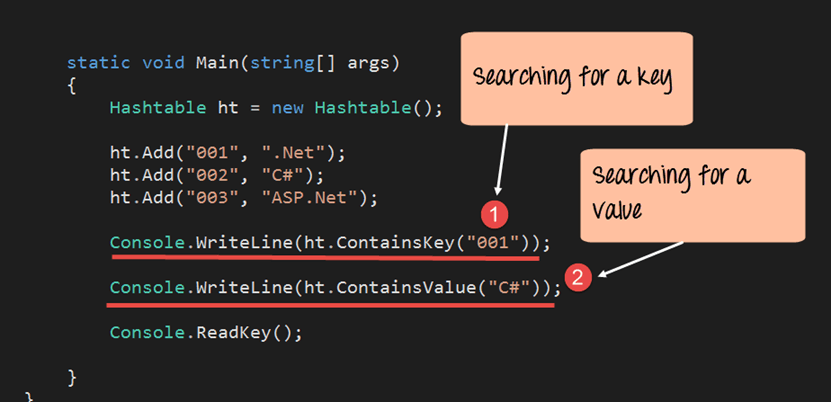
- First, we use the ContainsKey method to see if the key is present in the hashtable. This method will return true if the key is present in the hashtable. This method should return true since the key does exist in the hashtable.
- We then use the ContainsValue method to see if the value is present in the hashtable. This method will return ‘true’ since the Value does exist in the hashtable.
If the above code is entered properly and the program is run the following output will be displayed.
Output:

From the output, you can clearly see that both the key and value being searched are present in the hash table.
How to Loop Through a C# Hashtable
The examples above read values through the Keys collection, but a Hashtable can be walked in a cleaner way. A foreach loop over a DictionaryEntry hands you the key and the value of every element together in a single pass, which is the most common way to read a Hashtable.
Step 1) Create a Hashtable and add three key-value pairs to it.
Step 2) Loop over the Hashtable with a DictionaryEntry variable, then read the Key and Value properties of each entry.
using System;
using System.Collections;

namespace DemoApplication
{
 class Program
 {
  static void Main(string[] args)
  {
   Hashtable ht = new Hashtable();
   ht.Add("101", "Java");
   ht.Add("102", "Python");
   ht.Add("103", "Kotlin");

   foreach (DictionaryEntry entry in ht)
   {
    Console.WriteLine(entry.Key + " - " + entry.Value);
   }
   Console.ReadKey();
  }
 }
}
Code Explanation:-
- A Hashtable named ht is created, and three key-value pairs are inserted with the Add method.
- The foreach loop assigns each element to a DictionaryEntry, whose Key and Value properties expose the two halves of the pair.
When the program runs, it prints each key next to its value, such as 101 – Java. Because a Hashtable does not keep insertion order, the pairs may appear in a different sequence than they were added. To read only the keys, loop over the Keys collection, and to read only the values, loop over the Values collection instead.
C# Hashtable Methods and Properties
The Hashtable class exposes a small set of methods and properties that cover almost every task you will need, from adding and removing pairs to checking membership and counting elements. The most useful members are listed below.
| Member | Type | Description |
|---|---|---|
| Add(key, value) | Method | Inserts a new key and value pair; the key must be unique. |
| Remove(key) | Method | Deletes the element that matches the specified key. |
| Clear() | Method | Removes every key-value pair from the Hashtable. |
| ContainsKey(key) | Method | Returns true when the given key is present. |
| ContainsValue(value) | Method | Returns true when the given value is present. |
| Count | Property | Gets the number of key-value pairs stored. |
| Keys | Property | Returns a collection of all the keys. |
| Values | Property | Returns a collection of all the values. |
Because each key is hashed, ContainsKey and the indexer locate an element in near constant time, which is what makes a Hashtable so useful for fast lookups.
Difference Between Hashtable and Dictionary in C#
A Hashtable and a Dictionary both store key-value pairs, and both belong to the wider family of C# collections. The important difference is type safety, and that difference decides which one you should reach for in new code.
- Type safety: A Hashtable stores every key and value as an object, while Dictionary<TKey, TValue> is generic, so the compiler checks the types you use.
- Namespace: Hashtable lives in System.Collections, whereas Dictionary lives in System.Collections.Generic.
- Boxing: A Hashtable boxes value types such as int, but a generic Dictionary stores them directly and avoids that cost.
- Performance: Dictionary is usually faster because it needs no casting back from object when you read a value.
- Thread safety: Hashtable offers the Synchronized wrapper for one writer with many readers, while concurrent code usually chooses ConcurrentDictionary.
For any new project, the generic Dictionary is the recommended choice, and the non-generic Hashtable mainly appears in older code.
