
How to Install GCC Compiler on Windows
 Editorial Team
⚡ Smart Summary
Download and Install GCC Compiler in C for Windows, Linux, and macOS in under fifteen minutes. The Code::Blocks bundle on Windows ships GCC, an editor, and a debugger together, while Linux and macOS users install GCC directly through their package managers.
What is GCC?
The GCC (GNU Compiler Collection) is a free, open-source compiler suite maintained by the Free Software Foundation. It supports C, C++, Objective-C, Fortran, Ada, Go, and several other languages, and is the default compiler on most Linux distributions. GCC produces fast, portable executables and is the standard choice for learning C on Windows, Linux, and macOS.
This tutorial walks through installing GCC on each platform and verifying the installation with a simple version check.
How to Install GCC on Windows
On Windows the easiest path is the open-source IDE Code::Blocks, which bundles a compiler (GCC from the GNU Project), an editor, and a debugger in a single installer.
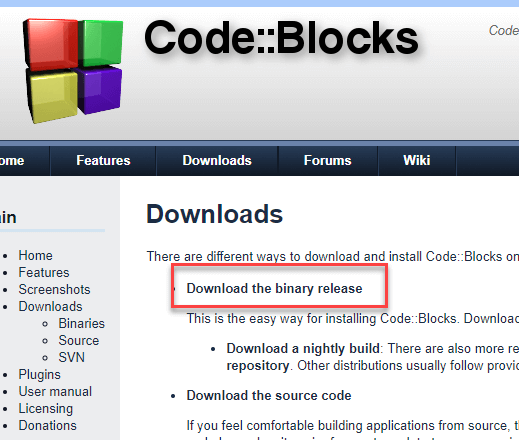
Step 1) Download the Binary Release
Go to https://www.codeblocks.org/downloads/ and click Binary Release.
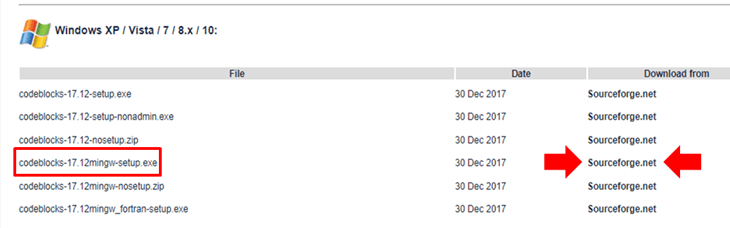
Step 2) Choose the installer with the GCC compiler
Pick the installer that bundles the GCC compiler — for example, codeblocks-17.12mingw-setup.exe. This package includes MinGW’s GNU GCC compiler and the GNU GDB debugger together with the Code::Blocks source files.
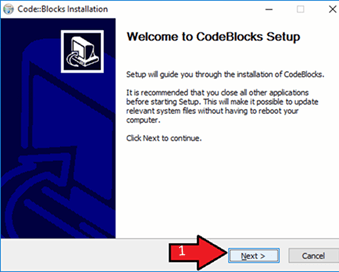
Step 3) Start the installation
Run the downloaded installer and accept the default options. This straightforward process sets up the GCC compiler on your Windows system.
Step 4) Accept the licence agreement
Accept the licence agreement to continue.

Step 5) Keep the default component selection
Leave the component selection at its default and click Next.

Step 6) Choose the installation path
Change the installation folder if you wish, then click Next.

Step 7) Launch Code::Blocks
Locate the Code::Blocks shortcut on your desktop or Start menu and double-click it.
Step 8) Let Code::Blocks detect the compiler
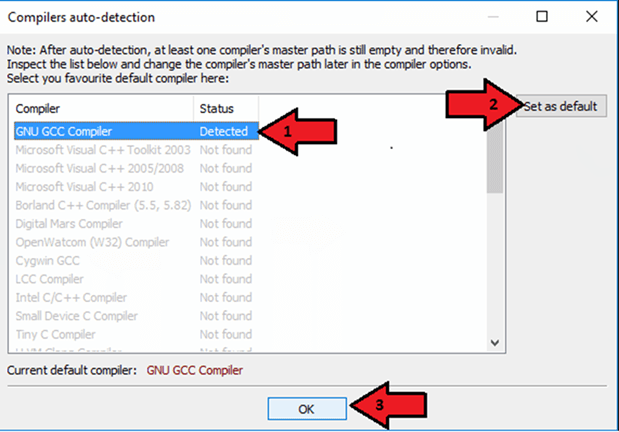
On first launch, Code::Blocks scans for installed compilers, detects GCC automatically, and sets it as the default. Associate C and C++ files with Code::Blocks when prompted.
Step 9) Open the IDE and start coding
The IDE home screen appears. You can now create a new C project and compile your first program.

How to Install GCC on Linux
Most Linux distributions ship with GCC pre-installed. Verify with:
gcc --versionIf GCC is present, the command prints its version. If it is missing, the shell prompts you to install it.
To set up the C build environment on Linux, follow the steps below.
- Open a terminal.
- On Red Hat and Fedora, run:
sudo yum groupinstall 'Development Tools' - On Debian and Ubuntu, run:
sudo apt-get update sudo apt-get install build-essential manpages-dev - Verify the installation:
gcc --version
How to Install GCC on macOS
On macOS, the GCC-compatible toolchain ships through Apple’s Command Line Tools for Xcode.
- Open a terminal and run:
xcode-select --installA dialogue prompts you to install the Command Line Tools. Click Install and accept the licence.
- Alternatively, sign in at https://developer.apple.com/download/all/ with your Apple developer ID, download the latest Command Line Tools for Xcode
.dmg, and run the installer. Keep the wizard defaults. - Open a terminal and verify the install:
gcc -v
Verify Your GCC Installation
Regardless of the operating system, a quick sanity check confirms that the compiler is on the PATH:
gcc --versionYou should see output similar to gcc (GCC) 13.2.0 followed by the licence notice. Compile a one-line “hello, world” to test the full pipeline:
// hello.c
#include <stdio.h>

int main(void) {
    printf("Hello, world!\n");
    return 0;
}
Build and run with:
gcc hello.c -o hello
./hello
Troubleshooting Common GCC Install Issues
The problems below cover most install-time complaints:
- “gcc is not recognized” on Windows: add the MinGW
binfolder to your PATH environment variable, then restart the terminal. - Code::Blocks does not detect the compiler: open Settings → Compiler → Toolchain executables and point the compiler installation directory at your MinGW root (e.g.,
C:\MinGW). - Linux says “command not found”: the package may have installed as
gcc-12orgcc-13. Runwhich gccand create a symlink, or call the versioned binary directly. - macOS reports “clang” instead of GCC: Xcode aliases clang as
gcc. If you need genuine GCC, install it through Homebrew withbrew install gccand callgcc-13. - Missing headers (e.g., stdio.h): reinstall
build-essentialon Linux or the Xcode Command Line Tools on macOS to restore the standard library headers.
Other Popular C Compilers
If GCC does not suit your environment, several alternatives compile and run C reliably:
- Clang — LLVM-based compiler with fast builds and excellent diagnostics. Default on macOS.
- MinGW-w64 — modern fork of MinGW with up-to-date GCC binaries for Windows.
- Portable C compiler (pcc) — lightweight, BSD-licensed compiler.
- Turbo C — classic compiler still common in academic settings.
- Microsoft Visual C++ (MSVC) — Microsoft’s compiler shipped with Visual Studio; compiles C with the
/TCswitch.
