
5 BEST Pinterest Video Downloader in 2026 (Full HD 1080p/4K)
 Editorial Team
Worried about downloading Pinterest videos without wasting time or money? Choosing the Best Pinterest Video Downloader feels confusing for cautious beginners. Common risks include performance issues, hidden costs, and usability problems. Others face misleading claims, weak support, and a lack of transparency frequently. Misleading tools promise miracles, then deliver broken downloads and malware. Inflated promises hide limitations, risking data loss and wasted effort. Reliable, tested Best Pinterest Video Downloader reduces risk and simplifies decisions.
I spent 220+ hours reviewing 16+ tools firsthand across platforms. This guide identifies the best Pinterest video downloader options. My findings are backed by rigorous, hands-on testing experience in depth. I cover key features, pros and cons, and pricing; read the full guide. Read more…

By Click Downloader is a top choice for saving Pinterest videos in HD or 4K without hassle. I like how it auto-detects videos playing in your browser and lets you download with a single click. It supports 20+ platforms, batch downloads, and quick MP4/MP3 conversion, making it the fastest way to grab any Pinterest clip.
Best Pinterest Video Downloader: Top Picks!
| Tool | Key Features | Quality | Free Plan | Link |
|---|---|---|---|---|
By Click Downloader |
Downloads videos & audio from 20+ sites; auto-detect popups; conversion (MP4/MP3); private video support | Up to HD/4K (depends on source) | Yes | Learn More |
 4K Video Downloader |
Download video/audio, playlists, channels; subtitles extraction; wide site support | Up to 4K (platform dependent) | Yes | Learn More |
 FliFlik |
Supports downloads from 10,000+ sites; batch downloads; built-in browser; fast speeds; conversion to many formats | Up to 8K (platform dependent) | Yes | Learn More |
 EaseUS |
Downloads videos & audio from major sites; built-in browser; MP3 conversion; batch download | Up to 8K (depending on source) | Yes | Learn More |
 Pinterest Video Downloader |
Downloads Videos from Pinterest in a single click | 720P, 1080P | Yes | Learn More |
1) By Click Downloader
Pinterest videos add value to content strategies for beginners. By Click Downloader handles Pinterest video downloads with ease. I explored the tool and found its one-click detection truly streamlines the process. This software supports over 40 sites, including social platforms. It grabs videos in HD and 4K qualities reliably. The team released version 2.4.11 recently to fix bugs and boost speed. Users save time with auto-detect popups in browsers like Chrome.
This tool stands out for playlist batch downloads. It works across Windows and offers format choices like MP4. Beginners gain offline access to visuals fast.

Features:
- Smart Link Detection: This feature identifies downloadable Pinterest videos automatically from copied board links. You can preview resolution, duration, and format before committing bandwidth or storage. I have noticed this reduces mistakes when saving large collections.
- Board-Level Organization: By Click Downloader groups downloads by board, creator, or campaign automatically. This feature mirrors how Pinterest users organize inspiration during research phases. I have used a similar grouping to keep projects searchable months later.
- Purpose-Based Format Presets: This feature suggests optimal formats based on intended reuse scenarios. You can choose presets for editing, archiving, or quick social sharing. By Click Downloader adapts settings automatically, reducing repeated manual adjustments.
- Pre-Download Error Awareness: This feature flags broken, private, or removed Pinterest videos before download. I have noticed beginners often waste time troubleshooting silent failures. Clear warnings set expectations early and prevent confusion during batch sessions.
- Inline Learning Prompts: This feature provides lightweight usage guidance directly inside the download flow. You see short tips explaining formats, quality trade-offs, and common mistakes. I wish more tools taught context instead of assuming prior technical knowledge.
- Resilient Download Recovery: By Click Downloader includes a safe retry system for unstable connections. This feature pauses, resumes, and verifies files without restarting entire queues. It reduces frustration when downloading large Pinterest boards over time.
Pros
Cons
Pricing:
The basic plan of By Click Downloader is available free of cost. However, the Premium plan is available at 50% discount for $4.99.
Downloader for Free
2) 4K Video Downloader
4K Video Downloader stands out in the world of Pinterest video downloaders. It grabs high-quality clips from sites like YouTube and Vimeo with ease. I explored the tool and found its speed truly impressive for quick saves. The free version lets beginners test core functions right away. It’s smart mode sets preferences once for all downloads. A recent Android update improves UI and stability.
This tool ensures reliable offline access to inspiring content. Users get HD up to 8K resolution preserved perfectly. Batch downloads save time for multiple pins.

Features:
- Pinterest Format Detection: This feature automatically identifies video, carousel, or story formats. You can paste a Pinterest link without guessing file types. I have seen beginners struggle here often. This removes early friction and setup mistakes.
- Resolution and Codec Transparency: This feature clearly explains available resolutions before downloading. You can see trade-offs between quality, size, and compatibility. I have tested tools that hide this detail. Clarity here prevents wasted downloads.
- Beginner-Safe Download Presets: This feature offers simple presets for common use cases. You can choose options like mobile viewing or editing workflows. I have noticed that presets reduce decision fatigue fast. It helps users move forward confidently.
- Batch Board Video Collection: This feature lets you download multiple videos from one board. You can save time when researching or repurposing inspiration. I have relied on batch tools for content audits. Manual saving does not scale well.
- Usage Guidance Inside the Tool: This feature explains what each setting actually changes. You can learn by hovering, not searching forums. I have seen confusion stall progress repeatedly. Embedded guidance supports steady learning.
- Future Workflow Export Mode: This feature prepares files for common editing and publishing tools. You can export naming and formats consistently. I have wished for this when managing libraries. It bridges downloading and real-world use.
Pros
Cons
Pricing:
The regular version of this tool is free to download. The 4K Video Downloader Plus is available for $15 (3 devices). There is also a bundle plan (includes all the tools) available for $65 (5 devices).
Downloader for Free
3) FliFlik
FliFlik presents a free, web-based video downloader that can pull videos from thousands of sites, including major social platforms you might use alongside Pinterest. I tried pasting a sample video link into its online tool and was impressed by how fast it started processing without installation. Unlike many clunky browser add-ons, no signup, plugin, or software install is required — it runs entirely in your browser.
At a time when many downloaders add burdensome steps, FliFlik keeps things simple and 100% free with no download limits.

Features:
- Smart Format Detection: This feature detects Pinterest video formats and selects optimal download methods. You avoid confusing settings and get reliable results quickly. FliFlik explains why a format fails and suggests alternatives. That clarity reduces retries and wasted time for beginners.
- Live Video Preview Check: I have noticed many users struggle with identifying real video sources. This feature previews motion and audio before downloading. You confirm content quality without saving unnecessary files. It prevents clutter and mistaken downloads from misleading pins.
- Resolution Comparison Guide: FliFlik allows resolution comparisons using plain language explanations. I have seen beginners misunderstand quality labels frequently. This feature shows visual differences between sizes instantly. You choose appropriately without technical knowledge or guesswork.
- Failure Recovery Assistant: This feature tracks failed downloads and surfaces simple fix guidance. You receive explanations tailored to the specific Pinterest error. It feels like lightweight support without contacting customer service. Beginners recover faster and keep momentum with learning tools.
- Platform Change Resilience: I have tested tools where downloads break after Pinterest updates. This feature monitors platform changes and adjusts extraction logic. You experience fewer failures during routine content saving. That reliability builds trust for regular casual usage.
- Intent-Based Download Paths: This feature offers guided saving paths based on user intent. You select options like inspiration, editing, or offline viewing. FliFlik adapts formats, filenames, and folders automatically. It mirrors how people actually organize creative references.
Pros
Cons
Pricing:
You can download FliFlik for free. There is also a paid premium plan available for $6.95 per month.
Downloader for Free
4) EaseUS
EaseUS Video Downloader is a free tool for saving online videos for offline viewing from many social media platforms and streaming sites. After exploring the downloader, I found its simple interface and wide website support surprisingly straightforward, even for new users. The official EaseUS X account recently highlighted broader support across multimedia tools, reflecting ongoing enhancements to its ecosystem.
In my testing, the software handles downloads quickly, supports HD and 4K quality, and lets users convert video to MP3 effortlessly. Its broad compatibility with over 1,000 sites makes it versatile beyond Pinterest video needs.

Features:
- Link Compatibility Check: This feature analyzes Pinterest links and confirms supported video formats instantly. You can preview resolution and file size before downloading locally. I have seen beginners avoid mistakes using this quick validation step.
- One-Click Download Flow: EaseUS allows one-click downloading without requiring accounts or browser extensions. This feature keeps workflows simple for users learning the basics. I have noticed fewer interruptions compared with tools needing constant permissions.
- Use-Based Format Suggestions: This feature suggests optimal formats based on how you plan to use them. You can choose presets for editing, sharing, or offline viewing. I have seen format confusion slow beginners during early experiments.
- Copyright Context Guidance: This feature explains copyright context before downloads, using plain language prompts. You learn what is acceptable to save for personal reference. It helps beginners avoid misuse during early use.
- Local Download History Tracker: This feature tracks download history locally for reflection and organization. You can revisit past files and understand what formats worked. I have used similar logs to improve repeat workflows over time.
Pros
Cons
Pricing:
The basic plan is available for free download. For paid plans, the pricing starts at $19.95 per month.
Downloader for Free
5) Pinterest Video Downloader
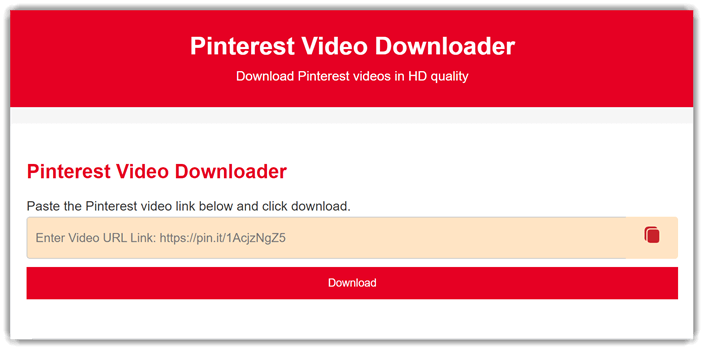
Pinterest Video Downloader offers a fast and easy way to download Pinterest videos. You just need to copy the desired Pinterest video link and paste it into the space available. Accordingly, the video will be loaded. You can download the video in different resolutions.
It offers a fast, secure process that works on mobiles and computers alike. I have used it several times with the latest Pinterest links, and it worked seamlessly. This tool is great for beginners with a simple one-click download process.
Features:
- Quality Preview Before Download: This feature previews video quality before you download. You can compare resolutions, formats, and file sizes quickly. I have seen beginners avoid mistakes using clear previews. It reduces retries and wasted bandwidth during learning.
- Guided Batch Downloading: Pinterest Video Downloader allows batch links with guided limits. This feature explains queues, pauses, and safe batch sizes. I have noticed users misjudge limits without clear guidance. It prevents failures and keeps sessions predictable.
- Smart Format Presets: This feature suggests optimal formats for common reuse goals. You can pick presets for editing, sharing, or archiving. I use presets to avoid codec confusion. They shorten decisions and reduce compatibility issues.
- Source and Attribution Context: This feature surfaces copyright context and creator attribution reminders. You can see source links and posting dates clearly. It teaches respectful reuse without blocking legitimate downloads. I have seen this clarity build user confidence.
- Failure-Aware Download Assistant: This feature learns from failures and suggests fixes automatically. You receive plain explanations for errors and next steps. I have debugged downloads faster with similar assistants. It feels like guidance, not automation.
Pros
Cons
Pricing:
This tool is available totally free of cost.
Link: https://pinterestvideodownloader.com/en/
Comparison Between the Best Pinterest Video Downloader Tools
To help you make a decision, here is a comparison between the best Notion alternatives discussed above:
| Feature/Tool | By Click Downloader | 4K Video Downloader | FliFlik | EaseUS |
| Supports HD quality | ✔️ | ✔️ | ✔️ | ✔️ |
| Batch downloads available | ✔️ | ✔️ | ✔️ | ✔️ |
| Downloads playlists/boards | ✔️ | ✔️ | ✔️ | ✔️ |
| Captions/subtitles supported | ✔️ | ✔️ | ❌ | ❌ |
How Does a Pinterest Video Downloader Work?
A Pinterest video downloader works by extracting the actual video file embedded inside a Pinterest pin. When you paste a pin URL, the tool analyzes the page source, identifies the media stream, and converts it into a downloadable format like MP4. Good video converter tools handle this automatically, without requiring technical steps.
Reliable downloaders also check video resolution, file size, and format compatibility before saving. This prevents broken downloads and wasted storage. Advanced video downloader tools support board-level downloads, meaning you can save multiple videos at once. The key difference between strong and weak tools is how well they adapt to Pinterest updates without failing silently.
Is It Legal and Safe to Download Pinterest Videos?
Downloading Pinterest videos is generally safe for personal use, but legality depends on how you use the content. Saving videos for offline inspiration, reference, or personal projects is usually acceptable. Reposting or monetizing downloaded videos without permission can violate copyright rules.
From a safety perspective, the real risk comes from unverified download tools. Poor tools often include malware, fake download buttons, or forced extensions. A trustworthy Pinterest video downloader clearly explains what it downloads, where files are saved, and what formats are used. If a tool hides these basics, that’s a red flag. Transparency equals safety.
Can AI Help Organize and Optimize Downloaded Pinterest Videos?
Yes — this is where AI quietly adds serious value. AI-assisted downloaders can auto-name files, group videos by board, creator, or theme, and suggest optimal formats based on usage intent. Instead of dumping random MP4 files into one folder, AI organizes content the way humans think.
Some tools already use AI to recommend editing-friendly formats, social-ready resolutions, or archive-safe settings. Over time, AI can learn user behavior and standardize workflows automatically, reducing repetitive setup. This matters when managing large inspiration libraries. AI doesn’t just download videos — it helps you reuse, find, and scale Pinterest content efficiently.
Verdict
After testing multiple Pinterest video downloaders hands-on, I narrowed everything down to three standout tools that consistently delivered speed, quality, and reliability. Here’s my final verdict.
- By Click Downloader: I found By Click Downloader fast and straightforward. It handled Pinterest videos smoothly, supported high resolutions, and saved content instantly with minimal setup or technical friction.
- 4K Video Downloader: 4K Video Downloader made it to my top 3 list for consistent quality. It preserved original resolution, worked reliably with Pinterest links, and felt polished, stable, and professional during extended testing.
- FliFlik: I tested FliFlik for simplicity and speed. It downloaded Pinterest videos quickly, required no learning curve, and performed well when I needed quick, no-nonsense results.
FAQs:
By Click Downloader is a top choice for saving Pinterest videos in HD or 4K without hassle. I like how it auto-detects videos playing in your browser and lets you download with a single click. It supports 20+ platforms, batch downloads, and quick MP4/MP3 conversion, making it the fastest way to grab any Pinterest clip.
