
Xero Review 2026: Best for Small Business Accounting?
 Mia Young
A Complete Guide for Small Business Owners
Xero Review: My Honest Verdict
Xero is a cloud-native accounting platform designed from the ground up for efficiency, collaboration, and mobility. After extensive testing and evaluation, Guru99 awards Xero a 4.6 out of 5 stars for 2026.
Best For: Growing small-to-medium businesses (SMBs), retail and e-commerce operators, and business owners who need to manage finances on the go.
Bottom Line: Xero delivers the best balance of elegant usability and powerful automation on the market today. It is the ideal platform for modern business owners who dislike accounting jargon and want a tool that feels intuitive from day one. Its standout feature—unlimited users on every plan—makes it unbeatable for growing teams. The only significant caveat is the absence of live phone support, a feature still offered by legacy competitors such as QuickBooks Online.

💡 Note: Customers would also get 95% off for 6 months if they use this link – https://www.xero.com/
What Is Xero?
Founded in New Zealand in 2006, Xero was built as a cloud-first accounting platform long before “cloud” became a buzzword. Unlike competitors that retrofitted desktop software for the internet, Xero’s entire architecture was conceived for online collaboration. The company’s guiding philosophy—sometimes called “Beautiful Business”—centers on making accounting accessible and even enjoyable for non-accountants.
Xero is a perfect fit for retail operators, high-volume invoicing businesses, and service-based entrepreneurs. It handles everything from basic bookkeeping to multi-currency transactions and project tracking, depending on your plan. The platform integrates with over 1,000 third-party applications, creating an ecosystem that can scale alongside your company.
Key Selling Point: Every Xero plan includes unlimited users at no additional cost. This is a major differentiator from QuickBooks Online, which restricts user counts by plan tier. For any business that plans to grow its team, this alone can represent significant savings.
Key Features of Xero for Small Businesses
1) Invoicing and Quotes
Xero’s invoicing engine lets you create professional, branded templates in minutes. You can add your logo, customize color schemes, and set default payment terms—ensuring every invoice reflects your brand identity. Beyond aesthetics, Xero’s invoicing is built for speed.
The standout feature here is the “Pay Now” button. When enabled, it integrates with payment gateways like Stripe and GoCardless, embedding a direct payment link on every invoice you send. This dramatically reduces your days’ sales outstanding (DSO)—in many cases, customers pay within hours instead of weeks.
Xero also supports automated invoice reminders. You can configure automatic emails that chase unpaid invoices at intervals you define (for example, 7 days overdue, 14 days overdue). This “set-it-and-forget-it” approach protects your cash flow without requiring awkward follow-up conversations.
2) Bank Reconciliation (The “Game Changer”)
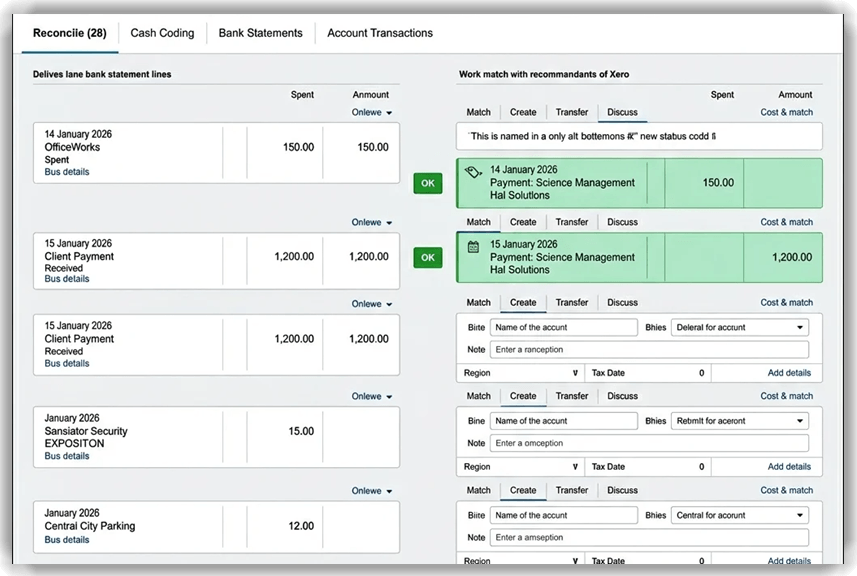
If there is a single feature that converts skeptics into Xero advocates, it is the bank reconciliation engine. Xero connects directly to your bank via live bank feeds, importing transactions automatically—no more manual CSV uploads or data entry.
The real magic is Xero’s AI-powered “OK” matching system. As transactions flow in, Xero suggests matches against your invoices, bills, and chart of accounts. In most cases, reconciliation is reduced to a single click: you review the suggestion, click “OK,” and you are done. Businesses routinely report an 80% reduction in time spent on data entry after adopting Xero’s bank feeds.
For high-volume businesses, Xero supports bulk reconciliation, allowing you to approve multiple matched transactions simultaneously—turning what once took hours into a task you can complete in minutes.
3) Inventory Management
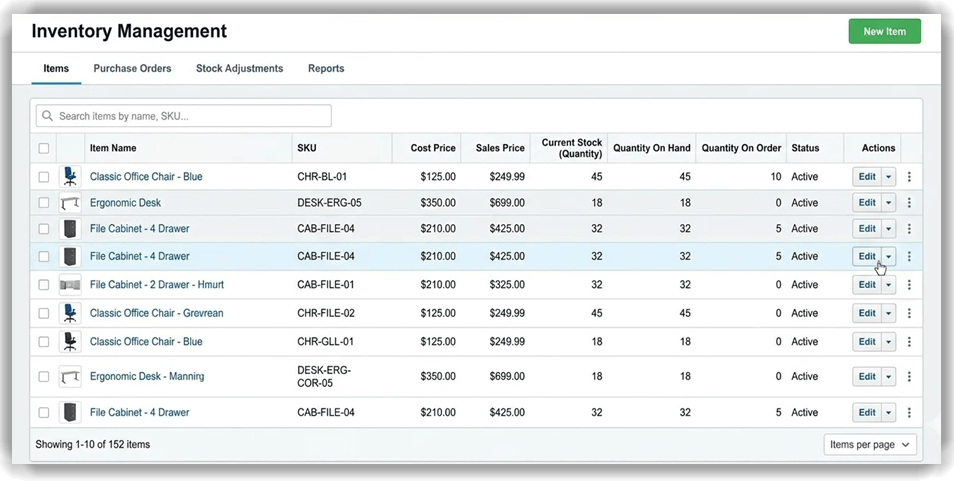
Xero offers built-in inventory tracking that is well-suited for businesses managing stock levels and average costs. Basic inventory tools are available on all plans, allowing you to track items, set purchase prices, and monitor quantities on hand. For businesses with an e-commerce presence, the Established plan includes Inventory Plus, which integrates with Shopify and Amazon for multi-channel tracking.
Note: If your business involves complex manufacturing or requires advanced features like bill-of-materials, Xero’s native tools may fall short. In such cases, consider app integrations such as DEAR Inventory or Cin7, which plug directly into Xero’s ecosystem.
4) Payroll (via Gusto / Partners)
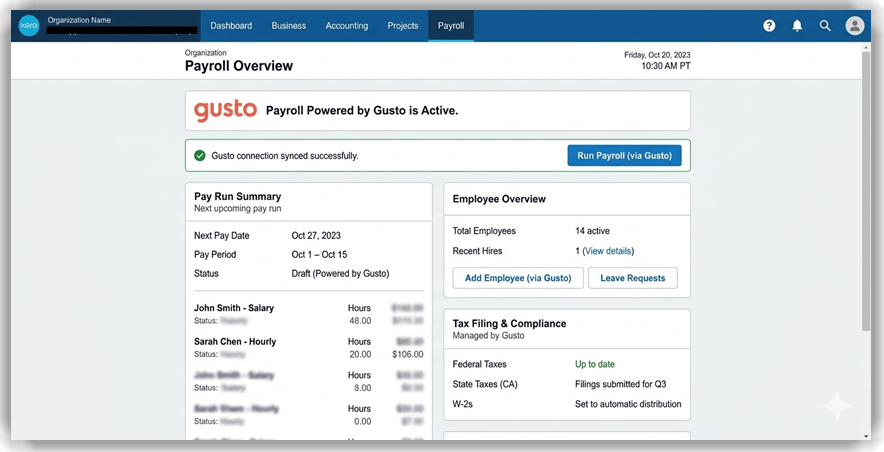
Rather than building a one-size-fits-all payroll engine, Xero integrates with Gusto in the United States to deliver best-in-class payroll functionality. This partnership model means you get a dedicated payroll specialist (Gusto) working seamlessly within your accounting platform.
The benefits include automated federal and state tax filings, employee self-service portals (where staff can view pay stubs and update personal information), and seamless journal entries that flow directly into your Xero ledger. Gusto’s base pricing starts at $49/month plus $6 per employee—an add-on cost worth noting when budgeting.
5) Expense Management (Xero Expenses)
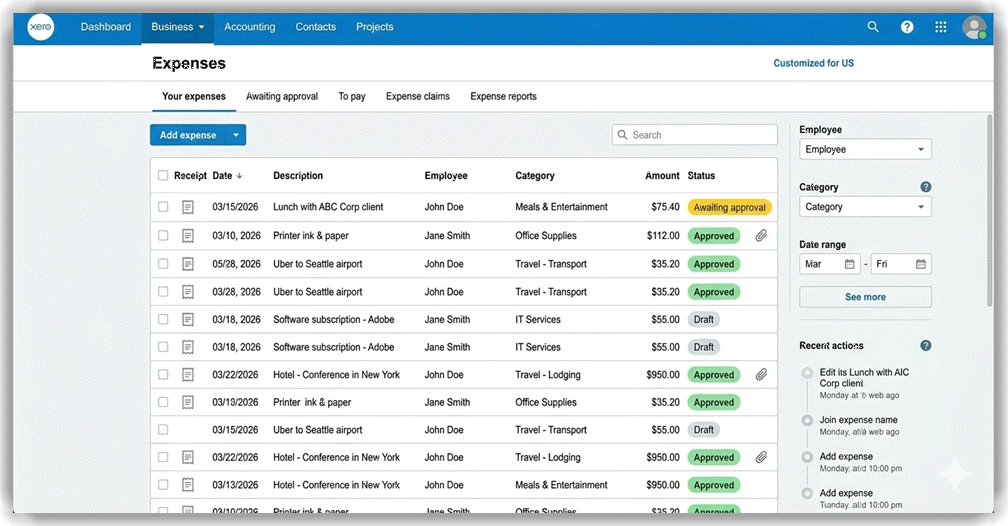
Available on the Established plan, Xero Expenses transforms how your team handles receipts and reimbursements. Employees can snap photos of receipts using their mobile devices, and Xero’s OCR (Optical Character Recognition) technology automatically extracts the vendor name, amount, and date.
Managers can configure approval workflows, so expense claims are routed to the right person for sign-off before posting to the ledger. This creates a clear audit trail and eliminates shoebox-style receipt management.
6) Hubdoc Integration
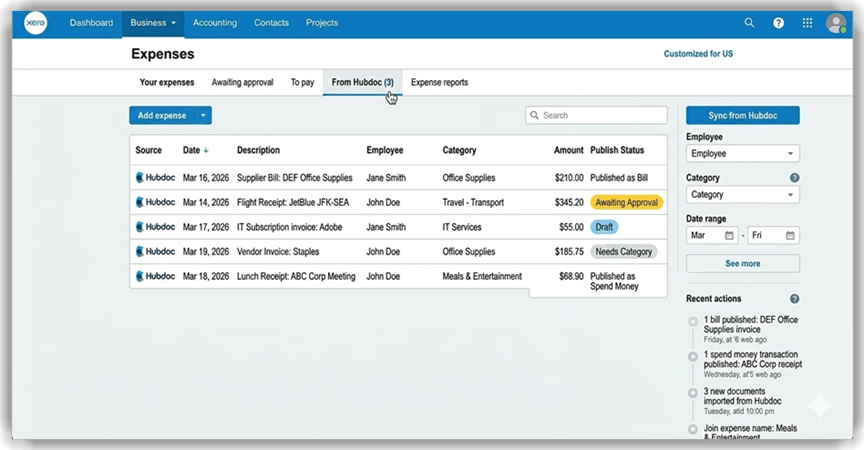
Feature Spotlight: Hubdoc is now included free with every Xero plan. This is a significant value-add that many competitors charge extra for.
Hubdoc is your gateway to the paperless office. It automatically fetches bills and receipts from your email and supplier portals, scans the documents using OCR, extracts the key data (vendor, amount, date, tax), and publishes it directly into Xero as a draft bill or transaction. You can also snap photos of paper receipts and upload them on the go.
The result is a complete digital archive of every financial document your business processes—searchable, organized, and permanently linked to the corresponding transaction in your books.
User Interface and Ease of Use
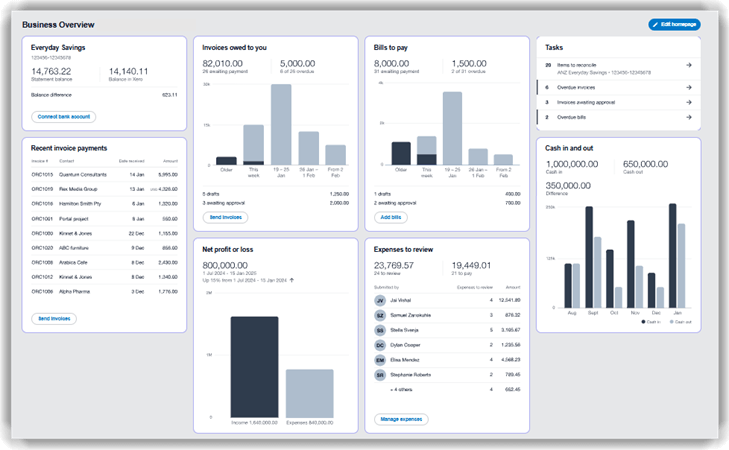
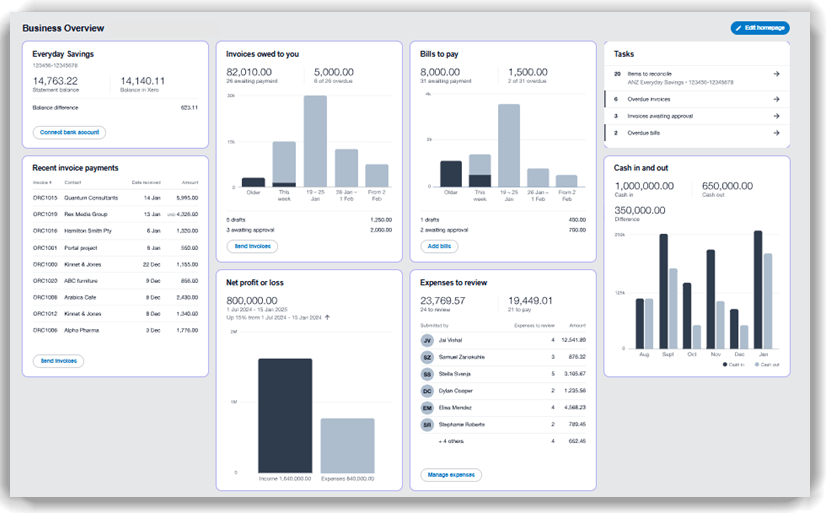
Xero’s dashboard is one of its greatest strengths. Upon logging in, you are greeted with a clean, card-based layout featuring widgets for Account Watchlist (monitoring key accounts), Cash In/Out (a visual cash flow snapshot), and Invoices Owed to You (outstanding receivables). Everything is designed to give you an at-a-glance financial picture without drilling into reports.
Navigation follows an intuitive ribbon menu across the top: Business, Accounting, and Payroll are your primary tabs, each expanding into logically organized sub-menus. Compared to QuickBooks Online, Xero’s interface feels cleaner and less cluttered, though the trade-off is fewer contextual tooltips for first-time users.
One area where Xero truly differentiates itself is its use of plain English terminology. Where QuickBooks might label a function “Write Checks,” Xero simply says “Spend Money.” Where QuickBooks uses “Receive Payments,” Xero uses “Receive Money.” This approach significantly flattens the learning curve for non-accountants, making Xero one of the most approachable accounting platforms available today.
Xero Mobile App Review

Xero’s mobile app (available on iOS and Android) is a capable companion that extends core functionality to your smartphone. Key capabilities include sending and tracking invoices on the go, reconciling bank transactions using a gamified, swipe-based interface, and visualizing your cash flow with interactive charts.
The bank reconciliation feature on mobile deserves special mention. Xero has turned what is typically a tedious desktop task into an almost game-like experience: transactions appear as cards you can swipe to match, categorize, or dismiss. Many small business owners report reconciling their daily transactions during their morning commute.
User feedback from the App Store and Google Play is generally positive, with reviewers praising the app’s stability and clean design. The most common criticism relates to loading speed on older devices and the occasional delay when syncing large transaction volumes. Overall, the mobile app earns strong marks as a day-to-day management tool—though complex tasks like reporting and payroll configuration are still best handled on the desktop version.
Xero Pricing Plans (2026)
Xero offers three core plans in the United States, all of which include unlimited users. Prices are billed monthly and reflect standard (non-promotional) rates as of February 2026.
Plan Breakdown
| Feature | Early | Growing | Established | Best For |
|---|---|---|---|---|
| Monthly Price | $25/mo | $55/mo | $90/mo | Solopreneurs |
| Invoices & Quotes | 20 invoices | Unlimited | Unlimited | Solopreneurs |
| Bills | 5 bills | Unlimited | Unlimited | SMBs |
| Bank Reconciliation | ✔️ | ✔️ (Auto) | ✔️ (Auto) | All |
| Hubdoc | ✔️ | ✔️ | ✔️ | All |
| Multi-Currency | ❌ | ❌ | ✔️ | Scaling |
| Projects & Expenses | ❌ | ❌ | ✔️ | Scaling |
| Analytics/KPIs | Basic | Dashboards | Advanced | Scaling |
Hidden Costs and Value
Add-ons to consider: Gusto Payroll ($49/month + $6/employee), Inventory Plus (available on Growing and Established plans for an additional fee), and Analytics Plus for advanced reporting.
Free trial: Xero offers a 30-day free trial with no credit card required, allowing you to explore the full feature set before committing. As of this writing, Xero is also running a promotional offer of 85% off for the first six months for new customers in the US.
Disclaimer: Pricing and feature availability are accurate as of February 2026 and are subject to change. Xero reserves the right to modify its plans at any time. Always verify current pricing on xero.com before making a purchasing decision.
Xero vs. Competitors
How Does Xero Stack Up?
When compared to industry giants, Xero’s distinct advantage is collaboration and scalability. Here is how it compares head-to-head:
| Feature | Xero | QuickBooks Online | FreshBooks |
|---|---|---|---|
| Unlimited Users | ✔️ (All Plans) | ❌ (1–5 users) | ❌ (Up to 10) |
| UI / Ease of Use | ★★★★★ | ★★★★ | ★★★★★ |
| Inventory Tools | Strong | Moderate | Basic |
| Phone Support | ❌ | ✔️ | ❌ |
| Best For | Growing SMBs | US Tax Focus | Freelancers |
Vs. QuickBooks Online: QuickBooks offers superior live phone support and US-centric tax features (including direct TurboTax integration). However, Xero wins decisively on user interface, inventory tools, and unlimited users on all plans. If team collaboration matters to your business, Xero is the clear choice.
Vs. FreshBooks: FreshBooks excels for freelancers who need simple, beautiful invoicing. However, it is not a full double-entry accounting engine. Xero is far more robust and better suited for growing businesses with employees, inventory, and complex financial needs.
The Verdict: Choose Xero if you have a team and want a modern, collaborative workflow. Choose QuickBooks if US-specific phone support is a non-negotiable requirement.
Final Verdict: Is Xero Right for Your Business?
Yes, if: You have a growing team (take advantage of unlimited users), need robust e-commerce and app integrations, or want to build a paperless, automated financial workflow. Xero is particularly strong for retail operators, service-based businesses, and any company that values a modern, intuitive interface.
No, if: You are a freelancer with very low transaction volume (consider a free tool like Wave), or your business requires complex enterprise-grade manufacturing features that go beyond what Xero and its app ecosystem can provide.
