
SAP BI Architecture Diagram: Overview Tutorial
 Jessica Blake
⚡ Smart Summary
SAP BI architecture is organized into conceptual data warehousing layers, staging, data warehouse, operational data store, and data mart, across a three-tier database, application, and presentation structure that extracts, stores, and reports business data.
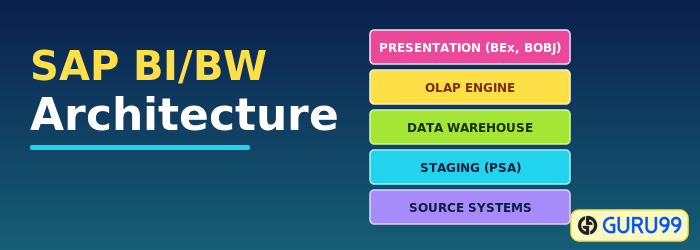
Before we learn more about SAP BI architecture, let us learn about the conceptual layers of data warehousing with BI.
Conceptual Layers of Data Warehousing with BI

Persistent Staging Area: The data extracted from the source systems first enters the Persistent Staging Area. The data at this layer is raw and unchanged; it is consolidated and cleansed only in the next layers. The staging area is a temporary table that holds the data and connects to the work area or fact tables. Without a staging area, the data load would go from the OLTP system to the OLAP system directly, which hampers the performance of the OLTP system.
Data Warehouse Layer (DWH Layer): Data from the Persistent Staging Area is loaded into the data warehouse layer, which holds the corporate information repository. Data is stored here for a longer period, that is, the entire history data (for example, the last 5 years). There is no aggregation of reporting-relevant data; the granularity is at line-item (detailed) level.
Operational Data Store Layer: Data is loaded into the Operational Data Store layer very frequently on a continuous basis from the source systems, so this layer contains all the changes made throughout the day. Data from the ODS can be loaded into the data warehouse layer at particular times (for example, end of day). It can also be used to recover data if the warehouse and data mart layers are lost. The ODS is not based on a star schema model; it is in flat file format.
Architected Data Mart Layer: The Architected Data Mart layer, also known as the InfoCube, is designed to store summarized and aggregated data for long periods. Data from the data warehouse layer is loaded into it and used in analysis and reporting. It consists of a central fact table (key figures) surrounded by several dimension tables and supports BW queries.
Key Components of a SAP BI System
Business Intelligence is a core component of SAP NetWeaver. The figure below shows the key components of a BI system.

- Data warehousing: mainly to extract, transform, and load data from source systems.
- BI platform: contains BI services that support complex analysis. It holds the Analytic Engine, which processes data requested through BEx navigations, and tools such as the Analysis Process Designer (APD) and Data Mining for merging, mining, and analyzing data.
- BI Suite: tools that help create reports. It contains the Business Explorer (BEx), which provides flexible reporting and analysis tools.
The following areas in the Business Explorer can be used for data analysis:
- BEx Analyzer (Microsoft Excel-based analysis tool with pivot-table-like features).
- BEx Web Analyzer (web-based analysis tool with pivot-table-like features).
- BEx Web Application Designer (customer-defined and SAP BI Content provided).
- BEx Report Designer (highly formatted web output).
SAP BI/BW Architecture
BI has a three-tier architecture:
Database Server: where data is physically stored (ODS, PSA, InfoCube, and the metadata repository).
Application Server: based on the OLAP processor. It is used to retrieve data stored in the database server.
Presentation Server: manages reporting and data access.
- Data is extracted from the source systems.
- Data is staged at the Persistent Staging Area (PSA), which holds source-like data.
- Data is cleansed, loaded, and stored in the DataStore Object.
- Data is viewed at multiple dimensions in the InfoCube.
- Data is made available by the OLAP processor to the Business Explorer to display per analysis requirements.
- Data can be made available to SAP and non-SAP data marts by the Open Hub Service (InfoSpoke).

