
JUnit ErrorCollector @Rule with Example
 Editorial Team
⚡ Smart Summary
JUnit ErrorCollector is a rule that lets a test keep running after a failure, gathering every error object and reporting them together once the test method finishes instead of stopping at the first problem.

In a normal scenario, whenever you identify any error during test execution, you would stop the test, fix the error and re-run the test.
But JUnit has a slightly different approach. With the JUnit error collector, you can still continue with the test execution even after an issue is found or the test fails. The error collector collects all error objects and reports them only once, after the test execution is over.
Why use Error Collector?
While writing a test script, you want to execute all the tests even if any line of code fails due to network failure, assertion failure, or any other reason. In that situation, you can still continue executing the test script using a special feature provided by JUnit known as “error collector.”
For this, JUnit uses the @Rule annotation, which is used to create an object of error collector. Once the object for error collector is created, you can easily add all the errors into the object using the method addError (Throwable error). As you know, Throwable is the super class of the Exception and Error classes in Java. When you add errors in this way, these errors will be logged in the JUnit test result.
The benefit of adding all errors in an Error Collector is that you can verify all the errors at once. Also, if the script fails in the middle, execution still carries on to the end of the test method.
Note: In the case of using a simple assert or a try/catch block, using the error collector method will not be possible.
Sample code
To understand more on Error Collector, see the code example below, which demonstrates how to create an Error Collector object and add all the errors to that object to track the issue:
package guru99.junit;

import org.junit.Rule;
import org.junit.Test;
import org.junit.rules.ErrorCollector;

public class ErrorCollectorExample {
    @Rule
    public ErrorCollector collector = new ErrorCollector();

    @Test
    public void example() {
    collector.addError(new Throwable("There is an error in first line"));
    collector.addError(new Throwable("There is an error in second line"));
    collector.checkThat(getResults(),
                not(containsString("here is an error")));
    // all lines of code will execute and at the end a combined failure will
    be logged in.
    }
}
Note: this is an illustrative extract, not a compilable file. Its trailing comment wraps onto a second line without a leading //, and getResults() plus the Hamcrest matchers are not shown. The complete runnable version follows under Example using ErrorCollector.
What is @Rule in JUnit?
JUnit provides a special kind of handling of tests, Test Case or test suite by using the @Rule annotation. Using @Rule, you can easily add or redefine the behaviour of the test.
There are several built-in rules provided by the JUnit API that a tester can use, and you can also write your own rule. A rule field must be public, non-static and of a type implementing TestRule.
See the line of code below, which shows how to use the @Rule annotation along with the Error Collector:
@Rule
public ErrorCollector collector= new ErrorCollector();
JUnit 5 note: Jupiter replaced rules with the Extension API, so @Rule and ErrorCollector do not exist in org.junit.jupiter. The nearest equivalents are Assertions.assertAll() and AssertJ SoftAssertions. The JUnit 4 code shown here still runs through the vintage engine. See the JUnit annotations tutorial for the full mapping.
Example using ErrorCollector
To understand the error collector, let us create a class and a rule to collect all the errors. You will add all the errors using addError(throwable) here.
See the code below, which simply creates a rule that is nothing but an “Error Collector object.” It is further used to add all the errors in order to report the issue at the end:
ErrorCollectorExample.java
package guru99.junit;

import org.junit.Assert;
import org.junit.Rule;
import org.junit.Test;
import org.junit.rules.ErrorCollector;

public class ErrorCollectorExample {
    @Rule
    public ErrorCollector collector = new ErrorCollector();

    @Test
    public void example() {
    collector.addError(new Throwable("There is an error in first line"));
    collector.addError(new Throwable("There is an error in second line"));

        System.out.println("Hello");
        try {
            Assert.assertTrue("A " == "B");
        } catch (Throwable t) {
            collector.addError(t);
        }
        System.out.println("World!!!!");
    }
}
TestRunner.java
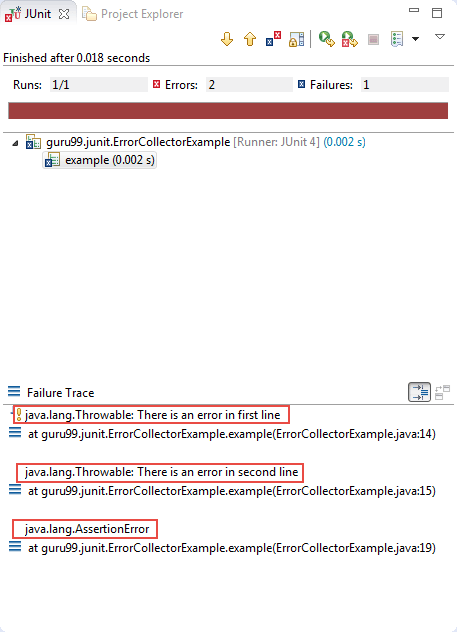
Let us add the above test class to a test runner and execute it to collect all the errors. See the code below:
package guru99.junit;

import org.junit.runner.JUnitCore;
import org.junit.runner.Result;
import org.junit.runner.notification.Failure;

public class TestRunner {
			public static void main(String[] args) {
      Result result = JUnitCore.runClasses(ErrorCollectorExample.class);
			for (Failure failure : result.getFailures()) {
         System.out.println(failure.toString());
      }
      System.out.println("Result=="+result.wasSuccessful());
   }
}
Output:
See the failure trace, which traces all the errors in one place. The JUnit view counts one run but reports two errors and one failure, each with its own line number:
Benefits of JUnit ErrorCollector
You can use a JUnit assertion for functional or GUI validation, for example:
- assertEquals(String message, Object expected, Object actual), which compares that two objects are equal.
- Similarly, assertTrue(Boolean condition) asserts that a condition is true.
Using assertions, validation testing becomes easy. But one major issue is that test execution will stop even if a single assertion fails.
Test continuity and recovery handling is crucial to test automation success, and it matters most in long Selenium flows where restarting a browser after each failed check is expensive. Error Collector is the best way to handle such scenarios.
