
Introduction to ABAP: Datatypes, Operators & Editor – Tutorial
 Editorial Team
⚡ Smart Summary
Introduction to ABAP covers the language SAP created for building applications on the R/3 system. This resource explains the data types, the operators, the control statements, the internal table, and the SE38 editor where every ABAP program begins.
What is ABAP?
ABAP stands for Advanced Business Application Programming. It is a programming language for developing applications for the SAP R/3 system.
The latest version of ABAP is called ABAP Objects and supports object-oriented programming. SAP will run applications written using ABAP/4, the earlier ABAP version, as well as applications using ABAP Objects.
This introduction does not attempt to document every ABAP language construct. It introduces the key concepts quickly, so that you can start writing working programs and then move on to the more advanced topics.
Data Types
Every ABAP program starts by declaring the data it will work with.
Syntax to declare a variable in ABAP –
DATA Variable_Name TYPE Variable_Type.
Example:
DATA employee_number TYPE I.
The following is a list of data types supported by ABAP.
| Data Type | Initial field length | Valid field length | Initial value | Meaning |
|---|---|---|---|---|
| Numeric types | ||||
| I | 4 | 4 | 0 | Integer (whole number) |
| F | 8 | 8 | 0 | Floating point number |
| P | 8 | 1 – 16 | 0 | Packed number |
| Character types | ||||
| C | 1 | 1 – 65535 | ‘ … ‘ | Text field (alphanumeric characters) |
| D | 8 | 8 | ‘00000000’ | Date field (format: YYYYMMDD) |
| N | 1 | 1 – 65535 | ‘0 … 0’ | Numeric text field (numeric characters) |
| T | 6 | 6 | ‘000000’ | Time field (format: HHMMSS) |
| Hexadecimal type | ||||
| X | 1 | 1 – 65535 | X’0 … 0′ | Hexadecimal field |
The eight types above are the classic fixed-length types. ABAP also offers two variable-length types that beginners meet almost immediately: STRING for text of any length, and XSTRING for binary data of any length.
ABAP Operators
Once data is declared, operators are what change it and compare it.
Assigning values
a = 16.
MOVE 16 TO a.
WRITE a TO b.
All three statements move a value. The equals sign is the modern form, while MOVE and WRITE TO are the older equivalents you will still meet in legacy programs.
Arithmetic operations
COMPUTE a = a * 100.
ABAP also supports ADD, SUBTRACT, MULTIPLY and DIVIDE as standalone keywords, but the COMPUTE form shown above is the one used most often.
Logical operators
Logical operators return true or false, and they are what every control statement in the next section tests. Each has a word form and a symbol form, and the two are interchangeable.
| Word form | Symbol form | Meaning |
|---|---|---|
EQ |
= |
Equal to |
NE |
<> |
Not equal to |
GT |
> |
Greater than |
GE |
>= |
Greater than or equal to |
LT |
< |
Less than |
LE |
<= |
Less than or equal to |
Control Statements
Control statements use the logical operators above to decide which lines of code run, and how often.
IF … ENDIF
IF [NOT] exp [ AND / OR [NOT] exp ].
  ........
[ELSEIF exp.
  .......]
[ELSE.
  .......]
ENDIF.
CASE statement
CASE variable.
  WHEN value1.
    .........
  WHEN value2.
    .........
  [WHEN OTHERS.
    .........]
ENDCASE.
WHILE loop
WHILE <logical expression>.
  .....
ENDWHILE.
DO loop
DO <n> TIMES.
  .....
ENDDO.
A WHILE loop runs for as long as its condition holds. A DO loop runs a fixed number of times, or endlessly until an EXIT statement stops it.
Internal Tables in ABAP
Single variables are rarely enough. Business programs read many rows at once, and the internal table is the structure that holds them in memory.
An internal table is a dynamic array. It has no fixed size, it lives only for the duration of the program, and it is the standard way to move rows between the database and the screen.
" Declare an internal table and a work area
DATA: lt_employees TYPE TABLE OF pa0001,
      ls_employee  TYPE pa0001.

" Fill it from the database
SELECT * FROM pa0001 INTO TABLE lt_employees UP TO 10 ROWS.

" Read it row by row
LOOP AT lt_employees INTO ls_employee.
  WRITE: / ls_employee-pernr, ls_employee-ename.
ENDLOOP.
The three operations above cover most day-to-day work: declare the table, fill it with a SELECT, then walk it with LOOP AT. APPEND adds a row, READ TABLE finds one, and DELETE removes rows that match a condition.
ABAP/4 Editor
All the syntax above is typed into a single place.
Transaction SE38 opens the ABAP Editor, where you will spend most of your time as a developer creating and modifying programs.
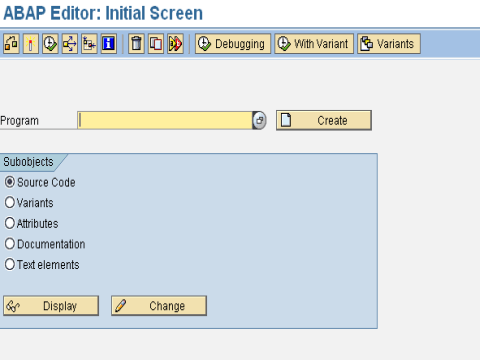
The ABAP/4 Editor, transaction SE38
How to Write Your First ABAP Program
The screen above is where the following steps take place. The sequence below produces a working report in a few minutes.
- Open the editor. Enter transaction code SE38 in the SAP GUI command field and press Enter.
- Name the program. Type a name beginning with Z or Y, for example
ZHELLO_WORLD. Those two letters are the customer namespace, and SAP guarantees it will never overwrite them during an upgrade. - Create it. Click Create, enter a short description, and choose Executable program as the type.
- Assign a package. Choose Local Object for practice work. A local object stays in your system and needs no transport request.
- Write the code.
REPORT zhello_world.

DATA employee_name TYPE string.
employee_name = 'Guru99'.

WRITE: / 'Hello, ABAP!',
       / 'Welcome', employee_name.
- Check the syntax. Press Ctrl + F2. The status bar reports any error and the line that caused it.
- Activate the program. Press Ctrl + F3. An inactive program cannot run.
- Execute. Press F8. The output list opens and displays both WRITE lines.
The forward slash in the WRITE statement forces a new line. Removing it prints everything on one line, which is the first formatting habit most beginners pick up.
Common ABAP Transaction Codes
A handful of transaction codes cover almost everything a new ABAP developer needs.
| Transaction | Purpose |
|---|---|
SE38 |
ABAP Editor. Create, edit, check and run programs. |
SE80 |
Object Navigator. A single workbench for programs, classes, packages and screens. |
SE11 |
ABAP Dictionary. Define and inspect database tables, data elements and domains. |
SE16N |
Data Browser. View the contents of any table without writing a SELECT. |
SE37 |
Function Builder. Create and test function modules. |
SE24 |
Class Builder. Create global classes for ABAP Objects. |
ST22 |
Dump analysis. Read the runtime error when a program terminates. |
SE38 and SE11 are enough to build a first report. ST22 becomes the most valuable of the group the moment a program crashes.
