
7 BEST Instagram to MP4 Converter to Save IG Videos Easily
 Hannah Roberts
Therefore, I spent over 150 hours testing 35+ sites and apps to curate a list of 7 reliable options. This article is backed by hands-on experience and real-world testing. To simplify your decision-making, I have given the tool description, features, pros and cons, and pricing details for each tool. My goal is to provide full transparency and an unbiased opinion so that you can choose the right tool for your requirements.

PeekViewer is an anonymous Instagram profile viewer that offers an IG content downloader feature. It allows you to save videos, posts, reels, stories, and carousel content in a single click. It lets you view and download private account videos as well.
Best Instagram to MP4 Converter: Top Picks!
| Tool Name | Key Features | Free Trial | Link |
|---|---|---|---|
PeekViewer |
• Private account access • Original video quality |
14-day refund policy | Learn More |
 4K Stogram |
• Mass download • No watermark |
Free tool | Learn More |
 Inflact |
• Story selection for download • Complete account backup |
Basic free version | Learn More |
 Zeemo |
• Metadata preservation • Queque-based download |
Basic free version | Learn More |
 EaseUS Video Downloader |
• Preview while downloading • No ad pop-ups |
Basic free version | Learn More |
1) PeekViewer
PeekViewer is an anonymous Instagram profile viewer that offers an IG content downloader feature. It allows you to save videos, posts, reels, stories, and carousel content in a single click. I was able to save all of it in one organized dashboard. This is an excellent tool for marketers and content creators for building mood boards and collecting ideas for your brand.
One of the best things about PeekViewer is that it lets you view and download private account videos as well. However, the first attempt may not always work for private accounts; therefore, do have patience and retry. I was highly impressed since the videos downloaded by PeekViewer do not lose their quality and audio. Read our Peekviewer review

Features:
- Easy Download: You can download the videos directly by just pasting the username or link of the account in the search bar. This leads directly to the profile, and you can download the contents from your target account. You do not need to have an account on IG to use PeekViewer.
- Types of Videos: I was able to save multiple types of content and videos using PeekViewer. It supports stories, carousel video posts, and reels. Additionally, it can read all the formats of videos and lets you download multiple videos without any limit. Moreover, I could also save the MP4s in bulk.
- Offline Access: Once the IG video is downloaded, you can access it easily on your device without being online. Since the MP4 contents of a public profile are instantly accessible, you can view them immediately after they are saved by PeekViewer. However, for private accounts, the reel and story retrieval can take some time before it appears on your device.
- Tagged Posts: This tool’s access is not limited to the uploaded content on the target profile, but it also allows you to save tagged posts and videos. I wanted to grab a video of a friend to create a reel for her birthday, and PeekViewer jumped in to save the day by downloading the video within a few seconds.
- Other Advanced Features: Using this app, I could view the followers, following, likes, and comments on every post. It also allows you to view the analytics of an account, which is useful for tracking your competitor’s profile growth, content reach, etc.
Pros
Cons
Pricing:
Here are the monthly plans provided by PeekViewer:
| 12 Months | 3 Months | 1 Month |
|---|---|---|
| $12.74/month | $30.03/month | $50.99 |
Free Trial: Basic access and 14-day refund policy
14-Days Money-Back Guarantee
2) 4K Stogram
4K Stogram is a desktop-based Instagram video downloader that is built for users who want the original format of the video for offline access. Whether you are a content creator or a social media manager, this tool offers you direct access to reels, posts, and stories. I run a small cloud bakery; hence, it allowed me to view what my competitors were up to without opening IG and provided full control over video quality.
It has a clean interface without any constant pop-ups that lead to other landing pages or ads. If you are looking for a tool that can download Insta videos in bulk, then try 4K Stogram. It also ensures that your videos are organized and stored without cluttering your device storage.

Features:
- Download by Username: This feature helped me pull Instagram content by typing the username, hashtag, and the location without any link. Hence, it makes batch download much easier, allowing you to grab reels, posts, and carousel content instantly.
- Mass-Download: Many apps offer batch processing, while 4K Stogram lets you download an entire profile or a hashtag feed in one go. With such capability, downloading content for analyzing a competitor or the online market becomes extremely convenient for marketers and brand owners.
- Private Instagram: One of the best features of this app is that you can download posts from private accounts that you follow. However, I did ask for the account owner’s consent before saving their videos. This allowed me to gather information from my competitors as well, and go back to the inspiration videos instantly in my storage without scrolling through their grid.
- Account Backup: You can create a complete backup of your profile using 4K Stogram. It allowed me to mass download not just my posts and videos, but I could also save the highlights, current stories, comments, metadata, etc. You can store all the contents of your account for republishing them later.
- Watermark-Free Reels: It downloads the Reels without the Instagram watermark, hence you get cleaner files and better reposting material. I could grab multiple reels for a project and didn’t need a third-party app for watermark removal, which streamlined my assignment submission.
Pros
Cons
Pricing:
It is a free tool
Download for Free
3) Inflact
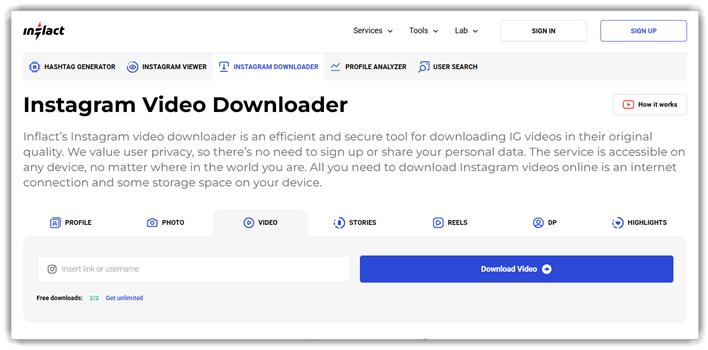
Inflact is an IG content-saving site that allows anonymous downloads without any software installation. It supports Instagram videos, reels, photos, etc., for instant download, all of it in original format. I was able to store my downloads online on the site itself without affecting my device storage.
Whether you are running a social media marketing agency or just a casual user, Inflact is an easy-to-use tool available for everyone. It doesn’t add any watermark to the videos, hence, you do not have to worry about using an additional tool to clean the reel or stories.
Features:
- Link or Username Input: The link and username input keep things straightforward and simple. All you have to do is paste the URL or type the username of the person, and then it will take you to the account/ content of the individual. This way, you jump right into action and download the desired videos.
- Anonymous Download Mode: Inflact offers an entirely anonymous download and doesn’t ask for your login credentials, nor do you have to install the app. Hence, the person of interest never finds out about your search and download activities.
- Original HD Quality: All the media that you save using Infact remains intact and is downloaded in HD format. It never compromises with the video resolution and makes sure the sound quality remains the same. However, if the video is already low-quality, then you will have to download it in that same low resolution. For such videos, you can use media enhancer tools.
- Album Saving: This site is designed to batch process, hence you can save numerous videos at once. I was creating a content calendar for the month and needed to add all the inspirations, hence Inflact came really handy while saving numerous videos for my calendar.
- Highlights and DP: I like that it lets you download highlights, their cover, and DPs as well. This way, you can create an organized folder of every competitor and recognize them easily. I could also store the DPs that showed the logo of the brands and find my own inspiration.
Pros
Cons
Pricing:
This Instagram to MP4 converter has a free basic version with ads and limited downloads. Inflact premium charges $7.8 per month and offers unlimited downloads with no ads.
Lifetime Free Basic Plan
4) Zeemo
Zeemo is an Instagram video downloader that offers high-quality MP4 downloads and emphasizes usability and modern workflows. What I liked the most about Zeemo is its ad-free interface that provides distraction-free downloads. Additionally, I could use it to download my own videos and distribute them on other video-sharing platforms such as YouTube.
During the testing period, I noticed that it responds quickly and doesn’t freeze mid-way while a download is in progress. This was one of my main considerations for shortlisting Zeemo, since some of the competitors that didn’t make it to the list frustrated me with continuous freezing. Additionally, its video quality retention is quite reliable even for very large files.

Features:
- Ad-Free Downloads: Unlike some free tools that save IG videos but include a lot of ads, Zeemo stands out and saves you from these frustrating pop-ups. Its ad-free download helped me save all kinds of IG content without paying for a premium plan.
- Metadata Preservation: It retains the original video metadata, such as the captions, timestamps, and the post structure. I found it especially useful for repurposing workflows and content analysis. Additionally, keep the metadata since it allows you to map engagement patterns better.
- Queque-Based Download: Zeemo lets you line up the downloads and process them sequentially in the background while you continue other activities. It is an ideal feature for creators who handle editing and several other tasks on their devices simultaneously.
- Format-Adaptive: You can adjust the output formats according to your intended use, such as vertical for reels or square for feed. Hence, no external converters are required, and this solves sizing errors for posting on different platforms.
- Fail-Safe Recovery: If your download is interrupted, then Zeemo automatically resumes or retries the process without starting over. This solves the issue of unstable networks while downloading videos from Instagram.
Pros
Cons
Pricing:
Here are Zeemo’s monthly plans:
| Pro | Expert | Business |
|---|---|---|
| $6.67 | $13.33 | $15.99 |
Free Trial: It has a free basic version
Lifetime Free Basic Plan
5) EaseUS Video Downloader
EaseUS Video Downloader is a desktop-grade solution designed for users who want complete control over downloads and videos. It provides format flexibility and consistent video quality without broken files. After using it, I must say that its stability stands out immediately, and it also includes batch processing. Additionally, it is a straightforward app that ensures the link detection and download are instant without multiple clicks and queries.
I wanted to access cooking videos offline since recipes are required to play continuously while following them, which consumes alot of data. Therefore, using EaseUS Video Downloader made this possible with just a single click.

Features:
- Subtitles and Cover Art Downloads: This MP4 converter helps download video subtitles and even grab the video’s cover image. Hence, if you are building a reference library, then the captions make the search even simpler with an accurate quote. I recommend naming the files with the creator’s name and the date.
- Built-in Search & Browser: You can search the videos by the name of the creator or simply use the built-in browser to locate them from the results. Therefore, you do not have to tab hop across the sites when you’re researching trends. I also use search keywords that match the reel creator to find the content faster.
- Quality Controls: EaseUS Video Downloader lets you choose the resolution you want for downloading the video. You can select SD or HD/4K as per your requirement. It helped me store the videos in high quality; moreover, I reduced the quality when my device didn’t have enough storage.
- Preview While Downloading: It lets you start watching the video that you are downloading, so you aren’t stuck waiting to verify the clip. This is an excellent feature for quickly viewing when you are processing bulk videos, allowing you to save time and data.
- Quick Link For Downloads: The tool is built around a straightforward “add URL > Choose Format > Download” process. This makes the download feel simple and beginner-friendly; hence, anyone using an Instagram to MP4 converter for the first time can try this site.
Pros
Cons
Pricing:
Here are the Individual plans offered by EaseUS Video Downloader:
| 1-Month | 1-Year | Lifetime Upgrades |
|---|---|---|
| $12.99 | $23.99 | $39.99 |
Free Trial: It provides a free trial
Downloader for Free
6) Video Downloader – FastSave
Video Downloader – FastSave is an Android-based Instagram downloader app developed by helalik for quickly saving photos, videos, reels, IGTV, and stories. What I appreciated the most is that no Instagram login is required, which makes it a safer choice for users who are cautious about sharing credentials. I simply copied a link or used the share option, and the app downloaded the media instantly without asking me to sign in to my IG account.
This app is lightweight and beginner-friendly. It integrates well with Instagram’s share menu, so you do not have to switch apps to save content. During my testing, the downloads were fast and consistent, and the built-in player let me view the saved videos offline without needing a separate media app. The multi-thread technology also boosted the speed significantly for larger files.

Features:
- No Login Required: You can use this app without logging in to your Instagram account, which keeps the entire download process completely anonymous. I felt much safer using it compared to other downloaders that demand IG credentials. It is a relief for privacy-conscious users who want quick access without exposing their account information.
- Super Download Mode: FastSave uses multi-thread technology to boost the download speeds significantly. I noticed that even large reels and IGTV videos were saved within a few seconds. This is one of the key advantages over slower downloaders that lag with bigger files and longer clips.
- Built-In Offline Player & Album: The app comes with its own video player and album viewer, so you can watch the saved videos and review the photos without going online. I found this useful while traveling, since I could enjoy my saved Instagram content without consuming mobile data on my plan.
- Repost & Share Support: You can repost the downloaded content back to Instagram or share it on Facebook, Twitter, Telegram, and other platforms. It also lets you copy hashtags and captions for easy reposting, which helps content creators recycle popular posts and trending material faster.
- Highlights, Reels & IGTV Download: Apart from regular posts, the app supports downloading Instagram Highlights, Reels, IGTV videos, and stories in HD quality. I was able to grab content in various formats without any quality loss, which is essential for repurposing on other platforms or storing for later reference.
Pros
Cons
Pricing:
It is a free tool
Link: https://play.google.com/store/apps/details?id=com.helalik.fastsaver&hl=en
7) Repost App for Instagram
Repost App for Instagram or RepostMax is compatible with Android and helps reshare Instagram content from other accounts on your profile. It helped me reshare the Instagram content, like photos, stories, and videos. I simply copied the link of a post on IG and opened RepostMax, which auto-detected the media and helped me repost the content with the original captions.
Moreover, it supports private profile media if you sign in to the app. However, it contains ads which can be frustrating, hence, you can opt for the in-app purchases to stop these intrusive advertisements.

Features:
- HD Video Reposting: This feature allows you to repost the Instagram videos in up to 4K resolution without losing quality. It preserves the quality of the original video along with the captions. Thus, making it useful for the content creators who are focused on professional presentations.
- Automatic Credit Attribution: Using the Repost App, you do not have to separately credit the original creator because it automatically credits them. It adds a customizable watermark or caption tag that helps maintain transparency. I suggest always keeping the attribution visible, especially when running theme pages or niche communities to build trust and avoid copyright concerns.
- Unlimited Downloads: Another advantage is unlimited downloads without restrictive caps on video saving. It allows consistent content sourcing for campaigns, repost strategies, or curated feeds. I have personally used it during a product launch week, and the seamless bulk-saving helped maintain a steady publishing schedule.
- User-Friendly Interface: The layout feels clean and intuitive, even for beginners exploring Instagram video downloader tools. You can navigate between the downloads, repost, and preview options effortlessly. Moreover, I could repost a Reel in under a minute with just a few clicks.
- Secure & Safe Processing: The security remains a priority, as the tool processes public links without requiring full Instagram login credentials. It minimizes the risks that are commonly associated with third-party Instagram video downloaders. Hence, you will notice that the downloads occur within the Instagram environment, adding an extra layer of reliability.
Pros
Cons
Pricing:
It is a free tool but includes in-app purchases that cost anywhere between $1.87 to $21.45.
Link: https://play.google.com/store/apps/details?id=ventures.bench.repost
Feature Comparison Table: Instagram to MP4 HD Video Downloader
Here’s a comparison table for you to quickly glance through the features of the above tools:
| Features | Peekviewer | 4K Stogram | Inflact | Zeemo |
| Download IG Videos (public) | ✔ | ✔ | ✔ | ✔ |
| Download Reels | ✔ | ✔ | ✔ | ✔ |
| Download Stories | ✔ | ✔ | ✔ | ✔ |
| Support Private Accounts | ✔ | Limited | Limited | Limited |
| High-Quality MP4 Download | ✔ | ✔ | ✔ | ✔ |
| Watermark Output | ✔ | ✔ | ✔ | ✔ |
| Batch/Multiple Download | ✔ | ✔ | ✔ | ✔ |
How to Save Instagram Videos Without Third Party Tool
If you do not want to use a third-party tool for saving an Instagram video, then here are the three best ways to do it:
- Download Option: You can use the Download option on Instagram that is available within the send/Paperplane option. Many IG users keep this download feature on for their reels; therefore, you can directly download the videos.
- Screenrecording: If the account owner has turned off the download option, you can always screenrecord the content. Simply turn on the screen-recording feature and record the content.
- Ask a friend: This tip can be helpful if you do not follow a user and you need to save their videos. You can ask a friend who already follows them to save it and send it to you.
Note: Make sure you do not share any of the downloaded videos publicly without the consent of the original creator.
How to Use an Instagram MP4 Converter to Save IG Videos?
It is quite easy to use Instagram MP4 converters; the steps may slightly vary depending on the tool, but the core procedure remains the same.
In this demonstration, I shall use PeekViewer and show you how you can save IG videos:
Step 1) First, go to https://peekviewer.com/instagram-downloader/, navigate to Watch Now.
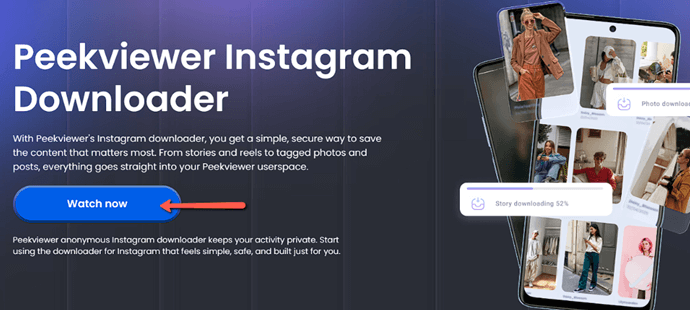
Step 2) Tap on Watch Now and select the type of account you want to view, between Private or Public, and click on Next.

Step 3) Now, enter the username or the URL of the profile you want to visit and download videos from, and hit Watch.

Step 4) Finally, Unlock the profile and view their posts, videos, stories, highlights, etc., and select the content to download them.

14-Days Money-Back Guarantee
What Ethical and Legal Things To Consider While Downloading IG Videos?
Here are the primary ethical and legal things that you must consider while downloading Instagram videos:
- You must respect the copyright laws of the content owner and the Instagram app itself. Hence, downloading videos is alright, but do not use them unethically or upload them claiming video rights.
- If you want to use videos for promotional or commercial purposes, always get explicit consent and provide fair compensation in the creator’s preferred manner.
- You must not distribute any misleading content without proper context after downloading someone’s content.
- I suggest checking the third party’s terms of service and seeing if it has any form of statement that could breach Instagram’s policies.
- If it is a private account, then do not download videos that they have specifically shared only with their followers, since they are putting their trust in you all. Even if you maintain all the ethical laws by respecting their privacy.
- Always credit the original creator when you share their video, even with consent, as there should always be fair use of someone else’s content.
How to Troubleshoot Common Issues of the Instagram MP4 Converter?
- Issue: The downloaded videos may fail due to private accounts or restricted privacy settings.
Solution: You must make sure that the content is public and always log in to your account to request permission before attempting to download the video. - Issue: The conversion process freezes midway, or the app fails to download the entire video.
Solution: I suggest switching to a stable network and refreshing the page to retry the process. Your app might also need an update if you are using a device app. - Issue: The downloaded video doesn’t have sound even after downloading.
Solution: Make sure to check your internet connection and select the right format while downloading. - Issue: The tool shows unsupported format errors when you are handling newer video encoding standards.
Solution: You can update the browser and clear the cached data, then retry using a different output option that supports modern encoding methods. - Issue: The videos are downloading in low resolution, and the clarity is reducing in the newer videos.
Solution: You can manually choose the highest quality available before you download a video. Avoid choosing options like quick download that speed up the process by reducing the resolution. - Issue: The download fails repeatedly due to some maintenance issue or server overload.
Solution: You can wait for a few minutes, clear your session data, and then I suggest retrying when the peak hours are over. - Issue: The downloaded videos refuse to open on certain media players.
Solution: In such cases, redownload the file completely and make sure your device has sufficient storage space. It is also a good idea to install a media player that is compatible with all formats. - Issue: The website/app keeps redirecting or loading ads instead of processing the video link.
Solution: Use only reputable services and enable an ad blocker. You must also close any extra tabs and carefully paste the link till the interruptions stop. If the app comes with an ad, watch it till the ad timer stops for more convenient downloading.
Verdict
After a thorough evaluation of the tools above, I noticed that all of these sites and apps are easy to use and allow you to easily download Insta videos and posts. However, the top three tools that stood out the most are as follows:
- PeekViewer: Its ability to access both private and public profiles makes it highly reliable. Additionally, the way it retains the video quality makes it one of my top picks.
- 4K Stogram: This site’s no-nonsense, straightforward download process is impressive. It is a free tool that is beginner-friendly and offers a bulk download, allowing you to back up your own account as well.
- Inflact: It allows you to save the videos without a watermark and makes sure that the quality remains intact. You can also use it to download the highlights and display a picture of the target account.
FAQs
PeekViewer is an anonymous Instagram profile viewer that offers an IG content downloader feature. It allows you to save videos, posts, reels, stories, and carousel content in a single click. It lets you view and download private account videos as well.
