
How to Create a New Cost Element
 Editorial Team
⚡ Smart Summary
Cost element in SAP classifies the nature of costs and revenues flowing through Controlling. Transaction KA01 creates a primary cost element, which must match a general ledger account of the same number, linking financial accounting to cost accounting.
What is a Cost Element in SAP?
A cost element is the object in SAP Controlling that describes the nature of a cost or revenue, such as salaries, depreciation, or internal activity. It is the bridge between Financial Accounting and Controlling. There are two kinds: primary cost elements, which correspond one-to-one with a general ledger account and carry external costs into Controlling, and secondary cost elements, which exist only in Controlling to record internal allocations such as assessments and settlements.
Cost Element Creation in SAP
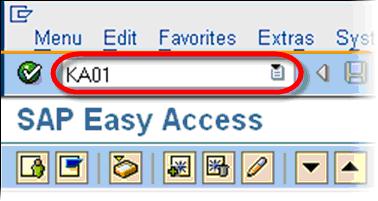
To create a New Cost Element , In the SAP transaction code box, enter transaction KA01
In the Create Cost Element Screen
- Enter the new cost element number.
- Enter the validity dates of the new cost element.
Optional – In the Reference section:
- In the Cost Element field, you can enter a reference cost element if the details are similar to the new cost element.
- In the Controlling Area field, you can enter the reference cost element’s controlling area.
Click Master Data Button

In the next SAP screen
- Enter Name & Description
- Enter a relevant CElem Category
- Click Save.
Cost Element is created

Note: Before you create a Cost Element you must create a G/L account with the same number in your SAP system.
Other Noteworthy Transactions
- Change an existing cost element – transaction KA02
- Display a cost element – transaction KA03
Primary vs Secondary Cost Elements
Choosing the correct type keeps cost accounting accurate and reconciled with the general ledger.
| Aspect | Primary Cost Element | Secondary Cost Element |
|---|---|---|
| Linked to G/L | Yes, same number | No, exists only in Controlling |
| Purpose | Carry external costs into CO | Record internal allocations |
| Examples | Salaries, rent, materials | Assessment, settlement, activity |
| Create with | KA01 | KA06 |
Best Practices for Cost Elements
- Create the G/L account first: A primary cost element needs a matching G/L account of the same number.
- Use the right category: Pick the cost element category that matches the cost type.
- Keep numbering consistent: Align cost element numbers with your chart of accounts.
- Separate secondary elements: Reserve a number range for internal secondary cost elements.
- Review regularly: Retire unused cost elements to keep reporting clean.
