
Constructor Overloading in Java
 Editorial Team
⚡ Smart Summary
Constructor Overloading in Java enables a class to declare multiple constructors that differ by parameter list, giving developers flexible object initialization, cleaner code reuse through this(), and predictable behavior whenever default or custom values are required at instantiation.
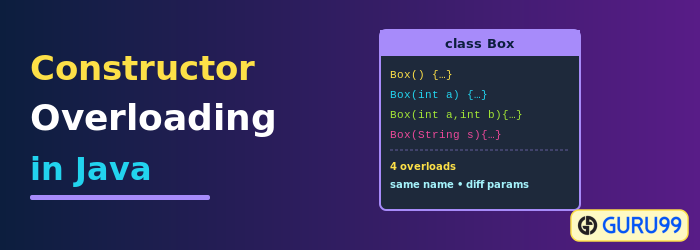
What is Constructor Overloading in Java?
Constructor Overloading in Java is a technique in which a class declares multiple constructors that differ in parameter list. The compiler differentiates these constructors by analyzing the number of parameters and their data types.
Examples of valid constructors for class Account are shown below:
Account(int a);
Account (int a,int b);
Account (String a,int b);
Why Do We Need Constructor Overloading in Java?
Constructor Overloading in Java improves flexibility and code efficiency by allowing several constructors in a class, each with a different parameter list.
- Flexibility in Object Creation: Constructor Overloading lets you initialize objects in various ways, depending on the number or type of parameters.
- Code Reusability: You can reuse constructor logic by invoking one constructor from another using the this() keyword.
- Improved Readability: Overloaded constructors make code more intuitive by offering specific options for different initialization needs.
- Default and Custom Initialization: Constructor Overloading lets you create both default and custom-initialized objects easily.
Example: Constructor Overloading in Java
The following example demonstrates Constructor Overloading in Java using a class named Demo.
Step 1) Type the code in the editor.
class Demo{
      int  value1;
      int  value2;
      /*Demo(){
       value1 = 10;
       value2 = 20;
       System.out.println("Inside 1st Constructor");
     }*/
     Demo(int a){
      value1 = a;
      System.out.println("Inside 2nd Constructor");
    }
    Demo(int a,int b){
    value1 = a;
    value2 = b;
    System.out.println("Inside 3rd Constructor");
   }
   public void display(){
      System.out.println("Value1 === "+value1);
      System.out.println("Value2 === "+value2);
  }
  public static void main(String args[]){
    Demo d1 = new Demo();
    Demo d2 = new Demo(30);
    Demo d3 = new Demo(30,40);
    d1.display();
    d2.display();
    d3.display();
 }
}
Step 2) Save, compile, and run the code.
Step 3) An error appears. Try to debug the error before proceeding to the next step of Constructor Overloading in Java.
Step 4) Every class has a default Constructor in Java. The default constructor for class Demo is Demo(). If you do not provide it, the compiler creates it for you and initializes the variables to default values.
However, if you specify a parameterized constructor like Demo(int a) and want to use the default Demo(), it is mandatory to declare it explicitly.
Step 5) Uncomment lines 4-8 of the code, then save, compile, and run the program again to observe the change in behavior.
Constructor Chaining in Java
Consider a scenario where a base class is extended by a child. Whenever an object of the child class is created, the constructor of the parent class is invoked first. This is called Constructor chaining.
Example: To understand constructor chaining with Constructor Overloading in Java
Step 1) Copy the following code into the editor.
class Demo{
   int  value1;
   int  value2;
    Demo(){
      value1 = 1;
      value2 = 2;
      System.out.println("Inside 1st Parent Constructor");
   }
   Demo(int a){
      value1 = a;
      System.out.println("Inside 2nd Parent Constructor");
   }
  public void display(){
     System.out.println("Value1 === "+value1);
     System.out.println("Value2 === "+value2);
  }
  public static void main(String args[]){
     DemoChild d1 = new DemoChild();
     d1.display();
  }
}
class DemoChild extends Demo{
    int value3;
    int value4;
    DemoChild(){
    //super(5);
     value3 = 3;
     value4 = 4;
    System.out.println("Inside the Constructor of Child");
    }
    public void display(){
      System.out.println("Value1 === "+value1);
      System.out.println("Value2 === "+value2);
      System.out.println("Value1 === "+value3);
      System.out.println("Value2 === "+value4);
   }
}
Step 2) Run the code. Owing to constructor chaining, when the object of child class DemoChild is created, the constructor Demo() of the parent class is invoked first and the constructor DemoChild() of the child runs next.
Expected Output:
Inside 1st Parent Constructor
Inside the Constructor of Child
Value1 === 1
Value2 === 2
Value1 === 3
Value2 === 4
Step 3) You may observe that the parent constructor Demo() runs by default. To call the overloaded constructor Demo(int a) instead, use the keyword “super”.
Syntax:
super();
--or--
super(parameter list);
Example: If your parent constructor is like Demo(String Name, int a), you will specify super(“Java”,5). If used, the keyword super needs to be the first line of code in the constructor of the child class.
Step 4) Uncomment line 26 and run the code. Observe the output.
Output:
Inside 2nd Parent Constructor
Inside the Constructor of Child
Value1 === 5
Value2 === 0
Value1 === 3
Value2 === 4
