
What is Interface in C# with Example
 Editorial Team
⚡ Smart Summary
Interface in C# defines a contract that specifies which methods and properties a class must implement, without providing the actual code. The implementing class supplies the concrete behavior, enabling loose coupling and multiple inheritance across unrelated types.

What is Interface in C#?
An Interface in C# is used along with a class to define a contract which is an agreement on what the class will provide to an application. The interface defines what operations a class can perform. An interface declares the properties and methods. It is up to the class to define exactly what the method will do.
Let’s look at an example of an interface by changing the classes in our Console application. Note that we will not be running the code because there is nothing that can be run using an interface.
C# Interface Example
Let’s create an interface class. The class will be called “Guru99Interface.” Our main class will then extend the defined interface. All the code needs to be written in the Program.cs file.
using System;
using System.Collections.Generic;
using System.Linq;
using System.Text;
using System.Threading.Tasks;
namespace DemoApplication
{
 interface IGuru99Interface
 {
  void SetTutorial(int pID, string pName);
  String GetTutorial();
 }

 class Guru99Tutorial : IGuru99Interface
 {
  protected int TutorialID;
  protected string TutorialName;

  public void SetTutorial(int pID, string pName)
  {
   TutorialID = pID;
   TutorialName = pName;
  }

  public String GetTutorial()
  {
   return TutorialName;
  }

  static void Main(string[] args)
  {
   Guru99Tutorial pTutor = new Guru99Tutorial();

   pTutor.SetTutorial(1,".Net by Guru99");

   Console.WriteLine(pTutor.GetTutorial());

   Console.ReadKey();
  }
 }
}
Code Explanation:-
Here, we explain the important sections of the code
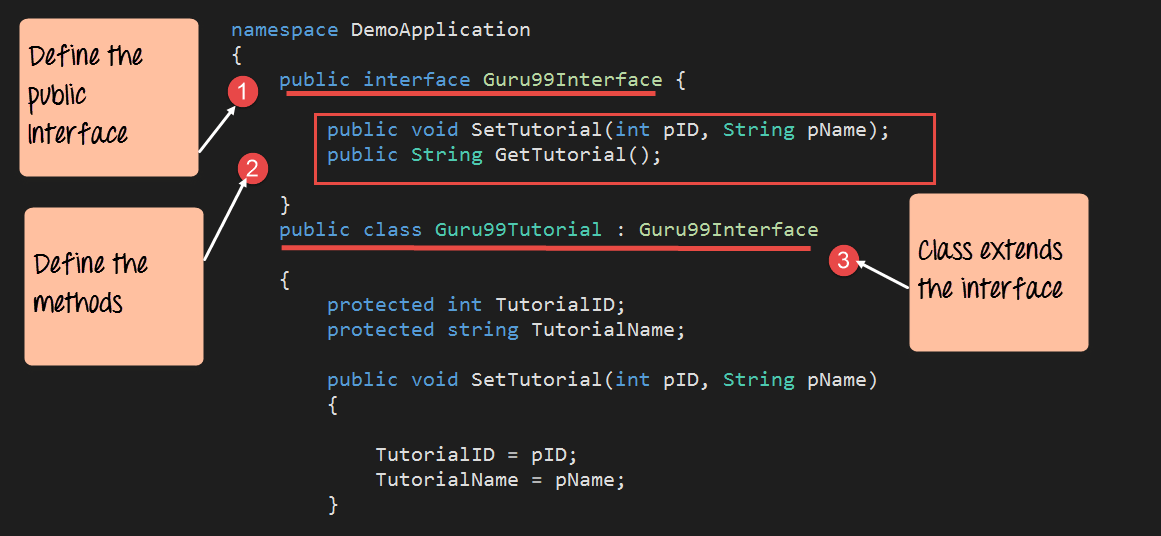
- We first define an interface called “Guru99Interface.” Note that the keyword “interface” is used to define an interface.
- Next, we are defining the methods that will be used by our interface. In this case, we are defining the same methods which are used in all of earlier examples. Note that an interface just declares the methods. It does not define the code in them.
- We then make our Guru99Tutorial class extend the interface. Here is where we write the code that defines the various methods declared in the interface. This sort of coding achieves the following
- It ensures that the class, Guru99Tutorial, only adds the code which is necessary for the methods of “SetTutorial” and “GetTutorial” and nothing else.
- It also ensures that the interface behaves like a contract. The class has to abide by the contract. So if the contract says that it should have two methods called “SetTutorial” and “GetTutorial,” then that is how it should be.
C# Interface vs Abstract Class
A common question for beginners is how a C# interface differs from an abstract class. Both define a contract that other types follow, yet they serve different design goals.
The key differences are listed below:
- Implementation: An interface contains only declarations, while an abstract class can provide both abstract members and fully implemented methods.
- Multiple inheritance: A class can implement many interfaces but can inherit only one abstract class.
- State: An abstract class can hold fields, constructors, and properties with data, whereas an interface cannot store instance state.
- Access modifiers: Abstract class members can be public, protected, or private, while classic interface members are implicitly public.
- Use case: Use an interface to add a capability across unrelated types, and an abstract class to share common code among closely related types.
In short, an interface describes what a class can do, while an abstract class can also define part of how it is done.
How to Implement Multiple Interfaces in C#
Unlike class inheritance, C# allows a single class to implement more than one interface. This is how the language offers a safe form of multiple inheritance without the ambiguity that arises from inheriting several base classes at once.
To implement multiple interfaces, list them after the class name and separate each one with a comma. The class must then define every method declared in each interface it implements.
Step 1) Declare two interfaces, each with its own method.
Step 2) Create a class that implements both interfaces, separating the interface names with a comma.
Step 3) Provide a method body for every member declared in each interface.
The example below shows a Document class that implements both an IReadable and an IWritable interface.
using System;
namespace DemoApplication
{
 interface IReadable
 {
  void Read();
 }
 interface IWritable
 {
  void Write();
 }
 class Document : IReadable, IWritable
 {
  public void Read()
  {
   Console.WriteLine("Reading the document");
  }
  public void Write()
  {
   Console.WriteLine("Writing to the document");
  }
  static void Main(string[] args)
  {
   Document doc = new Document();
   doc.Read();
   doc.Write();
   Console.ReadKey();
  }
 }
}
Code Explanation:-
- We declare two interfaces, IReadable and IWritable. Each interface declares a single method without a body.
- The Document class lists both interfaces after the colon, separated by a comma, so it agrees to honor both contracts.
- The class then defines the Read and Write methods. Skipping either method would cause a compile-time error.
- The Main method creates a Document object and calls both methods, proving the class satisfies the two interfaces.
When the program runs, it prints Reading the document on the first line and Writing to the document on the second line. This pattern keeps each contract small and focused, which makes the Document class easier to test and extend.
Advantages of Using Interfaces in C#
Interfaces are widely used in professional C# projects because they make code flexible and easier to maintain. They let you program to a contract rather than to a concrete class.
The main advantages include:
- Loose coupling: Code depends on the interface, not a specific class, so an implementation can change without breaking the callers.
- Multiple inheritance: A class can inherit behavior from several interfaces, which plain class inheritance does not allow.
- Testability: Interfaces make it simple to swap a real class for a mock object during unit testing.
- Dependency injection: Frameworks inject an interface implementation at run time, a core idea behind the SOLID principles.
- Consistency: Every implementing class is forced to provide the same set of members, which keeps an API predictable.
Because of these benefits, interfaces sit at the heart of most modern C# design patterns and application frameworks.
