
C# Inheritance and Polymorphism with Program Examples
 Editorial Team
⚡ Smart Summary
Inheritance and polymorphism in C# are two core object-oriented principles. Inheritance lets a child class reuse the fields and methods of a parent class, while polymorphism allows one method name to take many forms.
What is Inheritance in C#?
Inheritance is an important concept of C#. Inheritance is a concept in which you define parent classes and child classes. The child classes inherit methods and properties of the parent class, but at the same time, they can also modify the behavior of the methods if required. The child class can also define methods of its own if required.
Let’s get a better understanding of C# Inheritance by a Program Example:
C# Inheritance Example
Let’s now see how we can incorporate the concept of inheritance in our code.
Step 1) The first step is to change the code for our Tutorial class. In this step, we add the below code to the Tutorial.cs file.
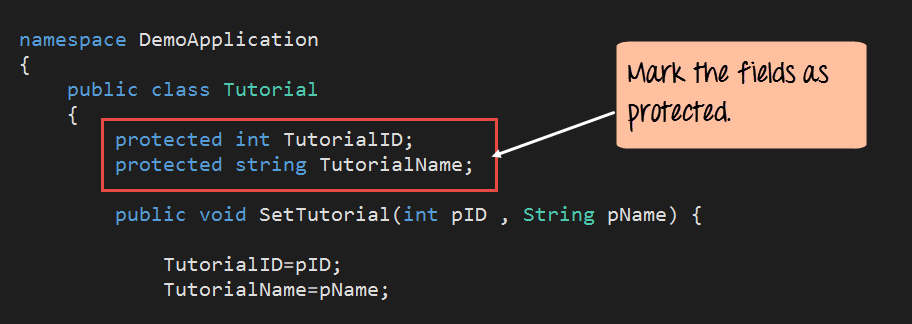
Note that we need to now add the access modifier of ‘protected’ to both the TutorialID and TutorialName field.
Remember we had mentioned this access modifier in the Access Modifier tutorial. Well here you can see the purpose of having this. Only when you have this access modifier (protected), the child class be able to use the fields of the parent class.
Step 2) The second step is to add our new child class. The name of this class will be “Guru99Tutorial”. In this step, we add the below code to the Tutorial.cs file. The code should be placed after the Tutorial class definition.

Code Explanation:-
- The first step is to create the Guru99Tutorial child class. We also need to mention that this class is going to be a child class of the Tutorial class. This is done by the ‘:’ keyword.
- Next, we are defining a method called RenameTutorial. It will be used to rename the TutorialName field. This method accepts a string variable which contains the new name of the Tutorial.
- We then assigned the parameter pNewName to the TutorialName field. Note: – Even though we have not defined the TutorialName field in the “Guru99Tutorial” class, we are still able to access this field. This is because of the fact that “Guru99Tutorial” is a child class of Tutorial class. And because we made the fields of the Tutorial class as protected, they can be accessed by this class.
Step 3) The last step is to modify our main Program.cs file. In our console application, we are going to make an object of the Guru99Tutorial class. With this object, we are going to call the RenameTutorial method. We are then going to display the TutorialName field with the help of the GetTutorial method.

using System;
using System.Collections.Generic;
using System.Linq;
using System.Text;
using System.Threading.Tasks;
namespace DemoApplication
{
 public class Tutorial
 {
  protected int TutorialID;
  protected string TutorialName;

  public void SetTutorial(int pID,string pName)
  {
   TutorialID=pID;
   TutorialName=pName;
  }

  public String GetTutorial()
  {
   return TutorialName;
  }
 }
  public class Guru99Tutorial:Tutorial
  {
   public void RenameTutorial(String pNewName)
   {
    TutorialName=pNewName;
   }

  static void Main(string[] args)
  {
   Guru99Tutorial pTutor=new Guru99Tutorial();

   pTutor.RenameTutorial(".Net by Guru99");

   Console.WriteLine(pTutor.GetTutorial());

   Console.ReadKey();
  }
 }
}
Code Explanation:-
- The first step is to create an object for the Guru99Tutorial class. This is done via the ‘new’ keyword. Note that this time we are not creating an object of the Tutorial class.
- We use the RenameTutorial method of the Guru99Tutorial class to change the TutorialName field. We pass the string “.Net by Guru99” to the RenameTutorial method.
- We then call the GetTutorial method. Note that even though this method is not defined in the Guru99Tutorial class, we are still able to access this method. The output of the GetTutorial method is then displayed to the console via the Console.WriteLine method.
If the above code is entered properly and the program is executed successfully, the following output will be displayed.
Output:

From the output, we can clearly see that the TutorialName field was renamed to “.Net by Guru99”. This was made possible of the RenameTutorial method called by the child class.
What is Polymorphism in C#?
Polymorphism in C# is an OOPs concept where one name can have many forms. For example, you have a smartphone for communication. The communication mode you choose could be anything. It can be a call, a text message, a picture message, mail, etc. So, the goal is common, that is, communication, but their approach is different. This is called Polymorphism.
You will get a better understanding of C# Polymorphism by the below Program Example:
C# Polymorphism Example
Let’s now see, how we can incorporate the concept of Polymorphism in our code.
Step 1) The first step is to change the code for our Tutorial class. In this step, we add the below code to the Tutorial.cs file.

Code Explanation:-
1 & 2) The first step is the same as in our earlier examples. We are keeping the definition of the SetTutorial method as it is.
3) This method sets the TutorialID and the TutorialName based on the parameters pID and pName.
4) This is where we make a change to our class wherein we add a new method with the same name of SetTutorial. Only this time we are only passing one parameter which is the pName. In this method, we are just setting the field of TutorialName to pName.
Step 2) The last step is to modify our main Program.cs file. In our console application, we are going to make an object of the Guru99Tutorial class.

using System;
using System.Collections.Generic;
using System.Linq;
using System.Text;
using System.Threading.Tasks;
namespace DemoApplication
{
 class Tutorial
 {
  public int TutorialID;
  public string TutorialName;

  public void SetTutorial(int pID,string pName)
  {
   TutorialID=pID;
   TutorialName=pName;
  }
  public void SetTutorial(string pName)
  {
   TutorialName=pName;
  }
  public String GetTutorial()
  {
   return TutorialName;
  }

  static void Main(string[] args)
  {
   Tutorial pTutor=new Tutorial();

   pTutor.SetTutorial(1,"First Tutorial");
   Console.WriteLine(pTutor.GetTutorial());

   pTutor.SetTutorial("Second Tutorial");
   Console.WriteLine(pTutor.GetTutorial());

   Console.ReadKey();
  }
 }
}
Code Explanation:-
- In the first step, we are using the SetTutorial method with 2 parameters. Where we are passing both the TutorialID and TutorialName to this method.
- In the second step, we are now calling the SetTutorial method with just one parameter. We are just passing the TutorialName to this method.
If the above code is entered properly and the program is run the following output will be displayed. If in case you wanted to also fetch the Tutorial ID along with the Tutorial Name , you should follow the below step
- Create a separate method called public int GetTutorialID
- In that method write the code line “return TutorialID.” This can be used to return the TutorialID to the calling program.
Output:

From the output, we can clearly see that both methods were called successfully. Because of this, the strings “First Tutorial” and “Second Tutorial” were sent to the console.
