
C# Array Tutorial: Create, Declare, Initialize
 Editorial Team
⚡ Smart Summary
C# arrays store a fixed-size collection of elements that share the same data type under one variable name. Each element sits at a zero-based index, so declaring, initializing, and accessing values stays fast and predictable.
What is an Arrays in C#?
An array is used to store a collection or series of elements. These elements will be of the same type.
So for example, if you had an array of Integer values, the array could be a collection of values such as [1, 2, 3, 4]. Here the number of elements in the array is 4.
Arrays are useful when you want to store a collection of values of the same type. So instead of declaring a variable for every element, you can just declare one variable.
This variable will point to an array or list of elements, which will be responsible for storing the elements of the array.
Let’s look at how we can work with arrays in C#. In our example, we will declare an array of Integers and work with them accordingly.
Note that all of the below code is being made to the Program.cs file.
Step 1) Declaring an array – The first step is to declare an array. Let’s see how we can achieve this by the below code example.

Code Explanation:-
- The first part is the datatype. It specifies the type of elements used in the array. So in our case, we are creating an array of Integers.
- The second part [ ], which specifies the rank of the array. (The rank is a placeholder which specifies the number of elements the array will contain)
- Next is the Name of the array which in our case is ‘values’. Note you see a green squiggly underline, don’t worry about that. That is just .Net saying that you have declared an array, but not using it anywhere.
Step 2) The next step is to initialize the array. Here we are going to specify the number of values the array will hold. We are also going to assign values to each element of the array.
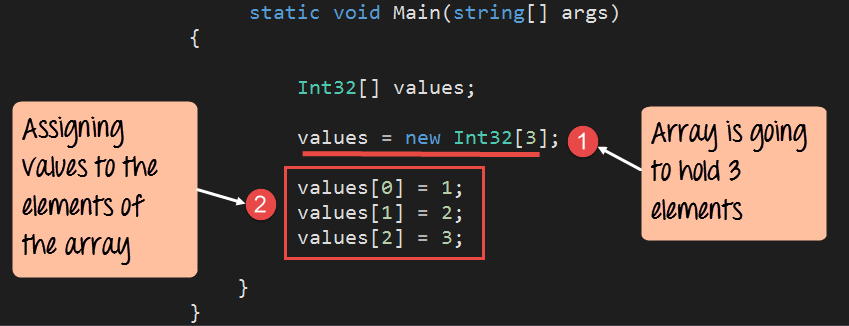
Code Explanation:-
- First, we are setting the number of elements the array will hold to 3. So in the square brackets, we are saying that the array will hold 3 elements.
- Then we are assigning values to each element of the array. We can do this by specifying the variable name + the index position in the array. So values[0] means that we are storing a value in the first position of the array. Similarly to access the second position, we use the notation of values[1] and so on and so forth.
Note: – In Arrays, the index position starts from 0.
Step 3) Let’s now display the individual elements of the array in the Console. Let’s add the below code to achieve this.

using System;
using System.Collections.Generic;
using System.Linq;
using System.Text;
using System.Threading.Tasks;
namespace DemoApplication
{
 class Program
 {
  static void Main(string[] args)
  {
   Int32[] value;
   value=new Int32[3];

   value[0]=1;
   value[1]=2;
   value[2]=3;

   Console.WriteLine(value[0]);
   Console.WriteLine(value[1]);
   Console.WriteLine(value[2]);

   Console.ReadKey();
  }
 }
}
Code Explanation:-
This is the simple part wherein we just use the Console.WriteLine method to send each value of the element to the console.
Note that again, we are accessing each element with the help of the array variable name along with the index position.
If the above code is entered properly and the program is executed, the following output will be displayed.
Output:

From the output, you can see all the values of the array being displayed in the Console.
How to Loop Through a C# Array Using foreach
Reading each element by its index works, but it becomes tedious when an array holds many values. The foreach loop offers a cleaner way to visit every element of an array in order without tracking an index variable yourself.
The foreach statement takes each item from the array one at a time and copies it into a loop variable. You then use that variable inside the loop body. Because the loop stops automatically at the last element, foreach removes the risk of reading past the end of the array.
using System;
namespace DemoApplication
{
 class Program
 {
  static void Main(string[] args)
  {
   Int32[] values = new Int32[3] {1, 2, 3};
   foreach (Int32 item in values)
   {
    Console.WriteLine(item);
   }
   Console.ReadKey();
  }
 }
}
The example above declares and initializes an array of three integers, then walks through it with foreach. On each pass the variable item receives the next value, and Console.WriteLine prints it. The output is the numbers 1, 2, and 3 on separate lines.
Key points to remember about foreach with arrays:
- The loop variable is read-only, so foreach is best for reading values rather than changing them in place.
- To modify elements while looping, use a for loop with an index instead.
- foreach works with single-dimensional arrays, multidimensional arrays, and any collection that supports iteration.
C# Multidimensional Arrays
The arrays shown so far are single-dimensional, meaning they store a simple list of values. C# also supports multidimensional arrays, which arrange elements in a grid of rows and columns. A two-dimensional array is the most common form and suits data such as matrices, game boards, and tables.
You declare a two-dimensional array by placing a comma inside the square brackets. Each extra comma adds another dimension, so int[,] is two-dimensional and int[,,] is three-dimensional. Elements are then reached with one index per dimension.
using System;
namespace DemoApplication
{
 class Program
 {
  static void Main(string[] args)
  {
   int[,] matrix = new int[2, 2] { {1, 2}, {3, 4} };
   Console.WriteLine(matrix[0, 0]);
   Console.WriteLine(matrix[1, 1]);
   Console.ReadKey();
  }
 }
}
Here the array matrix holds two rows and two columns. The element matrix[0, 0] returns 1, and matrix[1, 1] returns 4. The number of dimensions is fixed when the array is declared, while the size of each dimension is set when the array is created.
C# Jagged Arrays
A jagged array is an array whose elements are themselves arrays. Unlike a rectangular multidimensional array, each inner array can have a different length, which is why a jagged array is often called an array of arrays. This flexibility helps when rows naturally hold different numbers of values.
You declare a jagged array with two sets of square brackets, then create each inner array separately. The following example builds a jagged array where the first row holds three values and the second row holds two.
using System;
namespace DemoApplication
{
 class Program
 {
  static void Main(string[] args)
  {
   int[][] jagged = new int[2][];
   jagged[0] = new int[] {1, 2, 3};
   jagged[1] = new int[] {4, 5};
   Console.WriteLine(jagged[0][2]);
   Console.WriteLine(jagged[1][1]);
   Console.ReadKey();
  }
 }
}
The expression jagged[0][2] reads the third element of the first row, which is 3, and jagged[1][1] reads the second element of the second row, which is 5. Because each row is a separate array, jagged arrays use memory efficiently when row lengths vary, though they need an extra step to initialize every inner array.
