
Array of Objects in Java
 Editorial Team
⚡ Smart Summary
Array of Objects in Java stores object references in a fixed-size contiguous slot, letting a single variable hold many instances of a class and access each one through an index for iteration, mutation, and passing to methods.

What is an Array of Objects in Java?
A Java array of objects stores multiple object instances of the same class in a single fixed-size container. Unlike a primitive array that stores values such as int, double, or boolean directly in each slot, an array of objects stores references. Every slot points to the memory location of an object, and the object itself lives on the Java heap.
This layout matches how any object variable in Java works. The array simply groups several object references together so you can access them by index. It is the natural choice when the number of objects is known upfront and does not change during the program’s lifetime.
Syntax
ClassName[] obj = new ClassName[array_length];
The right side allocates space for array_length references, all initialised to null. No object of ClassName exists yet, only the container that can hold references to such objects.
How to Create an Array of Objects in Java
Creating a working array of objects always takes two allocation steps. The first allocates the reference container, and the second allocates each object that the container will point to. Skipping the second step is the single most common source of NullPointerException in beginner Java code.
Step 1) Open your code editor and copy the following code:
class ObjectArray {
    public static void main(String args[]) {
        Account obj[] = new Account[2];
        // obj[0] = new Account();
        // obj[1] = new Account();
        obj[0].setData(1, 2);
        obj[1].setData(3, 4);
        System.out.println("For Array Element 0");
        obj[0].showData();
        System.out.println("For Array Element 1");
        obj[1].showData();
    }
}

class Account {
    int a;
    int b;

    public void setData(int c, int d) {
        a = c;
        b = d;
    }

    public void showData() {
        System.out.println("Value of a = " + a);
        System.out.println("Value of b = " + b);
    }
}
Step 2) Save the file as ObjectArray.java, then compile and run it.
Step 3) Note the error. Try to debug it before continuing to Step 4.
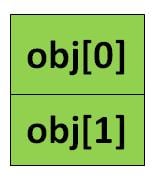
Step 4) Inspect the line Account obj[] = new Account[2];. It allocates an array of two reference variables of type Account, but it does not allocate any Account objects. Both slots hold null, and calling obj[0].setData(...) on a null reference throws a NullPointerException at runtime.
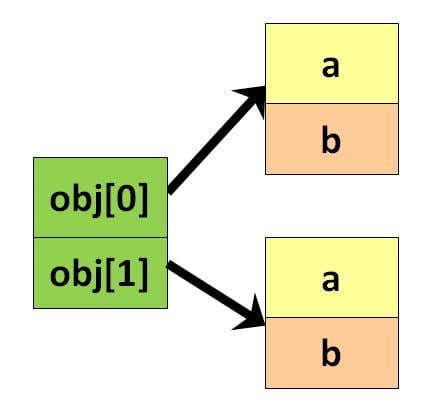
Step 5) Uncomment lines 4 and 5. These two lines create real Account objects and assign them to obj[0] and obj[1]. The array now holds real references, and the code runs cleanly.
Output:
For Array Element 0
Value of a = 1
Value of b = 2
For Array Element 1
Value of a = 3
Value of b = 4
How to Initialize an Array of Objects in Java
Beyond the setter-based initialisation shown above, an array of objects can be initialised in three cleaner ways. Each style trades verbosity for clarity, so pick the one that best matches the situation.
- Loop initialisation — allocate the array, then walk each index and assign a fresh object. This is the standard pattern for large arrays or when the object count is dynamic.
- Constructor initialisation — pass values directly to the constructor at creation time so no separate setter call is needed.
- Array literal initialisation — declare and populate in a single statement with an inline
{ ... }initialiser, ideal for small fixed sets.
class Account {
    int a, b;

    public Account(int a, int b) {   // constructor
        this.a = a;
        this.b = b;
    }
}

public class InitDemo {
    public static void main(String[] args) {

        // 1) Loop initialisation
        Account[] loopArr = new Account[3];
        for (int i = 0; i < loopArr.length; i++) {
            loopArr[i] = new Account(i, i * 10);
        }

        // 2) Constructor initialisation, one slot at a time
        Account[] ctorArr = new Account[2];
        ctorArr[0] = new Account(1, 2);
        ctorArr[1] = new Account(3, 4);

        // 3) Array literal initialisation
        Account[] litArr = {
            new Account(5, 6),
            new Account(7, 8),
            new Account(9, 10)
        };

        System.out.println("loop size   = " + loopArr.length);
        System.out.println("ctor size   = " + ctorArr.length);
        System.out.println("literal size= " + litArr.length);
    }
}
Loop initialisation is the safest default because it guarantees no slot is left null. Constructor initialisation makes intent explicit when each object needs different arguments, and array literals keep small demo code compact. Do not mix styles inside the same array unless you have a reason: consistency makes bugs easier to spot.
Iterating and Accessing Elements in a Java Array of Objects
Once an array of objects is populated, three patterns cover almost every access need. Choose the loop style that matches how much control the code needs over the index.
Classic for loop gives access to the index, which is useful for replacing elements, comparing neighbours, or iterating a subrange.
for (int i = 0; i < obj.length; i++) {
    System.out.println("Element " + i);
    obj[i].showData();
}
Enhanced for loop (the “for-each” loop) hides the index and reads more naturally when the index is not needed:
for (Account acc : obj) {
    acc.showData();
}
Streams (Java 8 and later) convert the array into a pipeline, which is handy for filtering, mapping, or aggregating without writing a loop:
import java.util.Arrays;

Arrays.stream(obj)
      .filter(acc -> acc.a > 0)
      .forEach(Account::showData);
To read or update a single element, use direct index access, for example obj[1].setData(10, 20). Always check the length first with obj.length to avoid ArrayIndexOutOfBoundsException. When any slot could be null, guard the access with a null check or an Optional to keep the program running instead of crashing.
Array of Objects vs ArrayList of Objects in Java
A plain array of objects is fast and predictable, but its fixed size becomes a limitation as soon as the object count changes at runtime. Java’s Collections framework provides ArrayList as the dynamic alternative. The table below highlights when each choice is appropriate.
| Feature | Array of Objects | ArrayList of Objects |
|---|---|---|
| Size | Fixed at creation | Grows and shrinks automatically |
| Declaration | Account[] a = new Account[5]; | List<Account> list = new ArrayList<>(); |
| Access element | a[i] | list.get(i) |
| Add element | Not supported after creation | list.add(obj) |
| Type safety | Compile-time typed by declaration | Generics enforced at compile time |
| Performance | Marginally faster indexed reads | Amortised O(1) add, some overhead per element |
| Preferred when | Size is known and fixed | Size is unknown or changes at runtime |
Use an array when a tight memory footprint and predictable indexing matter, for example in matrix layouts or performance-critical hot paths. Reach for ArrayList in most everyday application code, because the ability to add and remove without reallocation outweighs the small per-element overhead.
