
Apache Oozie Tutorial: Workflow Diagram, Scheduler
 Prafulla Ranadive
⚡ Smart Summary
Apache Oozie is the workflow scheduler for Hadoop that runs dependent jobs as Directed Acyclic Graphs, combining a workflow engine for MapReduce, Pig and Hive actions with a coordinator engine driven by time and data availability.

What is Apache Oozie?
Apache Oozie is a workflow scheduler for Hadoop. It is a system which runs the workflow of dependent jobs. Here, users are permitted to create Directed Acyclic Graphs of workflows, which can be run in parallel and sequentially in Hadoop.
It consists of two parts:
- Workflow engine: The responsibility of a workflow engine is to store and run workflows composed of Hadoop jobs, e.g., MapReduce, Pig, Hive.
- Coordinator engine: It runs workflow jobs based on predefined schedules and availability of data.
Oozie is scalable and can manage the timely execution of thousands of workflows (each consisting of dozens of jobs) in a Hadoop cluster. The diagram below shows where the scheduler sits in relation to the cluster and the jobs it drives.

Oozie is very flexible as well. One can easily start, stop, suspend and rerun jobs. Oozie makes it very easy to rerun failed workflows. One can easily understand how difficult it can be to catch up on missed or failed jobs due to downtime or failure. It is even possible to skip a specific failed node.
Project status: Apache Oozie was retired by the Apache Software Foundation in February 2025 and the move to the Apache Attic completed in April 2025. The final release remains 5.2.1 from February 2021, and the source repository is now read-only. Existing clusters still run it, which is why the mechanics below are worth knowing, but new pipelines are normally built on Apache Airflow.
How does Oozie work?
Oozie runs as a service in the cluster, and clients submit workflow definitions for immediate or later processing.
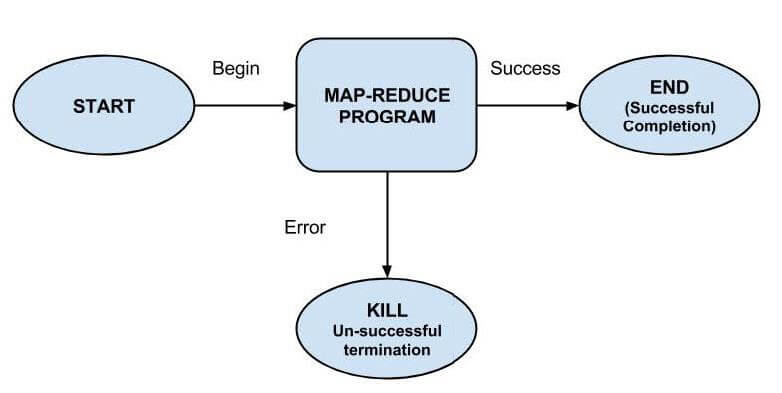
An Oozie workflow consists of action nodes and control-flow nodes.
An action node represents a workflow task, e.g., moving files into HDFS, running a MapReduce, Pig or Hive job, importing data using Sqoop, or running a shell script or a program written in Java.
A control-flow node controls the workflow execution between actions by allowing constructs like conditional logic, wherein different branches may be followed depending on the result of an earlier action node.
Start Node, End Node, and Error Node fall under this category of nodes.
- Start Node designates the start of the workflow job.
- End Node signals the end of the job.
- Error Node designates the occurrence of an error and the corresponding error message to be printed.
At the end of execution of a workflow, an HTTP callback is used by Oozie to update the client with the workflow status. Entry to or exit from an action node may also trigger the callback.
Oozie Control Nodes and Action Types
Beyond start, end and error, the workflow XML supports a small vocabulary of control nodes that shape the graph.
- decision: Evaluates an expression and sends the workflow down one of several branches, the equivalent of a switch statement.
- fork: Splits the path so two or more actions run in parallel.
- join: Waits for every branch of a matching fork to finish before continuing.
- kill: Terminates the workflow immediately and records the failure message.
Action nodes cover the work itself, and each has its own XML element:
- map-reduce, pig, hive and sqoop actions launch the corresponding Hadoop job.
- java runs a main class on the cluster; shell and ssh run scripts.
- fs performs HDFS housekeeping such as move, delete, mkdir and chmod.
- email notifies recipients, and sub-workflow calls another workflow application.
Example Workflow Diagram
The diagram below traces a small workflow from its start node, through a MapReduce action, to either the end node or the error path when the action fails.
Types of Oozie Jobs
Oozie describes work at three levels. Each layer wraps the one below it, so a bundle ultimately controls many individual workflows.
| Job type | What it defines | Triggered by |
|---|---|---|
| Workflow | A Directed Acyclic Graph of action and control nodes, written in workflow.xml | Manual submission, or a coordinator |
| Coordinator | A recurring schedule for one workflow, with a start time, end time and frequency | Clock time and input data availability |
| Bundle | A collection of coordinator applications managed together as one data pipeline | A kick-off time applied to all its coordinators |
The distinction matters in practice: a workflow answers “what runs”, a coordinator answers “when it runs”, and a bundle answers “what starts and stops together”.
Packaging and Deploying an Oozie Workflow Application
A workflow application consists of the workflow definition and all the associated resources such as MapReduce Jar files, Pig scripts etc. Applications need to follow a simple directory structure and are deployed to HDFS so that Oozie can access them.
An example directory structure is shown below:
<name of workflow>/
├── lib/
│   └── hadoop-examples.jar
└── workflow.xml
It is necessary to keep workflow.xml (a workflow definition file) in the top level directory (the parent directory carrying the workflow name). The lib directory contains Jar files containing MapReduce classes. A workflow application conforming to this layout can be built with any build tool, e.g., Ant or Maven.
Such a build needs to be copied to HDFS using a command, for example:
% hadoop fs -put hadoop-examples/target/<name of workflow dir> name of workflow
Steps for Running an Oozie Workflow Job
In this section, we will see how to run a workflow job. To run this, we will use the Oozie command-line tool (a client program which communicates with the Oozie server).
1. Export the OOZIE_URL environment variable, which tells the oozie command which Oozie server to use (here we are using one running locally):
% export OOZIE_URL="http://localhost:11000/oozie"
2. Run the workflow job using:
% oozie job -config ch05/src/main/resources/max-temp-workflow.properties -run
The -config option refers to a local Java properties file containing definitions for the parameters in the workflow XML file, as well as oozie.wf.application.path, which tells Oozie the location of the workflow application in HDFS.
Example contents of the properties file:
nameNode=hdfs://localhost:8020
jobTracker=localhost:8021
oozie.wf.application.path=${nameNode}/user/${user.name}/<name of workflow>
3. Get the status of the workflow job.
The status of a workflow job can be seen using the subcommand ‘job’ with the ‘-info’ option, specifying the job id after ‘-info’.
e.g., % oozie job -info <job id>
The output shows a status which is one of RUNNING, KILLED or SUCCEEDED.
4. Results of successful workflow execution can be seen using a Hadoop command like:
% hadoop fs -cat <location of result>
Why use Oozie?
The main purpose of using Oozie is to manage different types of jobs being processed in a Hadoop system.
Dependencies between jobs are specified by a user in the form of Directed Acyclic Graphs. Oozie consumes this information and takes care of their execution in the correct order as specified in a workflow. That way, the user’s time to manage a complete workflow is saved. In addition, Oozie has a provision to specify the frequency of execution of a particular job.
Features of Oozie
- Oozie has a client API and a command line interface which can be used to launch, control and monitor jobs from a Java application.
- Using its Web Service APIs, one can control jobs from anywhere.
- Oozie has a provision to execute jobs which are scheduled to run periodically.
- Oozie has a provision to send email notifications upon completion of jobs.
Oozie vs Apache Airflow
Because Oozie is retired, most teams evaluating a scheduler today compare what they already run against Apache Airflow. The two tools solve the same problem from opposite directions.
| Aspect | Apache Oozie | Apache Airflow |
|---|---|---|
| Definition language | Workflows written as XML | DAGs written as Python code |
| Scope | Built around Hadoop actions such as MapReduce, Pig, Hive and Sqoop | General purpose, with operators for cloud services, databases and containers |
| Scheduling | Coordinator jobs driven by time and data availability | Schedule intervals plus sensors that wait on external conditions |
| Project status | Retired to the Apache Attic in 2025; final release 5.2.1 | Actively developed Apache top level project |
Oozie remains the simpler option on a cluster that already runs it, because the actions map one-to-one onto Hadoop components. Airflow is the practical choice for anything new, particularly where a pipeline reaches beyond Hadoop.
