
SAP Item Category Determination: VOV4, VOV7
 Editorial Team
⚡ Smart Summary
Item Category Determination controls how each line item behaves within a sales document, defining whether the item is relevant for billing, pricing, or delivery based on the sales document type and material, configured through transactions VOV7 and VOV4.
What is Item Category?
An item category defines how a line item behaves in sales transaction.
SAP Uses Item category to process a material differently in each sales document type.
e.g.
AFX – It is inquiry Item category, it is not relevant for billing.
AGX – It is quotation Item category, it is not relevant for billing.
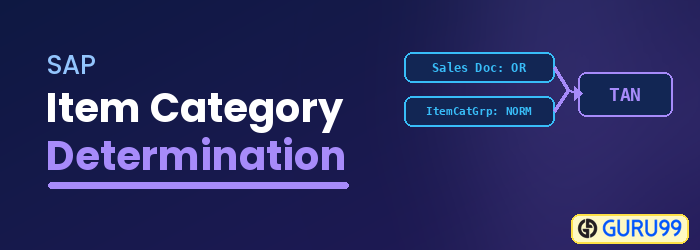
TAN – It is standard Item category, it is relevant for billing.
T-code for Define Item category is VOV7.
Step 1)
- Enter Tcode VOV7 in Command Bar.
- List of Item Category including SAP and User Define Item category.
- Click on New Entries
 Button, for create Item Category.
 Button, for create Item Category.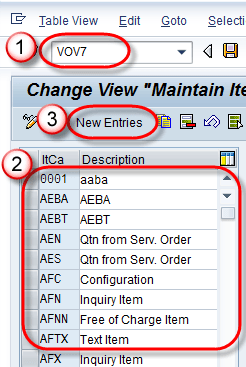
Step 2) While you create new Item category, following sections could be filled.
- Business Data (billing / pricing etc. information).
- General Control (It determine automatic batch, rounding permission and order quantity to 1 or not).
- Transaction Flow ( Item screen detail ).
- Bill of Material (used for variant configuration).
- Value Contract (for value contract).
- Service Management (service scenario).
- Control of resource (resource related billing scenario).
We will enter data in Business Data Section.

Step 3)
1. We are going to create YTA2 (Standard item category)
2. Enter Billing Relevance / Pricing. Check
- Business Item
- Sched. Line Allowed
- Wght
- Vol. Relevant
- Credit Active
- Determine Cost.

Step 4) Click On Save Button.
A Message “Data Was saved” Displayed.

Item Category Determination
Once item categories exist, SAP must decide which one applies to each line item. Item category controls the item behavior, e.g. Item category define that item is relevant for Billing or Pricing.
The item category in the sales document depends on the sales document type and the material.
Item Category Determination is done by T-code – VOV4. There are Many Standard Item Categories provide by SAP, Some of them is below-
| Item Categories | Description |
|---|---|
| TAN | Standard Item |
| TAB | Individual Purchase Order |
| TAS | Third Party Item |
| TAD | Service |
| TATX | Text Item |
| TANN | Free Of Charge |
| AFX | Inquiry Item |
| AGX | Quotation Item |
Step 1)
- Enter T-code VOV4 in Command Field.
- A list of existing item category displayed.
- To Create a New item category click on New Entries
 Button.
 Button.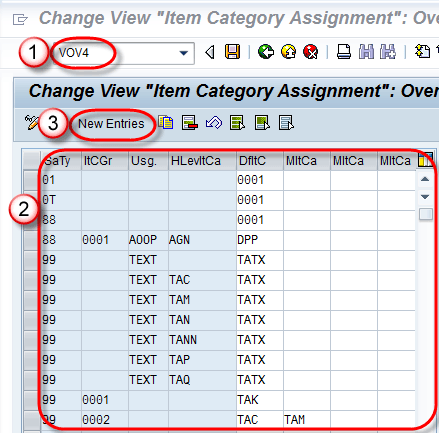
Step 2)
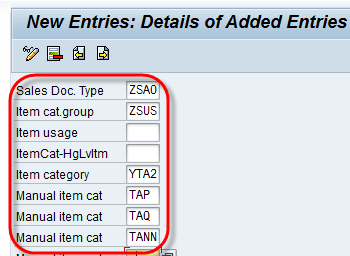
To Create New Item Category, Enter following data –
- Sales Doc. type.
- Item cat. group.
- Item category (Default item category, this can be overridden with manual item category value).
- Manual item category (if business demands, we can add manual item category to override default item category).
Note: Default item category will be picked up automatically for sales document type in which it’s define. Manual Item Category can be used in place of default item category OR we can replace default item category in sales document with allowed manual item category. e.g. Default item category ( YTA2) can be replaced with Manual item category (TAP,TAQ,TANN).
Step 3) Click on Save  Button.
A Message “Data Was Saved” displayed as below –

