
SAP FI01: How to Create a BANK KEY
 Kaelyn Flynn
⚡ Smart Summary
SAP FI01 Bank Key creation registers a bank’s identifying details within the system so that house banks, vendor accounts, and employee bank data can reference it. This master record stores the bank country, SWIFT code, address, and branch information.

In this tutorial, you will learn how to create a Bank Key in SAP using transaction code FI01. Before running the steps, it helps to understand what a bank key is and why it is required across SAP Financial Accounting and Payroll.
What is a Bank Key in SAP?
A bank key in SAP is a unique identifier that represents a bank within the system. It stores the essential master data of a bank, such as the bank name, country, address, SWIFT/BIC code, and branch details. Every bank that a company deals with — whether for making payments, receiving collections, or processing employee salaries — must first exist as a bank key.
The bank key acts as a reference point across multiple SAP modules. In Financial Accounting (FI), it links to house banks and to vendor or customer bank details. In SAP HR and Payroll, it connects to the employee bank information used during bank transfers and DME processing.
Because the bank key centralizes bank data in one master record, it removes the need to re-enter bank details repeatedly. It also ensures consistency and accuracy, since every transaction that references a bank pulls the same validated information. The transaction code used to create a bank key is FI01.
Procedure to Create a Bank Key in SAP
Step 1) Enter FI01 into the SAP transaction code box.

Step 2) In the next SAP Screen:
- Enter the Bank Country.
- Enter the new Bank Key.
- Click the Enter Button.

Step 3) In the next SAP screen, under the Address section:
- Enter the Bank’s name.
- Select the appropriate region.
- Enter the bank’s street address.
- Enter the Bank’s city.
- Enter the appropriate branch name.
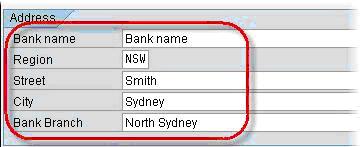
Step 4) In the control data section:
- Enter the bank’s SWIFT code.
- Enter the bank’s group.
- Tick the Post. Bank Acct checkbox.

Step 5) Click Save. A new Bank Key is created.
Benefits of Maintaining Bank Keys in SAP
Maintaining accurate bank keys in SAP provides several benefits for finance and payroll operations:
- Centralized bank data: All bank details are stored in a single master record, so they only need to be entered once and can be reused everywhere.
- Accurate payments: Payment programs and DME files rely on the bank key for correct routing, reducing the risk of failed or misdirected transfers.
- Consistency across modules: The same bank key is referenced by house banks, vendors, customers, and employee bank details, keeping data uniform.
- Regulatory compliance: Storing the SWIFT/BIC code and country-specific data helps ensure that transfers meet international and local banking standards.
- Easier maintenance: If a bank changes its address or details, the update is made once in the bank key and reflected across all linked records.
By keeping bank keys current, organizations reduce payment errors, speed up reconciliation, and maintain a reliable foundation for all bank-related transactions in SAP.
