
How To Create Credit Memo in SAP
 Jessica Blake
⚡ Smart Summary
Credit memo creation in SAP raises a credit memo request that refunds or reduces a customer’s charge during complaint processing. This resource explains what a credit memo is, how it differs from a debit memo, and how to create one.

What is Credit Memo?
A credit memo is a document that reduces the amount a customer owes. In SAP Sales and Distribution, the process begins with a credit memo request, which is a sales document used in complaint processing to request credit for a customer. When the request is billed, it becomes a credit memo that lowers the customer’s receivable.
Below are some situations in which a credit memo is issued:
- The price calculated for the customer is not correct — for example, a discount was not included in the sales document.
- The quantity is not correct in the sales document.
To keep control, the credit memo request can be held with a billing block, so that it is checked and approved before any credit reaches the customer. Only after approval, when the block is removed, is the request billed. This makes the credit memo a controlled way to correct an overcharge without changing the original invoice, and it records the reason for the credit for later audit. The transaction code used is VA01 with the credit memo request order type.
Credit Memo vs Debit Memo in SAP
Credit memos and debit memos are opposite corrections in SAP billing. Both adjust an amount after the original invoice, but they move the customer’s balance in different directions, so it is important to choose the right one.
| Basis of comparison | Credit memo | Debit memo |
|---|---|---|
| Effect on customer | Refunds or reduces the charge | Charges the customer more |
| Typical reason | Overcharge, missed discount, or return | Undercharge or missed charge |
| Request order type | Credit Memo Request (G2) | Debit Memo Request (L2) |
| Created in | VA01 | VA01 |
| Result of billing | Decreases the receivable | Increases the receivable |
In short, use a credit memo when the customer should pay less, and a debit memo when the customer should pay more. Both are created in VA01 with the matching request order type and then billed. In accounting terms, a credit memo posts a reduction to the customer account, while a debit memo posts an additional charge, so both can be traced back to the invoice they correct.
Steps to Create Credit Memo
Follow these steps to create a credit memo request in transaction VA01, with reference to a sales order.
Step 1) Enter the T-code and header data.
- Enter T-code VA01 in the command field.
- Enter the order type value as “Credit Memo Request”.
- Enter the Sales Organization, Distribution Channel, and Division in the Organizational Data.
- Click on the “Create with Reference” button.
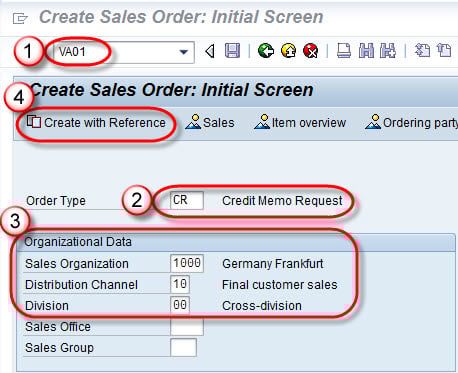
Step 2) Copy from the reference document.
- Enter the order number in the Order tab of the pop-up.
- Click on the Copy button.
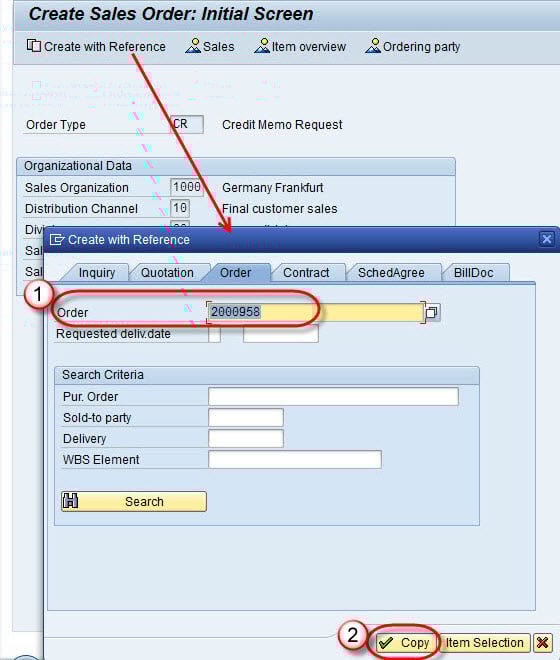
Step 3) Complete the credit memo request.
- Enter the Billing Block, Pricing Date, Order Reason, and Billing Date in the sales tab.
- Enter the Material and the Target Quantity for which you want to create the credit memo.
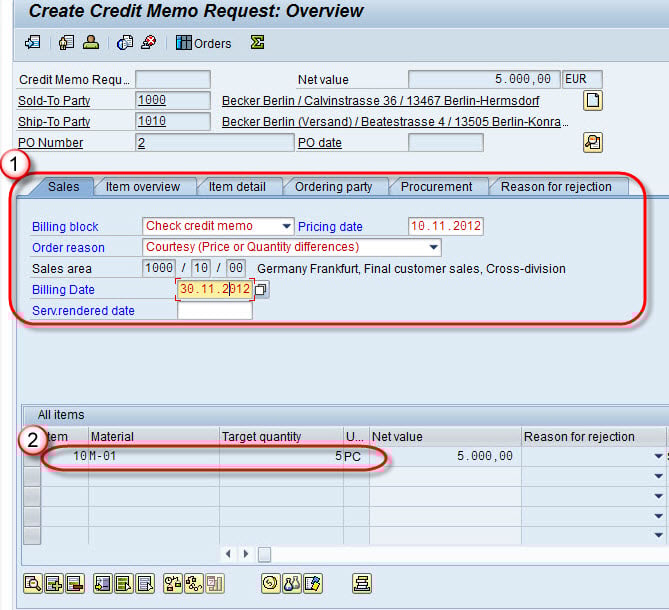
Step 4) Click on the Save  button.
A message “Credit Memo Request 60000189 has been saved” is displayed.

When Is a Credit Memo Used? Common Scenarios
A credit memo is useful whenever a customer needs money back or a lower balance after the original invoice. The most common scenarios include:
- Missed discount: An agreed discount was left out, so the customer was overcharged.
- Wrong quantity: The invoice billed more units than were actually delivered.
- Pricing error: A rate that was too high was applied and must be corrected.
- Returns: The customer returned goods and is owed a credit for them.
- Goodwill or complaint: A credit is granted to resolve a customer complaint.
In each case, the credit memo request captures the amount and the order reason, and a billing block ensures the credit is reviewed before it reaches the customer. Recording the reason on each request also gives the business useful data about why credits are raised, which helps reduce repeat complaints over time.
