
Outline Agreement in SAP MM: Contract & Scheduling
 Olivia Turner
⚡ Smart Summary
Outline Agreement in SAP MM is a long term purchasing arrangement with a vendor. It exists as a contract, covering quantity or value without delivery dates, or as a scheduling agreement carrying a fixed delivery schedule.
What is Outline Agreement?
Outline agreement is a long-term purchase agreement between vendor and customer. Outline agreement are two types:
- Contract
- Scheduling Agreement
Contract The contract is draft agreement, and they do not include delivery dates for the material. Contract is two types:
- Quantity Contract: This contract considered to fulfilled when the company supplied an agreed total quantity of materials against the contract.
- Value Contract: This contract considered to fulfilled when the company supplied agreed total value of material against the contract.
Both forms serve the same purpose: they let a buyer negotiate once and order many times. The difference lies in how the commitment is measured and whether delivery timing is agreed up front, which the comparison below sets out before the creation steps.
Contract vs Scheduling Agreement
Choosing between the two decides how much administration each subsequent delivery costs, so it is worth settling before the agreement is created.
| Parameter | Contract | Scheduling Agreement |
|---|---|---|
| Agreement type | MK quantity, WK value | LP scheduling agreement |
| Create transaction | ME31K | ME31L |
| Delivery dates included | No | Yes, through schedule lines |
| How goods are called off | A release order referencing the contract | Schedule lines maintained in ME38 |
| Documents per delivery | One purchase order each time | None, the schedule line is the trigger |
| Fulfilled when | Target quantity or value is reached | Validity period ends or target is reached |
| Best suited to | Irregular demand at a negotiated price | Regular, predictable supply such as production components |
In short, use a contract when the timing is unknown and a scheduling agreement when it is not. A scheduling agreement removes a purchase order from every delivery, which is why it dominates repetitive manufacturing supply.
Create Quantity Contract
Step 1)
- Enter T-code ME31K in the command field.
- Enter Vendor / Agreement Type (MK- Quantity Contract) / Agreement Date.
- Enter Purchase Org., Purchasing Group in organizational data.

Step 2) Enter Validity End date of contract in header data screen.

Step 3)
- Enter Material, Target quantity (A quantity for which quantity contract being created) and net price
- Click On Save Button.

A message as  will be displayed.
💡 Tip: The target quantity is a ceiling, not a commitment to order. SAP warns when release orders approach it but does not block them, so monitor consumption with ME3L if the agreed volume matters commercially.
Create Scheduling agreement
The scheduling agreement is a long-term purchase agreement with the vendor in which a vendor is bound for supplying of material according to predetermined conditions. Details of the delivery date and quantity communicated to the vendor in the form of the delivery schedule.
Step 1)
- Enter T-code ME31 in command field. In current releases ME31L is the dedicated transaction for scheduling agreements.
- Enter Vendor / Agreement Type (LP- Scheduling agreement) / Agreement Date.
- Enter Purch. Organization / Purchasing group.
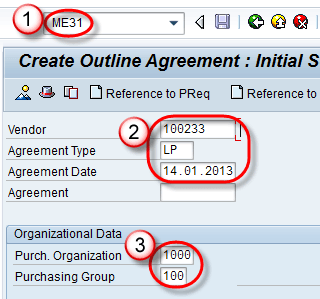
Step 2) Enter Validity End Date in header screen.

Step 3) Enter Material / Target Quantity / Net Price / Plant in Item Overview Screen.

Step 4) Enter Exclusion in next screen.

Step 5) Get back previous screen item overview and click on save button. A message as below –

Release Orders and Delivery Schedules
Creating the agreement is only half the process. Nothing is delivered until quantity is called off against it, and the two agreement types call off in completely different ways.
Calling off against a contract. A contract release order is an ordinary purchase order that references the contract instead of quoting its own price.
- Open ME21N and set the document type to NB.
- Switch the document overview to outline agreements and search for the contract number.
- Adopt the required item. Price, conditions, and vendor are copied from the contract, and only the quantity and delivery date are entered.
- Save. The released quantity is added to the contract, and ME3L shows how much of the target remains.
Calling off against a scheduling agreement. No purchase order is created at all. Delivery is driven by schedule lines maintained directly on the agreement.
- Open ME38 and enter the scheduling agreement and item.
- Enter one line per delivery with a date and a quantity. Dates can be daily, weekly, or monthly depending on the agreed release cycle.
- Save the schedule. Depending on configuration, releases are transmitted to the vendor as a forecast or just-in-time delivery schedule.
- Goods arriving against a schedule line are received with a normal goods receipt, referencing the agreement rather than an order.
This is why a scheduling agreement suits production supply. A hundred deliveries need a hundred purchase orders under a contract, but only a hundred schedule lines on one document under a scheduling agreement. Where the source of supply should default automatically, add the agreement to a source list and mark it as fixed.
Outline Agreement Transaction Codes
Contracts and scheduling agreements each have their own transaction family, following the SAP pattern of 1 to create, 2 to change, and 3 to display.
| Transaction Code | Purpose |
|---|---|
| ME31K / ME32K / ME33K | Create, change, and display a contract |
| ME31L / ME32L / ME33L | Create, change, and display a scheduling agreement |
| ME38 | Maintain the delivery schedule of a scheduling agreement |
| ME39 | Display the delivery schedule |
| ME35K | Release a contract subject to a release strategy |
| ME35L | Release a scheduling agreement |
| ME3L | List outline agreements by vendor |
| ME3M | List outline agreements by material |
| ME3N | List outline agreements by agreement number |
ME3L is the report to run before renegotiating, because it shows target quantity against quantity already released for every agreement with that vendor. Further steps are covered in creating a purchase order with reference and across the SAP MM tutorial series.
