
How to Reverse (Cancel) Goods Receipt MMBE in SAP
 Editorial Team
⚡ Smart Summary
Cancel a Goods Receipt in SAP using transaction MIGO with action A03 Cancellation against the material document. The reversal removes the stock, clears the accounting entry, and reopens the purchase order item.
Why Cancel a Goods Receipt?
A goods receipt cannot be edited once posted. It writes stock, valuation, and purchase order history simultaneously, so the only way to correct a mistake is to reverse the whole document and post it again.
The situations that call for a cancellation are narrow but common:
- Wrong stock type. Material went to quality inspection when it should have gone to unrestricted use, or the reverse. This is the case demonstrated below.
- Wrong quantity. A typing error posted more or less than actually arrived.
- Wrong plant or storage location. The receipt was booked against the wrong site.
- Wrong purchase order. The delivery was matched to a similar order for the same vendor.
- Posting date in the wrong period. The receipt landed in a period that must stay closed.
What a cancellation is not for is returning faulty goods to the supplier. That is a return delivery, which keeps the original receipt on file and creates a separate outbound movement, as the comparison further down explains.
After you have posted the goods receipt in MIGO, you can check stock levels in MMBE transaction code.
- Execute the transaction.
- For the requested material you will be shown stock levels for plants, storage locations and stock types (unrestricted, quality, blocked).
- In the Quality inspection column, you can see that our material is posted there 2 PAL = 24 PCS. We also have unrestricted stock from some of the previous receipts.
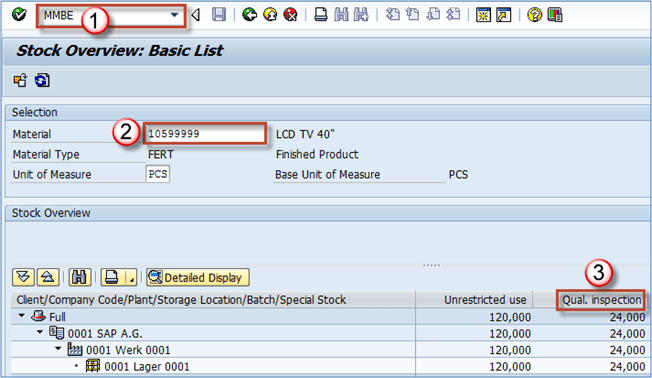
Let’s say that we have made a mistake, we wanted in this special case, our material to be posted directly to unrestricted stock. Therefore, we need to cancel the posting to reverse the process and do it again properly.
We can use MIGO transaction to cancel a posting.
Step by Step Process to Cancel Goods Receipt
Step 1) Choose A03 Cancellation, R02 Material document, enter the material document that has been created after posting the GR (goods receipt) from purchase order. Execute.

Step 2)
- Check the indicator that item is OK.
- Post.

Step 3) Check in MMBE if our goods receipt cancellation is in effect. As you can see, the quality inspection column is empty. It means that we have successfully reversed/cancelled our goods receipt posting.

It also means that we can use the purchase order number in MIGO to post the goods receipt again, this time with the correct settings.
💡 Tip: Transaction MBST cancels a material document directly when the number is already known, without navigating the MIGO action dropdowns. Both routes produce the same reversal document.
Cancellation vs Return Delivery vs Reversal
Three mechanisms undo or offset a goods receipt, and choosing the wrong one leaves the audit trail misleading. The table separates them.
| Parameter | Cancellation | Return delivery | Subsequent transfer posting |
|---|---|---|---|
| MIGO action | A03 Cancellation | A02 Return Delivery | A08 Transfer Posting |
| Movement type | 102, the reversal of 101 | 122, return to vendor | 321, 322, 343 and similar |
| Meaning | The receipt was entered in error | Goods arrived but are being sent back | Goods are correct, only the stock type changes |
| Vendor involved | No, purely an internal correction | Yes, a return document goes to the supplier | No |
| Original receipt visible | Yes, with its reversal alongside | Yes, plus a separate return line | Yes, untouched |
In the worked example above, the material was fine and only the stock type was wrong. A transfer posting with movement type 321 would have moved it from quality inspection to unrestricted use without any reversal. Cancelling and reposting is the correct choice when the whole document is wrong rather than one attribute.
When a Goods Receipt Cannot Be Cancelled
SAP refuses a cancellation whenever reversing it would leave another document inconsistent. Work through these causes before assuming a system fault.
- The stock has already been consumed. If the quantity was issued to production or delivered to a customer, it no longer exists to remove. Reverse the issue first.
- An invoice has been posted. Verification matched the invoice to the receipt. Cancel the invoice with MR8M before reversing the receipt.
- The material has moved to another storage location. A later transfer posting must be reversed first so the quantity sits where the original receipt placed it.
- The posting period is closed. Reversal posts in the current period by default. Where the original period must be used, it has to be reopened by finance.
- A usage decision has been made. For inspection stock, the quality usage decision must be cancelled before the receipt can be reversed.
- Batch or serial numbers were consumed. The specific batch must still be in stock in the same quantity for the reversal to find it.
Once the blocking document is undone, the reversal proceeds normally and the purchase order item reopens. Related steps are covered in posting a goods receipt and releasing an invoice, and the wider flow in the SAP MM tutorial.
