
Primary Key and Foreign Key in SQLite with Examples
 Editorial Team
⚡ Smart Summary
Primary keys and foreign keys in SQLite enforce data integrity by uniquely identifying every row and linking related tables, ensuring that referenced values always exist and preventing duplicate, null, or orphaned records across a relational database.

The sections below explain SQLite constraints in detail, starting with the PRIMARY KEY and FOREIGN KEY that define and connect tables, and covering the NOT NULL, DEFAULT, UNIQUE, and CHECK rules that validate the data in each column.
SQLite Constraints
Column constraints enforce rules on the values inserted into a column in order to validate the data. These constraints are defined when creating a table, inside the column definition. They keep the stored data consistent and accurate by rejecting values that break the rules you set, such as duplicates, nulls, or values that do not exist in a related table.
SQLite Primary Key
All the values in a primary key column must be unique and not null. The primary key uniquely identifies each row in the table.
The primary key can be applied to only one column or to a combination of columns. In the latter case, the combination of the columns’ values should be unique for all the table’s rows.
Syntax:
There are several different ways to define a primary key on a table:
In the column definition itself:
ColumnName INTEGER NOT NULL PRIMARY KEY;
As a separate definition:
PRIMARY KEY(ColumnName);
To create a combination of columns as a primary key:
PRIMARY KEY(ColumnName1, ColumnName2);
SQLite NOT NULL, DEFAULT, UNIQUE, and CHECK Constraints
Besides the primary key, SQLite provides several column constraints that validate the values entered into a table. The NOT NULL, DEFAULT, UNIQUE, and CHECK constraints are each defined in the column definition, and every one of them enforces a specific rule on the column’s data type and values.
NOT NULL Constraint
The SQLite NOT NULL constraint prevents a column from having a null value:
ColumnName INTEGER NOT NULL;
DEFAULT Constraint
With the SQLite DEFAULT constraint, if you do not insert any value in a column, the default value is inserted instead.
For example:
ColumnName INTEGER DEFAULT 0;
If you write an insert statement and you do not specify any value for that column, the column will have the value 0.
UNIQUE Constraint
The SQLite UNIQUE constraint prevents duplicate values among all the values of the column.
For example:
EmployeeId INTEGER NOT NULL UNIQUE;
This enforces the “EmployeeId” value to be unique; no duplicated values are allowed. Note that this applies to the values of the column “EmployeeId” only.
CHECK Constraint
The SQLite CHECK constraint sets a condition to check an inserted value. If the value does not match the condition, it will not be inserted.
Quantity INTEGER NOT NULL CHECK(Quantity > 10);
You cannot insert a value less than 10 in the “Quantity” column.
SQLite Foreign Key
The SQLite foreign key is a constraint that verifies the existence of a value present in one table in another table that has a relation with the first table where the foreign key is defined.
While working with multiple tables, there are cases where two tables relate to each other through one column in common. If you want to ensure that the value inserted in one of them must exist in the other table’s column, then you should use a foreign key constraint on the column in common.
In this case, when you try to insert a value in that column, the foreign key will ensure that the inserted value exists in the referenced table’s column.
Note that foreign key constraints are not enabled by default in SQLite. You have to enable them first by running the following command:
PRAGMA foreign_keys = ON;
Foreign key constraints were introduced in SQLite starting from version 3.6.19.
Example of SQLite Foreign Key
Suppose we have two tables: Students and Departments.
The Students table has a list of students, and the Departments table has a list of the departments. Each student belongs to a department; that is, each student has a departmentId column.
Now we will see how the foreign key constraint can be helpful to ensure that the value of the department id in the Students table must exist in the Departments table.
So, if we create a foreign key constraint on the DepartmentId in the Students table, each inserted departmentId has to be present in the Departments table.
CREATE TABLE [Departments] (
	[DepartmentId] INTEGER  NOT NULL PRIMARY KEY AUTOINCREMENT,
	[DepartmentName] NVARCHAR(50)  NULL
);
CREATE TABLE [Students] (
	[StudentId] INTEGER  PRIMARY KEY AUTOINCREMENT NOT NULL,
	[StudentName] NVARCHAR(50)  NULL,
	[DepartmentId] INTEGER  NOT NULL,
	[DateOfBirth] DATE  NULL,
	FOREIGN KEY(DepartmentId) REFERENCES Departments(DepartmentId)
);
To check how foreign key constraints can prevent an undefined element or value from being inserted into a table that has a relation to another table, we will look into the following example.
In this example, the Departments table has a foreign key relation to the Students table, so any departmentId value inserted in the Students table must exist in the Departments table. If you try to insert a departmentId value that does not exist in the Departments table, the foreign key constraint will prevent you from doing that.
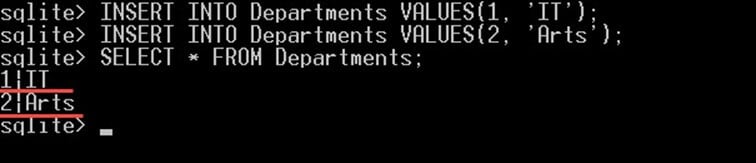
Let us insert two departments, “IT” and “Arts”, into the Departments table with the following INSERT queries:
INSERT INTO Departments VALUES(1, 'IT');
INSERT INTO Departments VALUES(2, 'Arts');
The two statements should insert two departments into the Departments table. You can confirm that the two values were inserted by running the query “SELECT * FROM Departments” afterwards:

Then try to insert a new student with a departmentId that does not exist in the Departments table:
INSERT INTO Students(StudentName,DepartmentId) VALUES('John', 5);
The row will not be inserted, and you will get an error saying: FOREIGN KEY constraint failed.
Difference Between Primary Key and Foreign Key in SQLite
Primary keys and foreign keys both help maintain data integrity, but they play different roles. A primary key identifies rows within a single table, while a foreign key links rows across two related tables. The table below summarizes the main differences.
| Basis | Primary Key | Foreign Key |
|---|---|---|
| Purpose | Uniquely identifies each row in its own table | Refers to the primary key of another table to link them |
| Uniqueness | Values must be unique | Values may repeat, so many child rows can share one parent |
| Null values | Cannot be null | Can be null when the relationship is optional |
| Number per table | Only one primary key per table | A table can have several foreign keys |
| Indexing | Indexed automatically | Not indexed automatically; add one for performance |
In the Students and Departments example, DepartmentId is the primary key of the Departments table and a foreign key in the Students table, which is what ties each student to a valid department.
SQLite Composite Primary Key
A composite primary key is a primary key made of two or more columns. It is used when no single column is unique on its own, but the combination of columns is unique for every row. SQLite treats the combined values as one key.
For example, an enrollment table may allow the same student in many courses and the same course for many students, yet each student-course pair should appear only once:
CREATE TABLE Enrollments (
	StudentId INTEGER NOT NULL,
	CourseId INTEGER NOT NULL,
	Grade TEXT,
	PRIMARY KEY (StudentId, CourseId)
);
Here neither StudentId nor CourseId is unique alone, but the pair (StudentId, CourseId) is unique, so the same student cannot be enrolled in the same course twice. Note the following points when you use a composite key:
- Use a composite key when a single column cannot uniquely identify a row.
- Every column in the composite key follows the primary key rules, so the combined value must be unique and not null.
- A composite key is written as a separate table-level PRIMARY KEY clause, not inside a single column definition.
SQLite Foreign Key Actions: ON DELETE and ON UPDATE
A foreign key can also control what happens to child rows when the parent row they reference is deleted or updated. These referential actions are added with the ON DELETE and ON UPDATE clauses when you define the foreign key. SQLite supports five actions:
- NO ACTION — the default action, which raises an error if child rows still reference the parent.
- RESTRICT — prevents the delete or update immediately, before any other change runs.
- SET NULL — sets the child foreign key column to null.
- SET DEFAULT — sets the child foreign key column to its declared default value.
- CASCADE — applies the same change to the child rows, so deleting a parent deletes its children.
The example below recreates the Students table so that deleting a department automatically deletes its students, and updating a department id updates the matching students:
CREATE TABLE Students (
	StudentId INTEGER PRIMARY KEY AUTOINCREMENT NOT NULL,
	StudentName NVARCHAR(50) NULL,
	DepartmentId INTEGER NOT NULL,
	FOREIGN KEY(DepartmentId) REFERENCES Departments(DepartmentId)
		ON DELETE CASCADE
		ON UPDATE CASCADE
);
Remember that referential actions only run when foreign key support is turned on, so run PRAGMA foreign_keys = ON at the start of every connection. Without it, SQLite parses the ON DELETE and ON UPDATE clauses but does not enforce them.
