
MongoDB Update() Document with Example
 Editorial Team
\
⚡ Smart Summary
MongoDB Update() Document operations modify existing records in a collection. The update() method takes a condition to select documents and a modifier such as $set to change field values, and the multi option updates several matching documents at once.

Basic document updates
MongoDB provides the update() command to update the documents of a collection. To update only the documents you want to update, you can add a criteria to the update statement so that only selected documents are updated.
The basic parameters in the command is a condition for which document needs to be updated, and the next is the modification which needs to be performed.
The following example shows how this can be done.
Step 1) Issue the update command
Step 2) Choose the condition which you want to use to decide which document needs to be updated. In our example, we want to update the document which has the Employee id 22.
Step 3) Use the set command to modify the Field Name
Step 4) Choose which Field Name you want to modify and enter the new value accordingly.
db.Employee.update(
{"Employeeid" : 1},
{$set: { "EmployeeName" : "NewMartin"}});
If the command is executed successfully, the following Output will be shown
Output:
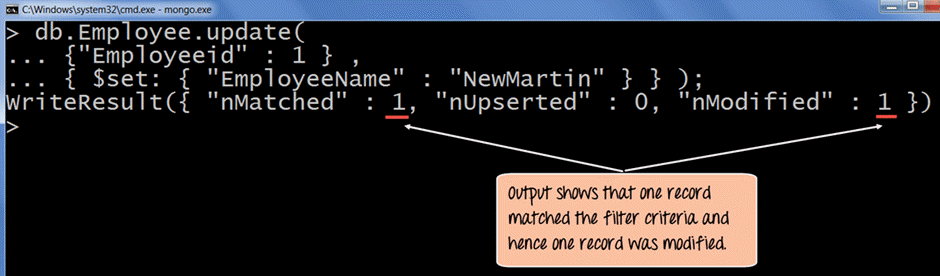
The output clearly shows that one record matched the condition and hence the relevant field value was modified.
MongoDB Update Operators
The $set operator is the most common way to change a field, but MongoDB provides several update operators for different needs. You place them in the second argument of update() alongside or instead of $set:
- $set: Sets the value of a field, creating the field if it does not exist.
- $unset: Removes a field from the document entirely.
- $inc: Increases or decreases a numeric field by a given amount.
- $mul: Multiplies the value of a numeric field.
- $rename: Renames a field to a new name.
- $push: Adds a value to an array field.
- $pull: Removes matching values from an array field.
Each operator targets only the fields you name, leaving the rest of the document unchanged. You can combine several operators in a single update() call to modify multiple fields at once, which keeps updates precise and avoids overwriting data you want to keep.
Updating Multiple Values
To ensure that multiple/bulk documents are updated at the same time in MongoDB you need to use the multi option because otherwise by default only one document is modified at a time.
The following example shows how to update many documents.
In this example, we are going to first find the document which has the Employee id as “1” and change the Employee name from “Martin” to “NewMartin”
Step 1) Issue the update command
Step 2) Choose the condition which you want to use to decide which document needs to be updated. In our example, we want the document which has the Employee id of “1” to be updated.
Step 3) Choose which Field Name’s you want to modify and enter their new value accordingly.
db.Employee.update
(
	{
		Employeeid : 1
	},
	{
		$set :
		{
			"EmployeeName" : "NewMartin",
			"Employeeid" : 22
		}
	}
)
If the command is executed successfully and if you run the “find” command to search for the document with Employee id as 22 you will see the following Output will be shown
Output:

The output clearly shows that one record matched the condition and hence the relevant field value was modified.
How to Upsert a Document in MongoDB
An upsert is a combination of update and insert. When you enable it, MongoDB updates the document that matches the condition, or inserts a new document if no match is found. This is useful when you are not sure whether a record already exists.
To perform an upsert, add the upsert option set to true as the third argument of update():
db.Employee.update(
  {Employeeid: 5},
  {$set: {EmployeeName: "Sofia"}},
  {upsert: true}
)
Here is what happens:
- If a document with Employeeid 5 exists, MongoDB updates its EmployeeName field.
- If no such document exists, MongoDB inserts a new document with Employeeid 5 and EmployeeName “Sofia”.
Upserts are handy for counters, settings, and any workflow where you want to create a record on first use and update it afterward. In modern MongoDB, the same behavior is available through updateOne() and updateMany() by passing {upsert: true} in the options. Be careful with the condition, because a broad filter combined with upsert can create unexpected documents.
updateOne() vs updateMany() vs replaceOne()
The update() method is now a legacy command. Modern MongoDB drivers split its behavior into three clearer methods. The table below compares them:
| Method | What it does | Documents affected |
|---|---|---|
| updateOne() | Applies update operators to the first matching document | One |
| updateMany() | Applies update operators to every matching document | Many |
| replaceOne() | Replaces the entire first matching document with a new one | One |
Use updateOne() for a single targeted change, updateMany() instead of the old multi option, and replaceOne() when you want to swap a whole document rather than edit fields. These methods return a clear result showing how many documents matched and how many were modified, which makes them safer and easier to debug than update().
