
How to Create User & add Role in MongoDB
 Editorial Team
⚡ Smart Summary
Creating a user and adding a role in MongoDB relies on the db.createUser() method to define credentials, assign built-in roles, and scope privileges to specific databases, strengthening access control across administrative and single-database accounts.
What are Built-in Roles in MongoDB?
Before you create an account, it helps to understand the built-in roles that MongoDB provides. A role is a named collection of privileges, and each privilege pairs a resource (a database or collection) with the actions that are allowed on it. Assigning a role during user creation therefore decides exactly what that account can do.
MongoDB groups its built-in roles into database user roles, database administration roles, cluster administration roles, backup and restore roles, and superuser roles. The table below summarises the roles used most often when managing users:
| Role | Category | Privileges Granted |
|---|---|---|
| read | Database User | Read-only access to all non-system collections in a database. |
| readWrite | Database User | Read access plus insert, update, and delete on collections. |
| dbAdmin | Database Admin | Schema, indexing, and statistics management for a database. |
| userAdmin | Database Admin | Create and modify users and roles on a single database. |
| userAdminAnyDatabase | Superuser | User administration across every database in the instance. |
| root | Superuser | Full access to all resources and operations. |
MongoDB Create Administrator User
Creating a user administrator in MongoDB is done by using the createUser method. The following example shows how this can be done.
db.createUser(
{	user: "Guru99",
	pwd: "password",

	roles:[{role: "userAdminAnyDatabase" , db:"admin"}]})
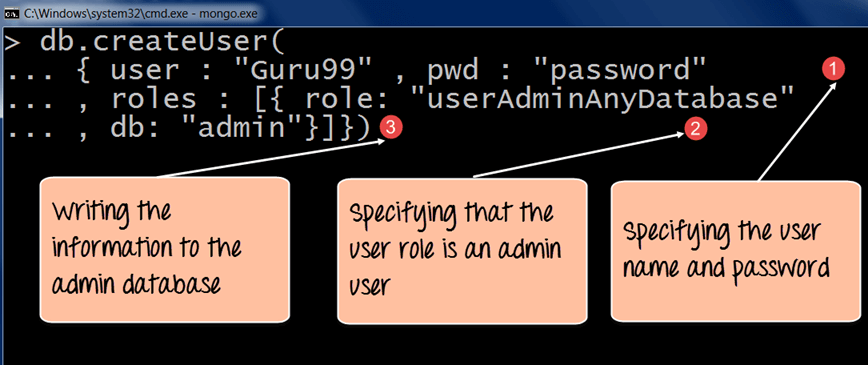
Code Explanation:
- The first step is to specify the “username” and “password” which needs to be created.
- The second step is to assign a role for the user. Since it needs to be a database administrator, in which case we have assigned the “userAdminAnyDatabase” role. This role allows the user to have administrative privileges to all databases in MongoDB.
- The db parameter specifies the admin database, which is a special Meta database within MongoDB that holds the information for this user.
If the command is executed successfully, the following Output will be shown:
Output:

The output shows that a user called “Guru99” was created and that user has privileges over all the databases in MongoDB.
MongoDB Create User for Single Database
To create a user who will manage a single database, we can use the same command as mentioned above, but we need to use the “userAdmin” option only.
The following example shows how this can be done:

db.createUser(
{
	user: "Employeeadmin",

	pwd: "password",

	roles:[{role: "userAdmin" , db:"Employee"}]})
Code Explanation:
- The first step is to specify the “username” and “password” which needs to be created.
- The second step is to assign a role for the user, which in this case, since it needs to be a database administrator, is assigned to the “userAdmin” role. This role allows the user to have administrative privileges only to the database specified in the db option.
- The db parameter specifies the database to which the user should have administrative privileges on.
If the command is executed successfully, the following Output will be shown:
Output:
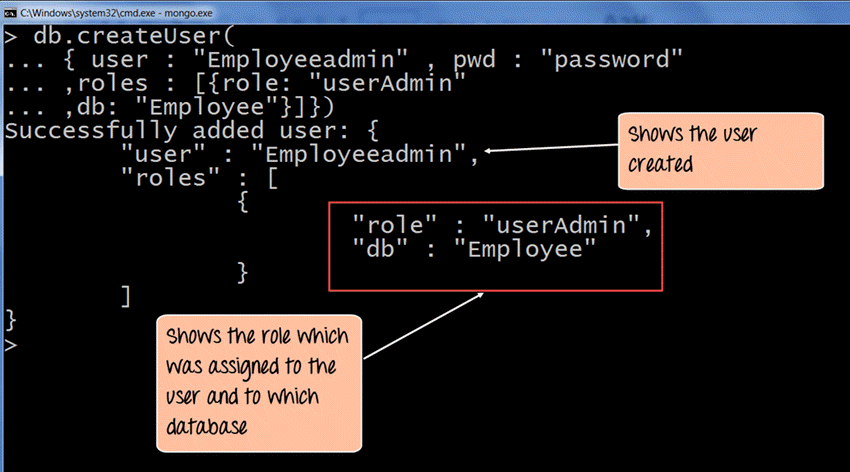
The output shows that a user called “Employeeadmin” was created and that user has privileges only on the “Employee” database.
Managing users
First, understand the roles which you need to define. There is a whole list of roles available in MongoDB. For example, there is the “read” role, which only allows read-only access to databases, and then there is the “readWrite” role, which provides read and write access to the database. This means that the user can issue the insert, delete, and update commands on collections in that database.

db.createUser(
{
	user: "Mohan",

	pwd: "password",

	roles:[
	{ role: "read" , db:"Marketing" },
	{ role: "readWrite" , db:"Sales" }
	]
})
The above code snippet shows that a user called Mohan is created, and he is assigned multiple roles in multiple databases. In the above example, he is given read-only permission to the “Marketing” database and readWrite permission to the “Sales” database.
How to View and Manage MongoDB Users
After accounts exist, MongoDB provides a set of commands to inspect, update, and remove them without dropping and recreating each user. These commands run against the database where the user was created, so switch to the correct database with the use statement before issuing them.
The most common user-management commands are:
- db.getUsers() — lists every user defined on the current database along with the roles each one holds.
- db.getUser(“username”) — returns the details of a single account, which is useful for auditing privileges.
- db.grantRolesToUser() — adds one or more roles to an existing user without affecting current roles.
- db.revokeRolesFromUser() — removes specific roles, tightening access when responsibilities change.
- db.changeUserPassword() — resets the password for an account while keeping its roles intact.
- db.dropUser() — permanently deletes a user from the database.
The example below grants an extra role, revokes another, resets a password, and finally deletes the account:
// List all users in the current database
db.getUsers()

// Grant an additional role to an existing user
db.grantRolesToUser("Employeeadmin", [{ role: "readWrite", db: "Employee" }])

// Remove a role from a user
db.revokeRolesFromUser("Employeeadmin", [{ role: "userAdmin", db: "Employee" }])

// Change a user's password
db.changeUserPassword("Employeeadmin", "newPassword")

// Delete a user
db.dropUser("Employeeadmin")
Running db.getUsers() again after these operations confirms that the changes were applied and that only the intended accounts and roles remain.
Best Practices for MongoDB User Management
Well-planned user accounts keep a MongoDB deployment secure and easy to audit. The following practices reduce the risk of accidental data exposure and privilege misuse:
- Apply least privilege: Grant only the roles an account genuinely needs, favouring readWrite on a single database over broad administrative roles.
- Avoid root in production: Reserve the root and userAdminAnyDatabase roles for setup and emergency tasks rather than daily operations.
- Enable authentication: Start the server with the –auth option so that credentials are actually enforced.
- Use strong passwords: Combine length and complexity, and rotate passwords with db.changeUserPassword() on a schedule.
- Audit regularly: Review db.getUsers() output periodically and remove accounts that are no longer required.
Together, these habits ensure that every account maps to a real need and that access can be traced whenever a security review takes place.
