
Python Main Function & Method: Understand def Main()
 Editorial Team
⚡ Smart Summary
Python main function marks the starting point where the interpreter begins running a program. Defined with def main() and paired with the if __name__ == “__main__” guard, it separates reusable module code from standalone script execution.
What is Python Main Function?
The Python main function is the starting point of any program. When the program is run, the Python interpreter runs the code sequentially. The main function is executed only when it is run as a Python program. It will not run the main function if it is imported as a module.
What is the def main() function in Python? To understand this, consider the following example code, which is part of the core Python programming basics:
def main() Example 1
def main():
     print ("Hello World!")
print ("Guru99")
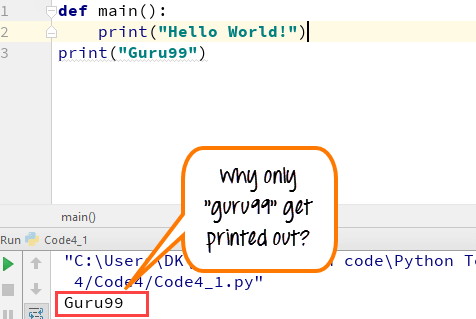
Here, we got two pieces of print- one is defined within the main function that is “Hello World!” and the other is independent, which is “Guru99”. When you run the function def main ():
- Only “Guru99” prints out
- and not the code “Hello World!”
It is because we did not declare the call function “if__name__== “__main__”.
It is important that after defining the main function, you call the code by if__name__== “__main__” and then run the code, only then you will get the output “hello world!” in the programming console. Consider the following code
def main() Example 2
def main():
    print("Hello World!")

if __name__ == "__main__":
    main()

print("Guru99")
Guru99 is printed in this case.
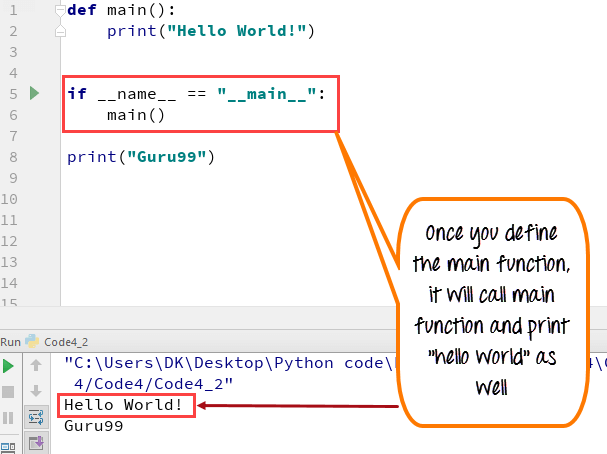
Here is the explanation,
- When Python interpreter reads a source file, it will execute all the code found in it.
- When Python runs the “source file” as the main program, it sets the special variable (__name__) to have a value (“__main__”).
- When you execute the main function in python, it will then read the “if” statement and checks whether __name__ does equal to __main__.
- In Python “if__name__== “__main__” allows you to run the Python files either as reusable modules or standalone programs.
Why Use a main() Function in Python?
Python does not force you to write a main function, yet experienced developers use one in almost every non-trivial script. The def main() pattern brings order to a file and makes the code safe to reuse. Here are the main reasons to use it:
- Clear entry point: A main() function tells any reader exactly where the program starts, so the logic is easy to follow.
- Reusable modules: Code guarded by if __name__ == “__main__” runs only on direct execution, so other files can import your functions without side effects.
- Local scope: Variables created inside main() stay local, which avoids accidental clashes with global names elsewhere in the module.
- Easier testing: Isolating logic in main() lets a test suite call it directly and check the result.
- Shared convention: A main() function is a widely recognized signal of the program entry point, which improves maintainability across teams.
In short, a main() function is optional in Python, but it keeps larger programs readable, testable, and safe to import.
The __name__ variable and Python Module
To understand the importance of __name__ variable in Python main function method, consider the following code:
def main():
    print("hello world!")

if __name__ == "__main__":
    main()

print("Guru99")

print("Value in built variable name is:  ",__name__)

Now consider, code is imported as a module
import MainFunction

print("done")

Here, is the code explanation: Like C, Python uses == for comparison while = for assignment. Python interpreter uses the main function in two ways
direct run:
- __name__=__main__
- if statement == True, and the script in _main_will be executed
import as a module
- __name__= module’s filename
- if statement == false, and the script in __main__ will not be executed
When the code is executed, it will check for the module name with “if.” This mechanism ensures, the main function is executed only as direct run not when imported as a module.
Above examples are Python 3 codes, if you want to use Python 2, please consider following code
def main():
  print "Hello World!"

if __name__== "__main__":
  main()

print "Guru99"
In Python 3, you do not need to use if__name. Following code also works
def main():
  print("Hello World!")

main()
print("Guru99")
Note: Make sure that after defining the main function, you leave some indent and not declare the code right below the def main(): function otherwise, it will give indent error.
How to Pass Command-Line Arguments to the Python main() Function
A main() function is the natural place to handle input that a user passes on the command line. Python stores these values in the sys.argv list, which the standard sys module provides. The first item, sys.argv[0], is the script name, and every value after it is an argument supplied by the user.
The following example reads and prints command-line arguments from inside a main() function:
import sys

def main():
    print("Script name:", sys.argv[0])
    print("Arguments passed:", sys.argv[1:])

if __name__ == "__main__":
    main()
If you save the file as script.py and run python script.py alpha beta, the program prints the script name and the list [‘alpha’, ‘beta’]. Because the values arrive inside main(), the logic stays organized and easy to test.
Here are a few practical tips when working with command-line input:
- Slice off the script name: Use sys.argv[1:] to read only the arguments the user typed.
- Use argparse for real tools: The built-in argparse module parses flags, options, and help text far more safely than reading sys.argv by hand.
- Return an exit code: Wrap the call as sys.exit(main()) so the return value of main() becomes the process exit status.
- Validate early: Check the number and type of arguments at the top of main() before running the rest of the program.
This pattern turns a simple script into a reliable command-line tool while keeping every step inside a single, testable main() function.
Python main() Function vs Other Programming Languages
Developers coming from C, C++, or Java often expect a mandatory main() function. Python works differently because it is an interpreted language, so the interpreter simply runs a file from the top line to the bottom. The main() function in Python is therefore a convention rather than a rule.
- C, C++, C#, and Java: A main() function is a required entry point. The runtime automatically calls it, and there can be only one per program.
- Python: No main() function is required. Execution starts at the first line of the file, and def main() runs only if your code calls it.
- The guard: The if __name__ == “__main__” block gives Python a purpose similar to a compiled main() by marking code that should run only when the file is the main program.
So while other languages enforce a main() entry point, Python leaves the choice to you, offering the same clarity through convention instead of a compiler rule.
