
IP Packet Header: Format, Fields
 Editorial Team
⚡ Smart Summary
IP header is the metadata placed at the start of every IP packet, carrying fields such as version, header length, total length, time to live, protocol, checksum, and the source and destination addresses that routers read to deliver data.
What is IP header?
IP header is meta information at the beginning of an IP packet. It displays information such as the IP version, the packet’s length, the source, and the destination.
The IPv4 header format is 20 to 60 bytes in length, and it contains the information needed for routing and delivery. It consists of fields such as Version, Header Length, Total Length, Identification, Flags, Checksum, the source IP address, and the destination IP address. Together these fields provide the essential data needed to transmit the packet reliably from one host to another.


IPv4 Header Components/Fields
The diagram below shows the complete IPv4 header format, with each field drawn in its correct position and bit width:
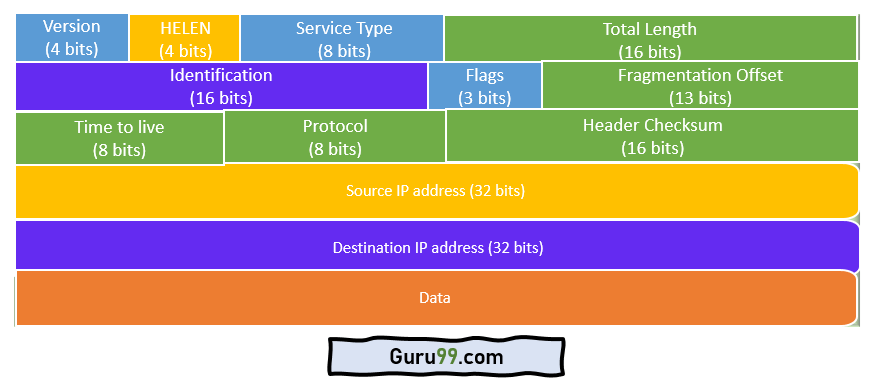
Following are the various components/fields of the IP packet header:
- Version: The first IP header field is a 4-bit version indicator. In IPv4, the value of these four bits is set to 0100, which indicates 4 in binary. If the router does not support the specified version, the packet is dropped.
- Internet Header Length: Internet Header Length, shortly known as IHL, is 4 bits in size. It is also called HELEN (Header Length). This IP component shows how many 32-bit words are present in the header.
- Type of Service: Type of Service is also called Differentiated Services Code Point, or DSCP. This field provides features related to the quality of service for data streaming or VoIP calls. The first 3 bits are the priority bits. It also specifies how a datagram should be handled.
- Total length: The total length is measured in bytes. The minimum size of an IP datagram is 20 bytes and the maximum is 65,535 bytes. HELEN and Total Length can be used to calculate the size of the payload. All hosts are required to be able to read 576-byte datagrams. However, if a datagram is too large for the hosts in the network, the fragmentation method is widely used.
- Identification: Identification is a field used to identify the fragments of an IP datagram uniquely. Some have recommended using this field for other purposes, such as adding information for packet tracing.
- IP Flags: Flags is a three-bit field that helps you control and identify fragments. The possible configurations are: Bit 0 is reserved and must be set to zero; Bit 1 means do not fragment; and Bit 2 means more fragments.
- Fragment Offset: Fragment Offset represents the number of data bytes ahead of a particular fragment in the specific datagram. It is specified in units of 8 bytes and has a maximum value of 65,528 bytes.
- Time to live: This is an 8-bit field that indicates the maximum time the datagram may live in the internet system. Every time a datagram is processed, its TTL value is decreased by one. When the value of TTL reaches zero, the datagram is discarded so that packets are not delivered endlessly. The value of TTL can range from 0 to 255.
- Protocol: This IPv4 header field denotes which internet protocol is carried in the latter portion of the datagram. For example, the number 6 is used to indicate TCP, and 17 is used to denote the UDP protocol.
- Header Checksum: The next component is a 16-bit header checksum field, which is used to check the header for any errors. The IP header is compared against the value of its checksum. When the header checksum does not match, the packet is discarded.
- Source Address: The source address is a 32-bit address of the source used for the IPv4 packet.
- Destination address: The destination address is also 32 bits in size and stores the address of the receiver.
- IP Options: This is an optional field of the IPv4 header, used when the value of IHL (Internet Header Length) is set greater than 5. It contains values and settings related to security, record route, time stamp, and similar options. The list of options usually ends with an End of Options List (EOL) marker.
- Data: This field stores the data from the protocol layer that has handed the data over to the IP layer.
How to Calculate IPv4 Header Length
The Internet Header Length (IHL) field tells a router exactly how long the header is so it knows where the header ends and the data begins. Because the field is only 4 bits wide, it does not store the length in bytes directly. Instead, it counts the header in 32-bit words, where each word equals 4 bytes.
To convert the IHL value into bytes, multiply it by 4:
- Minimum: The smallest legal IHL value is 5, so 5 × 4 = 20 bytes. This is a header with no options.
- Maximum: The largest IHL value is 15, so 15 × 4 = 60 bytes. The extra 40 bytes hold optional fields.
Consider a worked example. If a packet arrives with an IHL value of 6, the header length is 6 × 4 = 24 bytes, meaning 4 bytes of options are present after the standard 20-byte header. To find the size of the payload, subtract the header length from the Total Length field. If Total Length is 1,500 bytes and the header is 24 bytes, then the payload is 1,500 − 24 = 1,476 bytes.
This calculation matters during fragmentation, because a router must know the header size to work out how much data each fragment can carry without exceeding the network’s Maximum Transmission Unit (MTU).
IPv4 vs IPv6 Header
The IPv6 header was redesigned to be simpler and faster to process than the IPv4 header. It uses a fixed length and moves rarely used options into separate extension headers, so routers can forward packets at line rate. The table below compares the two headers field by field:
| Feature | IPv4 Header | IPv6 Header |
|---|---|---|
| Header size | 20 to 60 bytes (variable) | 40 bytes (fixed) |
| Number of fields | 13 fields plus options | 8 fields |
| Address length | 32-bit source and destination | 128-bit source and destination |
| Header checksum | Present | Removed |
| Fragmentation fields | In the base header (Identification, Flags, Offset) | Moved to a Fragment extension header |
| Options | Carried inside the header | Carried in extension headers |
| Length field | Total Length (header plus data) | Payload Length (payload only) |
Because IPv6 drops the checksum and the variable-length options, its header contains fewer fields and can be processed in hardware without per-hop recalculation.
Why the IP Header Is Important
Every field in the IP header exists so that routers and hosts can move a packet across many networks without a permanent connection between them. The header is what makes packet switching work.
- Routing: The destination address tells each router where to forward the packet, while the source address allows replies and error messages to return.
- Loop prevention: The Time to Live field is decremented at every hop, so a misrouted packet is discarded instead of circling the internet forever.
- Delivery to the right protocol: The Protocol field tells the receiving host whether to hand the payload to TCP, UDP, or another protocol.
- Integrity and reassembly: The checksum guards the header against corruption, and the Identification, Flags, and Fragment Offset fields let a fragmented datagram be rebuilt in the correct order.
For network engineers, reading these fields in a TCP/IP capture is often the fastest way to diagnose dropped packets, routing loops, and misconfigured IP addresses.
