
std::list in C++ with Example
 Editorial Team
⚡ Smart Summary
std::list in C++ is a sequence container implemented as a doubly linked list, enabling fast insertion and deletion at any position while storing elements in non-contiguous memory and supporting bidirectional sequential access instead of random access.
What is an std::list?
In C++, the std::list refers to a storage container. The std::list allows you to insert and remove items from anywhere. The std::list is implemented as a doubly-linked list. This means list data can be accessed bi-directionally and sequentially.
The Standard Template Library list does not support fast random access, but it supports sequential access from all directions.
You can scatter list elements in different memory chunks. The information needed for sequential access to data is stored in a container. The std::list can expand and shrink from both ends as needed during runtime. An internal allocator automatically fulfills the storage requirements.
These traits raise a practical question: when should you actually reach for a list?
Why use std::list?
Here are the reasons for using std::list:
- The std::list does better compared to other sequence containers like array and vector.
- They have a better performance in inserting, moving, and extracting elements from any position.
- The std::list also does better with algorithms that perform such operations intensively.
With the reasons clear, the next step is the syntax that declares one.
List Syntax
To define the std::list, we have to import the <list> header file. Here is the std::list definition syntax:
template < class Type, class Alloc =allocator<T> > class list;
Here is a description of the above parameters:
- T – Defines the type of element contained. You can substitute T by any data type, even user-defined types.
- Alloc – Defines the type of the allocator object. This uses the allocator class template by default. It is value-dependent and uses a simple memory allocation model.
Example 1
#include <algorithm>
#include <iostream>
#include <list>
int main() {
	std::list<int> my_list = { 12, 5, 10, 9 };

	for (int x : my_list) {
		std::cout << x << '\n';
	}
}
Output:

Here is a screenshot of the code:

Code Explanation:
- Include the algorithm header file to use its functions.
- Include the iostream header file to use its functions.
- Include the list header file to use its functions.
- Call the main() function. The program logic should be added within the body of this function.
- Create a list named my_list with a set of 4 integers.
- Use a for loop to create a loop variable x. This variable will be used to iterate over the list elements.
- Print out the values of the list on the console.
- End of the body of the for loop.
- End of the body of the main() function.
C++ List Functions
Here are the common std::list functions:
| Function | Description |
|---|---|
| insert() | This function inserts a new item before the position the iterator points. |
| push_back() | This functions add a new item at the list’s end. |
| push_front() | It adds a new item at the list’s front. |
| pop_front() | It deletes the list’s first item. |
| size() | This function determines the number of list elements. |
| front() | To determines the list’s first items. |
| back() | To determines the list’s last item. |
| reverse() | It reverses the list items. |
| merge() | It merges two sorted lists. |
<list> Constructors
Here is the list of functions provided by the <list> header file:
- Default constructor std::list::list()- It creates an empty list, that, with zero elements.
- Fill constructor std::list::list()- It creates a list with n elements and assigns a value of zero (0) to each element.
- Range constructor std::list::list()- creates a list with many elements in the range of first to last.
- Copy constructor std::list::list()- It creates a list with a copy of each element contained in the existing list.
- Move constructor std::list::list()- creates a list with the elements of another list using move semantics.
- Initializer list constructor std::list::list()-It creates a list with the elements of another list using move semantics.
Example 2
#include <iostream>
#include <list>
using namespace std;
int main(void) {
	list<int> l;
	list<int> l1 = { 10, 20, 30 };
	list<int> l2(l1.begin(), l1.end());
	list<int> l3(move(l1));
	cout << "Size of list l: " << l.size() << endl;
	cout << "List l2 contents: " << endl;
	for (auto it = l2.begin(); it != l2.end(); ++it)
	      cout << *it << endl;
	cout << "List l3 contents: " << endl;
	for (auto it = l3.begin(); it != l3.end(); ++it)
		cout << *it << endl;
	return 0;
}
Output:

Here is a screenshot of the code:
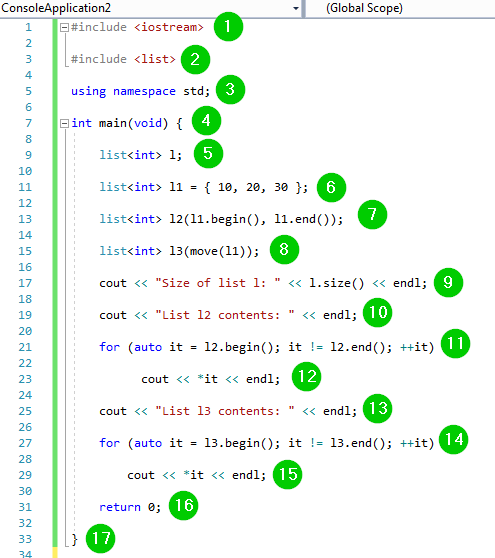
Code Explanation:
- Include the iostream header file to use its functions.
- Include the list header file to use its functions.
- Include the std namespace in the code to use its classes without calling it.
- Call the main() function. The program logic should be added within the body of this function.
- Create an empty list named l.
- Create a list named l1 with a set of 3 integers.
- Create a list named l2 with all elements in the list named l1, from the beginning to the end.
- Create a list named l3 using move semantics. The list l3 will have same contents as the list l2.
- Print the size of the list named l on the console alongside other text.
- Print some text on the console.
- Create an iterator named it and use it to iterate over the elements of the list named l2.
- Print the elements of the list named l2 on the console.
- Print some text on the console.
- Create an iterator named it and use it to iterate over the elements of the list named l3.
- Print the elements of the list named l3 on the console.
- The program must return value upon successful completion.
- End of the body of the main() function.
Container properties
Here is the list of container properties:
| Property | Description |
|---|---|
| Sequence | Sequence containers order their elements in a strict linear sequence. Elements are accessed by their position in the sequence. |
| Doubly-linked list | Every element has information on how to locate previous and next elements. This allows for constant time for insertion and deletion operations. |
| Allocator-aware | An allocator object is used for modifying the storage size dynamically. |
Inserting into a List
There are different functions that we can use to insert values into a list. Let us demonstrate this:
Example 3
#include <algorithm>
#include <iostream>
#include <list>
int main() {
	std::list<int> my_list = { 12, 5, 10, 9 };
	my_list.push_front(11);
	my_list.push_back(18);
	auto it = std::find(my_list.begin(), my_list.end(), 10);
	if (it != my_list.end()) {
		my_list.insert(it, 21);
	}
	for (int x : my_list) {
		std::cout << x << '\n';
	}
}
Output:

Here is a screenshot of the code:

Code Explanation:
- Include the algorithm header file to use its functions.
- Include the iostream header file to use its functions.
- Include the list header file to use its functions.
- Call the main() function. The program logic should be added within the body of this function.
- Create a list named my_list with a set of 4 integers.
- Insert the element 11 to the front of the list named my_list.
- Insert element 18 to the end of the list named my_list.
- Create an iterator it and using it to find the element 10 from the list my_list.
- Use an if statement to determine if the above element was found or not.
- Insert element 21 before the above element if it was found.
- End of the body of the if statement.
- Use a for loop to create a loop variable x. This variable will be used to iterate over the list elements.
- Print out the values of the list on the console.
- End of the body of the for a loop.
- End of the body of the main() function.
Elements that go into a list can just as easily be taken out.
Deleting from a List
It is possible to delete items from a list. The erase() function allows you to delete an item or a range of items from a list.
- To delete a single item, you simply pass one integer position. The item will be deleted.
- To delete a range, you pass the starting and the ending iterators. Let us demonstrate this.
Example 4
#include <algorithm>
#include <iostream>
#include <list>
using namespace std;
int main() {
	std::list<int> my_list = { 12, 5, 10, 9 };
	cout << "List elements before deletion: ";
	for (int x : my_list) {
		std::cout << x << '\n';
	}
	list<int>::iterator i = my_list.begin();
	my_list.erase(i);
	cout << "\nList elements after deletion: ";
	for (int x : my_list) {
		std::cout << x << '\n';
	}
	return 0;
}
Output:

Here is a screenshot of the code:
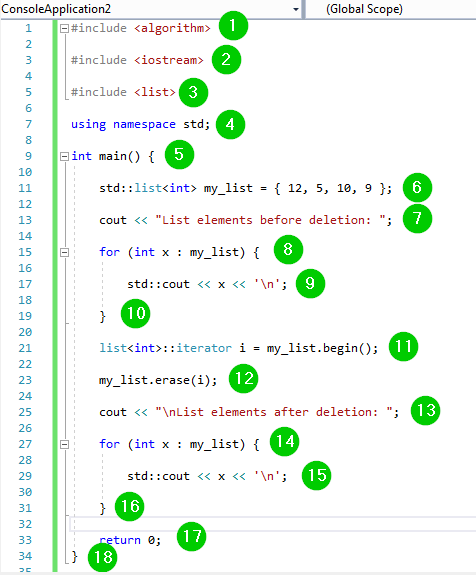
Code Explanation:
- Include the algorithm header file to use its functions.
- Include the iostream header file to use its functions.
- Include the list header file to use its functions.
- Include the std namespace in our program to use its classes without calling it.
- Call the main() function. The program logic should be added within the body of this function.
- Create a list named my_list with a set of 4 integers.
- Print some text on the console.
- Use a for loop to create a loop variable x. This variable will be used to iterate over the list elements.
- Print out the values of the list on the console.
- End of the body of the for loop.
- Create an iterator i that points to the first element of the list.
- Use the erase() function pointed by the iterator i.
- Print some text on the console.
- Use a for loop to create a loop variable x. This variable will be used to iterate over the list elements.
- Print out the values of the list on the console. This comes after deletion.
- End of the body of the for loop.
- The program must return a value upon successful completion.
- End of the body of the main() function.
