
C# ArrayList Tutorial with Examples
 Editorial Team
⚡ Smart Summary
ArrayList in C# is a dynamic collection from the System.Collections namespace that stores elements as objects. Unlike an array, it grows and shrinks at runtime and can hold integers, strings, and Boolean values together in one list.
What is ArrayList in C#?
The ArrayList collection is similar to the Arrays data type in C#. The biggest difference is the dynamic nature of the array list collection.
For arrays, you need to define the number of elements that the array can hold at the time of array declaration. But in the case of the Array List collection, this does not need to be done beforehand. Elements can be added or removed from the Array List collection at any point in time. Let’s look at the operations available for the array list collection in more detail.
Declaration of an Array List
The declaration of an ArrayList is provided below. An array list is created with the help of the ArrayList Datatype. The “new” keyword is used to create an object of an ArrayList. The object is then assigned to the variable a1. So now the variable a1 will be used to access the different elements of the array list.
ArrayList a1 = new ArrayList()
Adding elements to an array
The add method is used to add an element to the ArrayList. The add method can be used to add any sort of data type element to the array list. So you can add an Integer, or a string, or even a Boolean value to the array list. The general syntax of the addition method is given below
ArrayList.add(element)
Below are some examples of how the “add” method can be used. The add method can be used to add various data types to the Array List collection.
Below you can see examples of how we can add Integer’s Strings and even Boolean values to the Array List collection.
- a1.add(1) – This will add an Integer value to the collection
- a1.add(“Example”) – This will add a String value to the collection
- a1.add(true) – This will add a Boolean value to the collection
Now let’s see this working at a code level. All of the below-mentioned code will be written to our Console application. The code will be written to our Program.cs file.
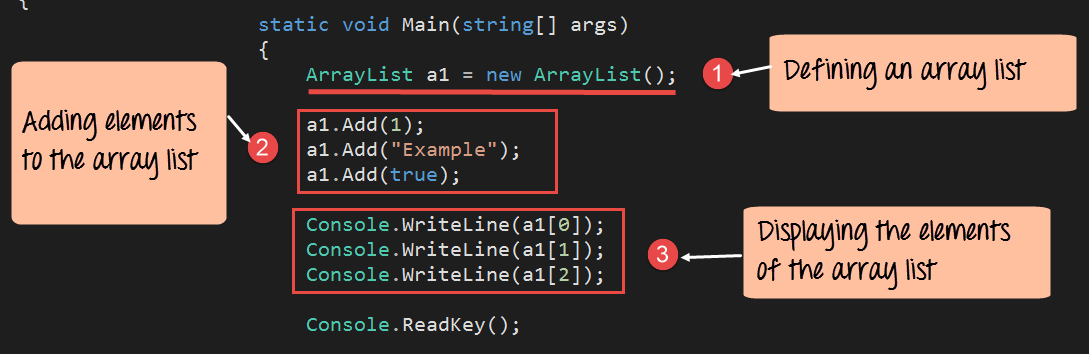
In the program below, we will write the code to create a new array list. We will also show to add elements and to display the elements of the Array list.
using System;
using System.Collections;
using System.Collections.Generic;
using System.Linq;
using System.Text;
using System.Threading.Tasks;

namespace DemoApplication
{
 class Program
 {
  static void Main(string[] args)
  {
   ArrayList a1 = new ArrayList();
   a1.Add(1);
   a1.Add("Example");
   a1.Add(true);

   Console.WriteLine(a1[0]);
   Console.WriteLine(a1[1]);
   Console.WriteLine(a1[2]);
   Console.ReadKey();
  }
 }
}
Code Explanation:-
- The first step is used to declare our Array List. Here we are declaring a1 as a variable to hold the elements of our array list.
- We then use the add keyword to add the number 1 , the String “Example” and the Boolean value ‘true’ to the array list.
- We then use the Console.WriteLine method to display the value of each array lists element to the console. You will notice that just like arrays, we can access the elements via their index positions. So to access the first position of the Array List, we use the [0] index position. And so on and so forth.
If the above code is entered properly and the program is run the following output will be displayed.
Output:

From the output, you can see that all of the elements from the array list are sent to the console.
Let’s look at some more methods which are available as part of the ArrayList.
Count
This method is used to get the number of items in the ArrayList collection. Below is the general syntax of this statement.
ArrayList.Count() – This method will return the number of elements that the array list contains.
Contains
This method is used to see if an element is present in the ArrayList collection. Below is the general syntax of this statement
ArrayList.Contains(element) – This method will return true if the element is present in the list, else it will return false.
RemoveAt
This method is used to remove an element at a specific position in the ArrayList collection. Below is the general syntax of this statement
ArrayList.RemoveAt(index) – This method will remove an element from a specific position of the Array List.
Now let’s see this working at a code level. All of the below-mentioned code will be written to our Console application. The code will be written to our Program.cs file.
In the below program, we will write the code to see how we can use the above-mentioned methods.

using System;
using System.Collections;
using System.Collections.Generic;
using System.Linq;
using System.Text;
using System.Threading.Tasks;

namespace DemoApplication
{
 class Program
 {
  static void Main(string[] args)
  {
   ArrayList a1 = new ArrayList();
   a1.Add(1);
   a1.Add("Example");
   a1.Add(true);

   Console.WriteLine(a1.Count);
   Console.WriteLine(a1.Contains(2));
   Console.WriteLine(a1[1]);
   a1.RemoveAt(1);
   Console.WriteLine(a1[1]);
   Console.ReadKey();
  }
 }
}
Code Explanation:-
- So the first property we are seeing is the Count property. We are getting the Count property of the array list a1 and then writing it to the Console.
- In the second part, we are using the Contains method to see if the ArrayList a1 contains the element 2. We then write the result to the Console via the Writeline command.
- Finally, to showcase the Remove element method, we are performing the below steps,
- First, we write the value of the element at Index position 1 of the array list to the console.
- Then we remove the element at Index position 1 of the array list.
- Finally, we again write the value of the element at Index position 1 of the array list to the console. This set of steps will give a fair idea whether the remove method will work as it should be.
If the above code is entered properly and the program is run the following output will be displayed.
Output:

Why is the last value true?
If you see the sequence of events, the element Example is removed from the array because this is at position 1. Position 1 of the array then gets replaced by what was in position 2 earlier which the value ‘true’
How to Loop Through a C# ArrayList
Reading every element of an ArrayList is a common task. Because an ArrayList stores its items as objects, you can visit them with a foreach loop or with a for loop that uses the Count property. The foreach loop is the simplest way, as it walks through each item in order without needing an index.
The example below creates an ArrayList of strings and prints each value on its own line. The code is written in the Program.cs file of a Console application.
Step 1) Import the System.Collections namespace and create an ArrayList with three items.
Step 2) Use a foreach loop to read each element as an object and write it to the console.
using System;
using System.Collections;

namespace DemoApplication
{
 class Program
 {
  static void Main(string[] args)
  {
   ArrayList a1 = new ArrayList();
   a1.Add("Java");
   a1.Add("Python");
   a1.Add("Kotlin");
   foreach (object item in a1)
   {
    Console.WriteLine(item);
   }
   Console.ReadKey();
  }
 }
}
Code Explanation:-
- The System.Collections namespace is imported so the ArrayList type is available to the program.
- Three string values are added to the ArrayList with the Add method.
- The foreach loop reads each item as an object, and the Console.WriteLine method prints it on a new line.
When the program runs, it prints Java, Python, and Kotlin on separate lines. A for loop with the Count property would give the same result while also letting you use the index position of each element.
C# ArrayList Methods and Properties
The ArrayList class provides many built-in methods and properties to manage its elements. Beyond adding and removing items, it can sort, search, and reverse the collection. The most common members are listed below.
| Member | Description |
| Add | Adds a single element to the end of the ArrayList. |
| Insert | Adds an element at a specific index position. |
| Remove | Removes the first occurrence of a specific element. |
| RemoveAt | Removes the element at the given index position. |
| Clear | Removes all elements from the ArrayList. |
| Sort | Sorts the elements in ascending order. |
| Reverse | Reverses the order of the elements in the list. |
| Contains | Returns true if a given element exists in the list. |
| IndexOf | Returns the index position of a given element. |
| Count | Property that returns the number of elements stored. |
| Capacity | Property that returns the number of elements the list can hold. |
These members let you add, find, order, and remove items without writing the logic yourself, which is one of the main advantages of using a collection over a plain array.
Difference Between ArrayList and List in C#
Both an ArrayList and a generic List store a group of items that can grow at runtime, yet they differ in how they handle types. Knowing the difference helps you pick the right one for modern C# code.
The main differences are listed below:
- Type safety: An ArrayList stores every item as an object, while a List is bound to one declared type and is checked at compile time.
- Performance: An ArrayList boxes and unboxes value types such as int, which costs time, whereas a List avoids boxing for better speed.
- Namespace: ArrayList lives in System.Collections, while List lives in System.Collections.Generic.
- Casting: Reading from an ArrayList often needs a cast back to the original type, but a List returns the correct type directly.
- Recommendation: Microsoft recommends List for new development because it is safer, faster, and easier to read.
In short, an ArrayList is useful for understanding older code or mixed-type storage, while a List is the preferred choice for most applications today.
