
MySQL SELECT Statement with Examples
 Marcus Allen
⚡ Smart Summary
The MySQL SELECT statement retrieves rows from one or more tables, and every example below runs against the myflix sample database, moving from the plain star query to expressions, column aliases, and string functions.
What is SELECT Query in MySQL?
SELECT query is used to fetch data from the MySQL database. Databases store data for later retrieval. The purpose of MySQL SELECT is to return one or more rows from the database tables that match a given criteria. A SELECT query can be used in a scripting language like PHP or Ruby, or you can execute it from the command prompt.

Because SELECT is the command you will run most often, it pays to learn its syntax before touching the sample data.
SQL SELECT Statement Syntax
SELECT is the most frequently used SQL command, and it has the following general syntax:
SELECT [DISTINCT|ALL] { * | [fieldExpression [AS newName]} FROM tableName [alias] [WHERE condition] [GROUP BY fieldName(s)] [HAVING condition] [ORDER BY fieldName(s)];
HERE
- SELECT is the SQL keyword that lets the database know that you want to retrieve data.
- [DISTINCT | ALL] are optional keywords that fine-tune the results returned from the SQL SELECT statement. If nothing is specified, then ALL is assumed as the default.
- {*| [fieldExpression [AS newName]} at least one part must be specified. “*” selects all the fields from the specified table name; fieldExpression performs computations on the specified fields, such as adding numbers or joining two string fields into one.
- FROM tableName is mandatory and must contain at least one table. Multiple tables must be separated using commas or joined using the JOIN keyword.
- WHERE condition is optional. It specifies criteria in the result set returned from the query.
- GROUP BY is used to put together records that have the same field values.
- HAVING condition is used to specify criteria when working with the GROUP BY keyword.
- ORDER BY is used to specify the sort order of the result set.
*
The star symbol selects all the columns in a table. A simple SELECT statement looks like the one shown below.
SELECT * FROM `members`;
The statement above selects all the fields from the members table. The semicolon is a statement terminator. It is not mandatory, but ending your statements this way is considered good practice.
SELECT DISTINCT and LIMIT in MySQL
Two optional keywords in the syntax deserve a closer look, because beginners meet them as soon as a table grows.
DISTINCT removes duplicate rows from the result set. The movies table stores several films released in 2007, so a plain query repeats that year. DISTINCT returns each value once.
SELECT DISTINCT `year_released` FROM `movies`;
LIMIT caps the number of rows returned, which protects the client from a query that would otherwise pull millions of records.
SELECT * FROM `movies` LIMIT 5;
| Keyword | What it does | When to use it |
|---|---|---|
| ALL (default) | Returns every matching row, duplicates included | Counting or listing raw records |
| DISTINCT | Collapses duplicate rows into one | Building a list of unique values |
| LIMIT | Returns only the first N rows | Previewing data or paging results |
With the syntax settled, the sample database brings these clauses to life.
SELECT Statement Practical Examples
Click to download the myflix DB used for the practical examples.
You can learn how to import the .sql file into MySQL Workbench.
The examples are performed on the following two tables.
Table 1: members table
| membership_ number | full_names | gender | date_of_ birth | physical_ address | postal_ address | contct_ number | |
|---|---|---|---|---|---|---|---|
| 1 | Janet Jones | Female | 21-07-1980 | First Street Plot No 4 | Private Bag | 0759 253 542 | janetjones@yagoo.cm |
| 2 | Janet Smith Jones | Female | 23-06-1980 | Melrose 123 | NULL | NULL | jj@fstreet.com |
| 3 | Robert Phil | Male | 12-07-1989 | 3rd Street 34 | NULL | 12345 | rm@tstreet.com |
| 4 | Gloria Williams | Female | 14-02-1984 | 2nd Street 23 | NULL | NULL | NULL |
Table 2: movies table
| movie_id | title | director | year_released | category_id |
|---|---|---|---|---|
| 1 | Pirates of the Caribean 4 | Rob Marshall | 2011 | 1 |
| 2 | Forgetting Sarah Marshal | Nicholas Stoller | 2008 | 2 |
| 3 | X-Men | NULL | 2008 | NULL |
| 4 | Code Name Black | Edgar Jimz | 2010 | NULL |
| 5 | Daddy’s Little Girls | NULL | 2007 | 8 |
| 6 | Angels and Demons | NULL | 2007 | 6 |
| 7 | Davinci Code | NULL | 2007 | 6 |
| 9 | Honey mooners | John Schultz | 2005 | 8 |
| 16 | 67% Guilty | NULL | 2012 | NULL |
Getting Members Listing
Suppose we want a list of all the registered library members from our database. We would use the script shown below to do that.
SELECT * FROM `members`;
Executing the script in MySQL Workbench produces the following results.
| membership_ number | full_names | gender | date_of_ birth | physical_ address | postal_ address | contct_ number | |
|---|---|---|---|---|---|---|---|
| 1 | Janet Jones | Female | 21-07-1980 | First Street Plot No 4 | Private Bag | 0759 253 542 | janetjones@yagoo.cm |
| 2 | Janet Smith Jones | Female | 23-06-1980 | Melrose 123 | NULL | NULL | jj@fstreet.com |
| 3 | Robert Phil | Male | 12-07-1989 | 3rd Street 34 | NULL | 12345 | rm@tstreet.com |
| 4 | Gloria Williams | Female | 14-02-1984 | 2nd Street 23 | NULL | NULL | NULL |
The query returned all the rows and columns from the members table.
Selecting Specific Columns
Say we are interested only in the full_names, gender, physical_address, and email fields. The following script achieves this.
SELECT `full_names`,`gender`,`physical_address`, `email` FROM `members`;
Executing the script in MySQL Workbench produces the following results.
| full_names | gender | physical_address | |
|---|---|---|---|
| Janet Jones | Female | First Street Plot No 4 | janetjones@yagoo.cm |
| Janet Smith Jones | Female | Melrose 123 | jj@fstreet.com |
| Robert Phil | Male | 3rd Street 34 | rm@tstreet.com |
| Gloria Williams | Female | 2nd Street 23 | NULL |
Getting Movies Listing With Expressions
Expressions can also be used in SELECT statements. Say we want a list of movies with the title and the name of the director in one field, the director in brackets, plus the year the movie was released. The following script does that.
SELECT Concat(`title`, ' (', `director`, ')') , `year_released` FROM `movies`;
HERE
- The Concat() MySQL function joins column values together.
- The line “Concat(`title`, ‘ (‘, `director`, ‘)’)” gets the title, adds an opening bracket followed by the name of the director, then adds the closing bracket.
- String portions are separated using commas inside the Concat() function.
Executing the script in MySQL Workbench produces the following result set.
| Concat(`title`, ‘ (‘, `director`, ‘)’) | year_released |
|---|---|
| Pirates of the Caribean 4 ( Rob Marshall) | 2011 |
| Forgetting Sarah Marshal (Nicholas Stoller) | 2008 |
| NULL | 2008 |
| Code Name Black (Edgar Jimz) | 2010 |
| NULL | 2007 |
| NULL | 2007 |
| NULL | 2007 |
| Honey mooners (John Schultz) | 2005 |
| NULL | 2012 |
Note: Concat() returns NULL when any argument is NULL, which is why films without a director show NULL above.
Alias Field Names
The example above returned the concatenation code as the field name. To use a more descriptive field name in the result set, apply a column alias. The basic syntax follows.
SELECT `column_name|value|expression` [AS] `alias_name`;
HERE
- “SELECT `column_name|value|expression`” is the regular SELECT statement, which can be a column name, value, or expression.
- “[AS]” is the optional keyword before the alias name.
- “`alias_name`” is the alias that is returned in the result set as the field name.
The same query with a more meaningful column name:
SELECT Concat(`title`, ' (', `director`, ')') AS `Concat`, `year_released` FROM `movies`;
We get the following result.
| Concat | year_released |
|---|---|
| Pirates of the Caribean 4 ( Rob Marshall) | 2011 |
| Forgetting Sarah Marshal (Nicholas Stoller) | 2008 |
| NULL | 2008 |
| Code Name Black (Edgar Jimz) | 2010 |
| NULL | 2007 |
| NULL | 2007 |
| NULL | 2007 |
| Honey mooners (John Schultz) | 2005 |
| NULL | 2012 |
Getting Members Listing Showing the Year of Birth
Suppose we want a list of all members showing the membership number, full names, and year of birth. We can use the LEFT string function to extract the year of birth from the date of birth field.
SELECT `membership_number`,`full_names`,LEFT(`date_of_birth`,4) AS `year_of_birth` FROM members;
HERE
- “LEFT(`date_of_birth`,4)” the LEFT string function accepts the date of birth as the parameter and returns only 4 characters from the left.
- “AS `year_of_birth`” is the column alias name returned in our results. The AS keyword is optional; you can leave it out and the query still works.
Executing the query in MySQL Workbench against the myflixdb gives us the results shown below.
| membership_number | full_names | year_of_birth |
|---|---|---|
| 1 | Janet Jones | 1980 |
| 2 | Janet Smith Jones | 1980 |
| 3 | Robert Phil | 1989 |
| 4 | Gloria Williams | 1984 |
Hand-written queries are only one route to a result set. Workbench can also build the statement for you.
SQL Using MySQL Workbench
We are now going to use MySQL Workbench to generate the script that displays all the field names from our categories table.
1. Right-click on the Categories table. Click on “Select Rows – Limit 1000”.
2. MySQL Workbench automatically creates a SQL query and pastes it in the editor.
3. Query results are shown in the grid below the editor.
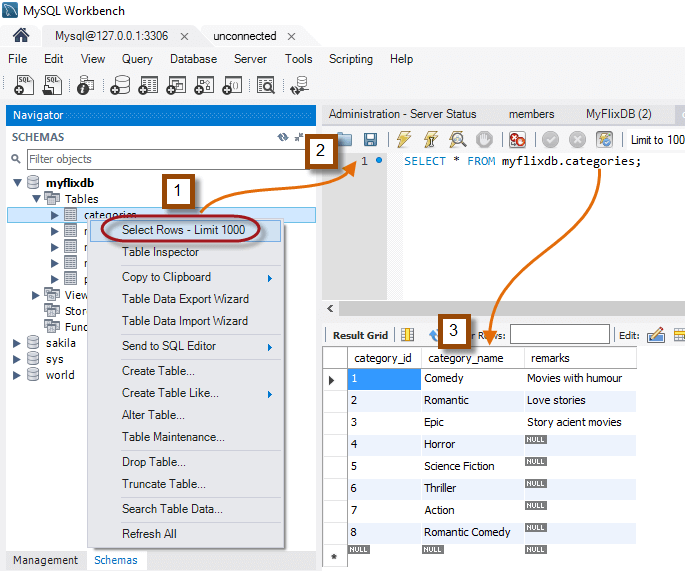
As the screenshot shows, we did not write the SELECT statement ourselves. MySQL Workbench generated it for us.
Why Use the SELECT SQL Command When We Have MySQL Workbench?
You might be wondering why you should learn the SQL SELECT command when a tool such as MySQL Workbench returns the same results without any knowledge of the SQL language. That shortcut is possible, but learning the SELECT command gives you more flexibility and control over your SQL SELECT statements.
MySQL Workbench falls into the category of “Query by Example” (QBE) tools. It is intended to generate SQL statements faster and increase user productivity.
Learning the SQL SELECT command lets you create complex queries that cannot easily be generated by Query by Example utilities such as MySQL Workbench.
To improve productivity, you can generate the code in MySQL Workbench, then customize it to meet your requirements. That is only possible once you understand how the SQL statements work.

