
Test Case Template Excel Download
 Thomas Hamilton
⚡ Smart Summary
Test Case Template provides a standardized structure to document test cases for any software project. This tutorial explains every essential field, offers downloadable Excel and Word samples, and lists best practices that keep test artifacts consistent across the entire QA team.

What is a Test Case Template?
A Test Case Template is a well-designed document that helps testers develop and consistently understand the data for a particular test case scenario. A good Test Case template maintains test-artifact consistency for the team and makes test cases easy for every stakeholder to follow. Writing test cases in a standard format lessens the test effort and reduces the error rate. A standardized format is especially desirable when test cases are reviewed by external experts.
The template you choose for your project depends on your test policy. Many organizations create test cases in Microsoft Excel, others in Microsoft Word, and some use test-management tools such as HP ALM.
Important Fields in a Test Case Template
Irrespective of the documentation method chosen, any good test case template must include the following fields.
| Test Case Field | Description |
|---|---|
| Test case ID | Each test case should be represented by a unique ID. Use a convention such as “TC_UI_1” to indicate test type — for example, “User Interface Test Case #1”. |
| Test Priority | Useful during execution. Common values are Low, Medium, and High. |
| Name of the Module | The main module or sub-module being tested. |
| Test Designed by | Tester’s name. |
| Date of test designed | Date when the test was designed. |
| Test Executed by | Tester who executed the test. |
| Date of Test Execution | Date when the test needs to be executed. |
| Name or Test Title | Title of the test case. |
| Description / Summary | Brief summary of the test purpose. |
| Pre-condition | Any prerequisites that must be met before executing this test case. List every pre-condition. |
| Dependencies | Any dependencies on test requirements or other test cases. |
| Test Steps | Detailed steps in the order they must be executed. Be as specific as possible. |
| Test Data | Test Data used as input. Provide different data sets with precise values. |
| Expected Result | The expected outcome, including any error or message that should appear on screen. |
| Post-Condition | The state of the system after the test case runs. |
| Actual Result | Actual result captured after execution. |
| Status (Pass/Fail) | Mark as Fail if the actual result does not match the expected result. |
| Notes | Special conditions not captured elsewhere. |
Optional fields can be added depending on project requirements.
- Link / Defect ID: Link to the defect or defect number if the test failed.
- Keywords / Test Type: Used to categorize tests by type, such as usability, functional, or business rules.
- Requirements: Requirement(s) for which the test case is written.
- References / Attachments: Path to a supporting document or diagram for complex scenarios.
- Automation (Yes/No): Track automation status for automated test cases.
- Custom Fields: Fields specific to your project’s client or process needs.
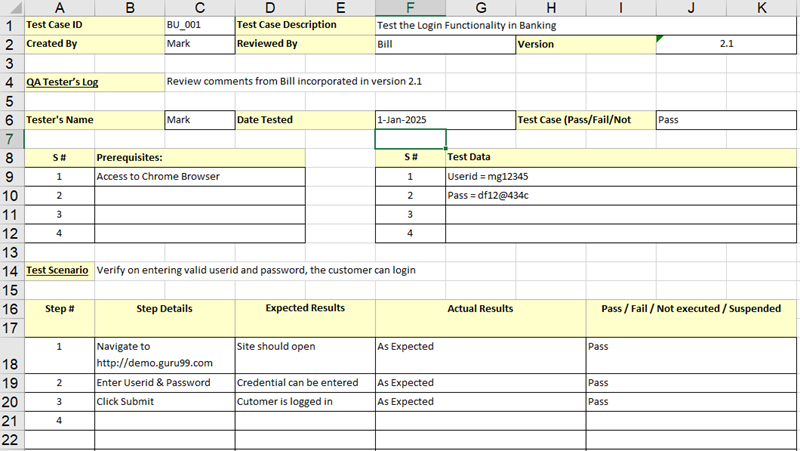
Download Test Case Template (Excel and Word)
Both templates contain the fields described above. Choose whichever format matches your team’s documentation style.
Best Practices for Writing Test Cases
A template is only as valuable as the discipline applied when filling it in. The practices below keep test cases reusable, traceable, and clear.
- Write each step clearly: any tester should be able to execute the steps without asking for clarification.
- Start from the user’s perspective: describe what the user does, not what the code does.
- Reuse instead of duplicating: reference an existing test case by ID instead of repeating its steps.
- Ensure full coverage: map test cases to requirements with a Requirement Traceability Matrix.
- Use a management tool: platforms such as JIRA or HP ALM keep version history, attachments, and execution logs in one place.
