
SAP CRM Sales Process & Management
 Editorial Team
⚡ Smart Summary
SAP CRM Sales Process enables organizations to manage the complete sales cycle across direct sales, channel sales, telesales, and e-selling channels, maximizing sales force productivity and customer satisfaction to rapidly grow revenues.

SAP CRM supports the implementation of a complete sales cycle as per customer-specific requirements, maximizing sales force productivity, ensuring customer satisfaction, and rapidly increasing revenues.

With SAP CRM Sales, the complete sales cycle can be managed across different sales channels: direct sales, channel sales, telesales, and e-selling.
SAP CRM Sales Business Role
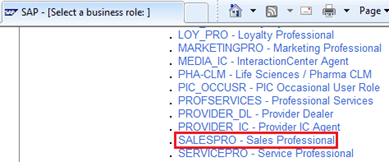
SAP CRM offers a predefined Business Role [Sales Professional – SALESPRO] for the sales representatives of an organization.

With this role, SAP standard functionalities related to Account Management, Activities, Sales Cycle, Pipeline Management, and Sales Management can be performed by sales representatives.


SAP CRM Sales also offers a Sales Assistant that sales representatives use to plan sales activities within sales cycle processes. Sales methodologies elements — including buying centre, competitor analysis, and project goals — can be incorporated into an opportunity while preparing the customer value proposition.
General Sales Cycle Steps
- A sales representative receives a qualified lead (Hot Lead).
- When the Hot Lead is accepted, the system creates an Opportunity.
- Within SAP CRM, the actual sales process begins with an opportunity. Using a Lead to create the Opportunity is not mandatory.
- The sales representative contacts the customer and updates the opportunity with further data.
- Activities available in the Sales Assistant can be activated or new activities created. These activities can be configured for different stages of the Opportunity.

- The Opportunity must be evaluated by the sales representative with a positive or negative decision.
- An Opportunity ends with creation of a quotation or rejection by the customer.
- The solution derived from the opportunity is presented to the customer, and the sales representative creates a quotation.
- Once the sale representative secures agreement based on the quotation, a sales order can be created.
- Delivery is not part of SAP CRM; it is handled through integration with a back-end SAP ERP system.
- Billing for sales orders can be performed within SAP CRM.
- SAP CRM integrates with SAP BI to analyze the complete sales project based on opportunity outcomes.
Opportunity Management
- An opportunity represents a possibility for the sale of services or products.
- A bid invitation, a sales deal, or a trade fair can result in an opportunity.
- An Opportunity can also be created from a Hot Lead, which is a business transaction in the Marketing process.
- SAP CRM offers Opportunity as a business transaction document presenting various aspects of sales prospects — including requested products and services, budget, expected sales volume, and estimated sales probability.

With SAP CRM Opportunity Management, an organization can maintain and track a sales project at different stages, providing options for analysis and optimization of customer-specific business processes.

- For a Sales Cycle, various sales stages can be configured in customizing per the customer-specific business process.
- Each sales stage can have planned activities that the sales employee activates using the Sales Assistant.


The above 2 images display Assignment Blocks in the Create page for an Opportunity.
An opportunity document in SAP CRM contains data related to the Sales cycle, forecast data, opportunity classification, product data (maintained in the Items Assignment Block), and information related to activities, competitor products, sales team, and attachments.
- A change in the sales stage for an Opportunity triggers recalculation of forecast data; completing a sales stage determines the probability of sale.
- Forecast data contains the expected volume of the sale in terms of product quantity and product value.
An opportunity can be classified based on Opportunity Group (such as existing customer or new customer), its origin (such as trade fair), and its priority.
- These data can be used in the analysis of Opportunity Management across your company.
In product data (maintained within the Items assignment block), expected product quantity and product value can be maintained at each item level.

- This also reflects in the expected value of the Opportunity in the forecast data at the document level.
- It is possible to save an Opportunity with an incorrect product ID or description, which is useful when product information is not clear at the early stage of the sales cycle.
SAP CRM also provides functionality to search and maintain competitor products in the Opportunity document. This relationship between products must be maintained in CRM product master data.
SAP CRM Sales offers Sales Stage History, which presents data related to each completed sales stage for the Opportunity. SAP CRM is also integrated with SAP BI for analysis of Opportunity Management data at different sales stages and from forecast data.
Quotation Management
A quotation is a legally binding agreement with your customer to deliver a specific product within a specified timeframe at a pre-defined price.

- In SAP CRM Sales, quotations are created as follow-up documents for opportunities.
- A quotation can be copied or converted to a sales order.
- It is also possible to create a quotation with reference to an inquiry.
- A validation period is maintained within which the customer can place, modify, or cancel the order.
Quotation Management includes the following processes:
- Create a quotation in the system
- Create items for the quotation
- Add products requested by the customer
- Perform ATP check of products for each quotation item
- Determine the pricing of individual items
- Send the quotation to the customer
- Create activities as part of a Quotation document
The Quotation document also includes order probability, validity, alternative items, actions, and availability check data.
Product Proposal
SAP CRM offers product proposal functionality within a Quotation document, allowing you to propose products that a customer may be interested in while entering the Quotation.
Product proposal functionality can be implemented using:
- Transaction history of the customer, which includes previous sales orders.
- Marketing projects in which the customer has been involved.
- For these proposed products, ATP check and price calculation can be performed.

The following types of product proposals are available:
- Cross-selling
- Up-selling
- Down-selling
- Accessories
- Top-n product lists
Sales Order Management
SAP CRM Sales order processing is used to create and process a sales order and to trigger logistics processing in the integrated back-end SAP ERP system. The following are possible sources for creating Sales Orders in CRM:

- SAP ERP
- Directly in CRM
- IC Web Client
- Mobile Sales
- Internet Sales Application (E-Commerce)
- Handhelds

Sales orders can be created as follow-up documents to one or multiple existing quotations.
- To create a sales order from multiple existing quotations, the organizational data of all quotations must match.
- The remaining header data is copied from the first quotation selected.
Sales order processing in SAP CRM consists of the following steps:
- Create a sales order with the requested product
- Perform ATP check
- Maintain and determine the pricing conditions
- Integrated ERP system performs credit check
- System replicates to and receives from SAP ERP
- Order confirmation is sent to the customer
Outbound delivery activities such as picking, packing, transport, and goods issue take place in the integrated SAP ERP system.
The billing process within SAP CRM is used for creating customer invoices.
- A billing document can be created with reference to the sales order, delivery, or contract depending on customizing settings.
General data entered at the header level of the sales order includes transaction types, requested delivery date, employee responsible, contact person, sold-to party, and ship-to party.
- Required products and quantities are entered at the item level.


SAP CRM offers functionality to configure products as part of the Internet Pricing and Configurator (IPC) application.
- This application integrates with SAP CRM Sales so that a user can configure a product and place a sales order for it in the same interface.
- A configurable product is maintained with characteristics that can have multiple values.
- The customer sets values for characteristics as required and then places an order for the configured product.
For analyzing quotation and sales order processing, SAP BI provides standard reports. For example:
- 0CRM_QUTO_Q0001 – Monitor top 5 quotations
- 0CSAL_C03_Q0001 – Monitor incoming sales orders
SAP CRM offers functionality to determine pricing information for a sales order.
- The system automatically calculates the gross price, discounts, and surcharges applicable for your customer at a specific time.
- SAP CRM uses pricing condition techniques for maintaining and determining pricing.
- A condition group can be assigned to the Business Partner, Product, or customer hierarchy.
Other Features in Quotation and Sales Order Management
SAP CRM Sales processing includes several well-featured functionalities: product determination, listing and exclusion, free goods, and availability check. These features are used at different stages of sales processing within SAP CRM Sales.
Product Determination
During sales document processing, the system can automatically determine and substitute products.
- Using the condition technique, a product determination procedure can be configured.
- This product determination procedure is then assigned to a transaction type.
- When a sales document is created for this transaction type and a product is entered, the product determination procedure is triggered.
- This configuration is used when product substitution is required in a sales document.
- Product determination is not used to substitute an unavailable product with an available one.

- For unavailability substitution, the rule-based ATP check in SAP APO should be used.
- Product determination is supported with CRM Mobile Sales and the IC WebClient.
Listing and Exclusion
Listing and Exclusion for a particular account specifies which products are permissible or not permissible for that account within a specific timeframe for a particular business transaction.
- There are two approaches to implement this:
- PPR – Partner/Product Range (without condition technique)
- A newer approach using condition technique
With PPR, assignment of business partners, products, and timeframe is done through customizing settings.
In the newer approach, Listing determines whether a product is valid or invalid. The Listing consists of a header (containing the condition technique) and items (containing PPR information).

Free goods enable quantity discounts by offering a product for free when a customer orders a certain quantity. This feature is also implemented using the condition technique in two ways:
- Inclusive free good: the discount is applied when a certain quantity of product is purchased.
- Exclusive free good: a certain quantity of product is offered for free when some predefined quantity of product is purchased.
Contract Management
Through different SAP CRM channels, SAP CRM Sales offers Contract Management embedded into the sales cycle. A contract is an agreement with a customer based on agreed conditions related to price, target value, or target quantity, allowing the company to release products or services accordingly.
Contracts can be created based on a won opportunity. The sales employee and customer agree to favorable conditions, after which the sales order is created. The customer accepts the contract, the sales manager releases it, and the customer can then order products against the released contract. Near the contract completion date, the sales representative can contact the customer to negotiate renewal.
Sales orders created are linked to the contract as follow-up documents, maintaining a complete record of all sales order information.
SAP CRM offers two types of contract:
- Quantity contract: an agreement in which the customer will buy a certain quantity of a particular product within a specified timeframe.
- Value contract: an agreement in which the customer will buy a certain value of a particular product within a specified timeframe.

The following are relevant status values for a CRM sales contract:
- Open – Set by default when the contract is created.
- In Process – Set while negotiating the contract with the customer.
- Released – Set when a contract item is ready and can be used to release products and create sales orders.
- Completed – Set for items whose validity has expired or whose target value or quantity has been fully released. Once an item reaches this status, products can no longer be released against it.
To create an order against a contract, open the contract and create the order as a follow-up document. Alternatively, create the order and use contract determination to fetch possible contracts, then select the appropriate one. The order maintains a release order list and checks against the agreed maximum quantity and value.
