
SAP CRM Marketing: Plan & Campaign Management
 Editorial Team
⚡ Smart Summary
SAP CRM Marketing is a core module that enables organizations to plan, execute, and automate marketing campaigns while leveraging segmentation and personalized communication across multiple channels.
Introduction
Marketing is a major module provided by SAP CRM, alongside Sales and Service.

SAP CRM provides a wide range of capabilities to implement marketing-related business processes.

- Marketing capabilities can be customized to match customer-specific business processes.
- Marketing capabilities integrate with other CRM modules and external systems.
- All SAP CRM marketing capabilities integrate with inbound and outbound communication channels.

SAP CRM Marketing analytics provides:
- A robust set of analytics around customers and products
- Coverage ranging from basic reporting to advanced analytics
- Predictive models and scores
- Optimization capabilities
The major SAP CRM Marketing capabilities include:

- Segment and List Management capabilities are delivered through an easy-to-use graphical, interactive tool.
- This tool supports importing external data such as rented or purchased lists, and creating new customer attributes.
- Customizing settings for SAP CRM Marketing are integrated into transaction SPRO, accessible through the SAP GUI.

Marketing Plans and Campaign Management
SAP CRM allows you to view marketing projects from three perspectives:
- Marketing Calendar: Provides an overview of all marketing projects for a defined time range.
- Marketing Plan: Provides a hierarchical view of planned marketing activities.
- Campaign Automation: Offers a Java applet-based process view for automated campaigns.

SAP CRM Marketing projects include elements at both the Strategic Planning Level and the Operative Task Level.
- At the Strategic Planning Level, the Marketing Plan defines the overall marketing concept, including targeted market share, budget, and other strategic goals.
- Marketing plans use a hierarchy of marketing elements and support top-down budget allocation to brands, regions, and so on.
- One or more campaigns can be assigned to each marketing plan.
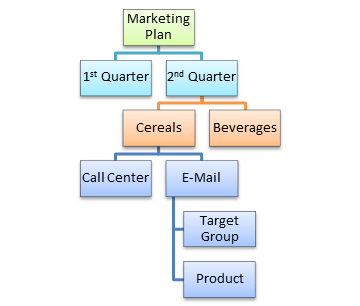
At the Operative Task Level, Campaigns and Promotions focus on execution. In a campaign you can define:
- Event characteristics such as dates, objectives, and tactics
- Execution parameters such as products and prices
- Intended audience as a target group or customer segment
The Type field in a marketing plan or campaign acts as the controlling element. It defines appropriate objectives and tactics, as well as default attributes such as action profile and status profile. Relationships between types, objectives, and tactics are configured in SAP CRM Marketing customizing.
Default system statuses for CRM Marketing elements are:
- Created
- Approved
- Locked
- Released
User statuses can also be defined in customizing and assigned to specific campaign types. The current status (or combination of statuses) determines the business transactions that can be executed for a marketing element.
A marketing element has its own lifecycle, beginning at creation and ending with closure or cancellation. During this lifecycle it passes through several system statuses. Marketing organization is assigned in the General Data of marketing plan and campaign details.

The Integrated Marketing Calendar is an Adobe Flex-based central entry point that gives an overview of all planned and running marketing activities for a given time range. It supports:
- Creating new marketing projects and rescheduling existing ones
- Drag-and-drop date changes
- Mass assignment of products, product groups, or product hierarchies to marketing projects in a single step
Product assignment options are configured through customizing settings for Product Assignment, Product Group Assignment, and Assignment of Product Groups/Product Hierarchies.

Partner determination procedures can be used to work with partners in a marketing object and can be made campaign-type-dependent. The Involved Parties assignment block in the Web UI manages business partners involved in a campaign.
You can define the communication channel for a campaign to specify the medium used for outreach. Campaign execution can be based on each business partner’s preferred communication method (e-mail, phone, and so on). Where no preferred method is set, priority-based backup methods apply, for example: phone first, then e-mail, letter, and fax.
Prerequisites to execute an e-mail campaign:
- A campaign must exist
- A target group must exist
- An e-mail form must exist
- The sender address must be configured
Segmentation
Segmentation in SAP CRM Marketing covers the following major processes:
- Creating attributes for business partner segmentation
- Maintaining data sources for segmentation

- Using the Graphical Modeler: data flow and integration
- Creating a segmentation basis and performing de-duplication

Marketing attributes are created to characterize business partners. These attributes can represent regional affiliation, hobbies, spending history, and similar characteristics. Multiple data sources can be defined to build target groups.

Target groups are then used with marketing activities to address a specific group of customers or prospects. The Business Partners Segmentation process is shown below:

Target groups are created using the Segment Builder. Key segmentation objects include:
- Segmentation Models: Do not require target groups or segments; can contain subsets.
- Segments: Assigned to exactly one segmentation model; cannot have target groups directly assigned. To use a segment in a different model, it must be recreated by copying.
- Target Groups: Can only be assigned once; Marketing Planner can use only active target groups.

Personalized Mails
Personalized mail sends tailored marketing information to members of target groups. The Form Builder application supports personalized communication through the following channels:
- E-Mail (Plain Text or HTML)
- SMS
- Fax
Using the mail form builder tool, you can:
- Personalize messaging to target list members
- Assign mail forms to campaign target lists
- Embed URLs to websites in generated e-mails
- Insert subject lines dependent on conditions
Mail Form capabilities include:
- Defines the layout and content of marketing information
- Supports direct marketing campaigns
- Integrated editor for text or HTML source code
- Controls mail form formatting
- Enables insertion of graphics and attachments
- Allows setting the communication channel and default values
- Supports layout mode and source code mode
- Attribute context populates data dynamically
- Supports conditional text blocks for flexible output

Campaign Automation
Campaign automation creates campaigns based on predefined criteria so they execute without manual intervention. Predefined conditions can be based on time frameworks, customer responses, or other campaign relationships.
Campaign automation enables you to:
- Automate multi-wave marketing campaigns across multiple channels
- Model recurring campaign processes
- Execute campaigns automatically without manual action
Elements of campaign process modelling:
- Campaign: Depicts the start node of a campaign process. A campaign process contains exactly one campaign.
- Campaign Elements: Individual steps within a campaign process, created within the process modelling area. Each depicts an action point in the campaign process.
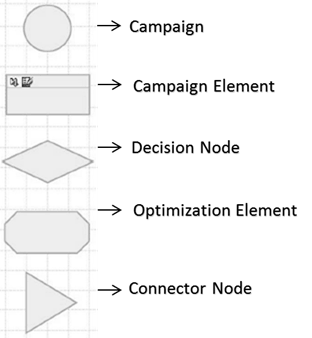
- Decision Node: Controls follow-up steps when a response is received from a customer or prospect.
- Optimization Element: Optimizes the campaign for probability, taking business constraints into account.
- Connector Node: Used to jump into another event-triggered campaign.
