
SAP CRM Business Transaction Process
 Editorial Team
⚡ Smart Summary
Business Transaction Processing in SAP CRM models every customer-facing interaction your organization performs, from sales orders to follow-up activities, using transaction types, item categories, and shared basic functions for consistent execution.
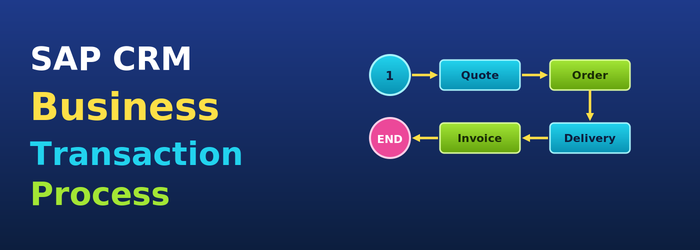
What is a Business Transaction?
- Business Processes in SAP CRM:

- A business transaction provides the structure and functions used across a company’s processes. In SAP CRM, it represents your organization’s interaction with various business partners.
- It enables the same interface and processing concepts across business processes.
- Components of business transactions can be reused.
- Within one transaction, items can come from different business contexts.
- Independent of the transaction type, the look and feel of business transactions in SAP CRM is always similar.
Structure of Transactions
- Any company-specific business process can be flexibly controlled and managed with business transactions in SAP CRM.
- SPRO path -> Customer Relationship Management -> Transactions -> Basic Settings

SPRO path for Business Transaction configuration
- A business transaction in SAP CRM consists of a leading business transaction category.
- The structure of a CRM business transaction depends on the leading business transaction category.
- A CRM business transaction consists of the header level and the item level (Fig. 2 & Fig. 3).

Header (General) and Item Data representation in a Business Transaction

Header (General) and Item Data representation in a Business Transaction
Transaction Types Item Categories and Category Description
- Transaction Type structure:

- A transaction type defines:
- attributes
- characteristics
- controlling attributes
- In SAP CRM, business transaction processing is controlled by a transaction type.
- The leading business transaction category in a transaction type controls:
- specific settings that can be applied on a lower level
- other business transaction categories to which it could be assigned
- detailed control of the transaction
- The properties and attributes of a business transaction item are specified by an item category.
- An item category controls how the item is processed.

- First, an item category needs to be assigned to an item object type that defines the business context in which the item category is used.

- Similar to transaction types, an item category can be assigned to one or more business transaction categories.
- Specific settings applied to item categories on a lower level depend upon the leading item category (object type).
- In SAP CRM, for processing business transactions, default item categories need to be defined per business transaction category and item category group.
- It is also possible to define alternative item categories that can be entered manually instead of the system default.

- Item category determination depends on:
- Transaction Type
- Item Category Group
- Item Category Usage
- Main Item Category
- Item Category Group is a field in the product master.
- Item Category Usage comes from the programming logic.
Copy Transaction or Follow up transaction
- A follow-up transaction represents the next business transaction in the current business process.
- For example, from a released Sales Contract, Sales Orders can be created.
- In this case, the Sales Order is viewed as a follow-up document for the Sales Contract.
- Also, a business transaction can be copied to create another transaction of the same business transaction type.
- For example, a sales order can be copied to create another sales order.
- From an existing business transaction it is possible to create a copy or to create a follow-up transaction.
- When a business transaction is copied:
- the transaction type is the same
- header and item data is copied
- transaction history is not updated
- no relation to the source transaction is maintained
- When a follow-up transaction is created from a business transaction:
- it is possible to configure the transaction type for the follow-up transaction
- header data is copied
- you can select items
- transaction history is updated
- copy control settings should be maintained for this purpose
- this flow can be seen in the Transaction History assignment block

- The required settings in the copy control are:
- Copy control for transaction types
- Copy control for item categories
- Settings for the target transaction type
- Determination of the item category during the copy (optional)
- Implementation of CRM_COPY_BADI (optional)
- In SAP CRM, the BAdI definition CRM_COPY_BADI is provided for implementation to write your own data transfer routines.
- You can access the interlinkage between business transactions at header and item level through the transaction history data.
- SAP CRM also provides the Subsequent Referencing option, where you can link an activity to an existing activity while it is being created.
- This makes the new transaction a follow-up to the existing one (Fig. 4).
Basic Functions in Business Transactions
- Basic functions in Business Transactions:
- Text Determination
- Date Management
- Status Management
- Incompleteness Check
- Partner Processing
- Action Processing
- Pricing
- For each business transaction in SAP CRM, it is possible to maintain different notes.

- As per the requirement, it is possible to combine a number of text types in the text determination procedure.


- Text determination procedures are used in business transactions for different relevant texts.
- CRM Web UI provides assignment blocks to:
- Create a new text with a particular text type.
- Display the text in the business transaction.
- Modify the particular text.
- With date management it is possible to process the dates that are relevant for a business transaction.
- It consists of:
- Date type
- Date rule
- Duration
- Date Profile
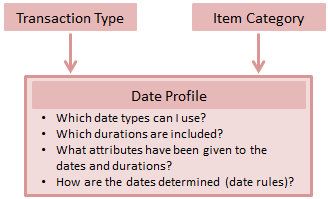
- This date management system also supports the conversion of saved dates to user time zones and considers the factory calendar in a business transaction.

- Dates in a business transaction can be entered manually or can be calculated by the system using date rules.

- Status management allows maintaining user statuses in a status profile for business transactions.
- It consists of a status profile that is assigned to a business transaction.
- If the status profile is not assigned to a business transaction type or item category, system statuses are displayed in the application.
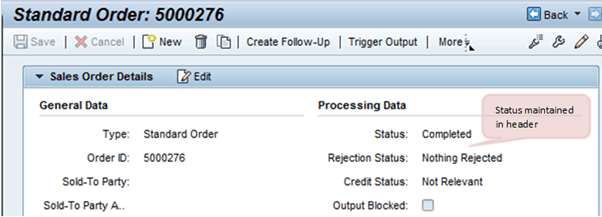
- The following can be defined in a status profile:
- Activation sequence of user statuses
- An initial status or start status
- A set transaction status connected with a user status
Activity Management
- Activity management is an example of a business transaction in SAP CRM.
- An activity represents an action performed by an employee in the organization.
- It also covers interactions between the employee and a business partner involved in the transaction.
- Activities can be linked as follow-ups to transactions like Sales Order or Service Order, across CRM modules such as Sales, Marketing, and Services.
- Technically –
- Information about an interaction with a business partner on a particular date is stored in a Business Activity.
- Information about activities employees must complete by a particular date is stored in a Task.
- SAP CRM offers different activity types to cover different communication channels with business partners.
- Types of activity:
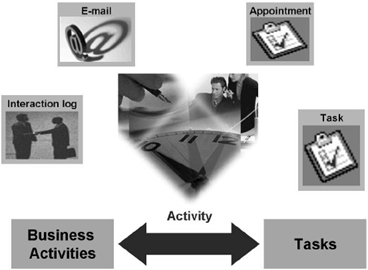
- Like other transaction types, activities contain data related to the business process, for example the interaction with a business partner.
- Structure of activities:

