
What is Model Based Testing?
 Thomas Hamilton
⚡ Smart Summary
Model Based Testing checks the runtime behavior of software against predictions made by an abstract model of the system, generating test cases automatically from finite state machines, statecharts or UML notations rather than by hand.
What is Model Based Testing?
Model Based Testing is a software testing technique where the run time behavior of the software under test is checked against predictions made by a model. A model is a description of a system’s behavior, expressed in terms of input sequences, actions, conditions, output, and the flow of data from input to output. A usable model has to be practically understandable, reusable and shareable, and it must describe the system under test precisely.
There are numerous models available, and each one describes a different aspect of system behavior. Common examples are:
- Data flow
- Control flow
- Dependency graphs
- Decision tables
- State transition machines
Model Based Testing describes how a system behaves in response to an action determined by the model. Supply the action, then check whether the system responds as the model predicts. Any divergence between the two is either a defect in the software or an error in the model, and both are worth finding.
It is a lightweight formal method for validating a system, and it applies to hardware testing as readily as to software testing. Because the tests come from a specification of behavior rather than from the code, the technique sits with the black box testing family of software testing techniques.
Model Based Testing Example
The simplest way to read a behavioral model is to follow one through. The diagram below models a small text-editing task, with each box representing a state the application can be in and each arrow representing an action a user can take.

The model explains a simplified approach to writing poetry in Notepad and the possible actions related to each step. For every action, such as starting the application, entering a poem or saving the file, a test case can be generated and the output verified. Walking a different path through the same diagram, for example starting and closing without saving, produces a different test case at no extra design cost, which is the economic argument for the whole technique.
Types of MBT
There are two types of Model Based Testing frameworks, and the difference between them is simply when the test steps are produced:
- Offline / a priori: Generation of test suites before executing them. A test suite is a collection of test cases, and in this mode the suite is stored, reviewed and re-run like any other automation testing asset.
- Online / on-the-fly: Generation of test suites during test execution, where the next step is chosen based on how the system actually responded to the previous one.
Offline generation suits regulated environments that need a reviewable, repeatable suite. Online generation suits long-running exploratory sessions against stateful systems, because the generator can react to the real response rather than to the predicted one.
How Model Based Testing Works
Whichever framework is used, the technique follows the same five stages. Each stage produces an artifact the next stage consumes, which is why the model, and not the test script, becomes the thing the team maintains.
- Step 1: Build the model. Translate requirements or a specification into an abstract model of expected behavior, defining the states, the transitions between them, and the inputs that trigger each transition.
- Step 2: Choose the test selection criteria. Criteria tell the generator when to stop. Common ones are all-states coverage, which visits every state at least once; all-transitions coverage, which exercises every arrow at least once; and path or data-flow coverage for deeper exploration.
- Step 3: Generate abstract test cases. The tool walks the model and emits sequences of abstract steps that satisfy the chosen criteria, together with the expected result at each step.
- Step 4: Concretize the abstract tests. An adapter layer maps each abstract step onto a real action against the system, such as a UI interaction, an API call or a protocol message. This mapping is written once and reused by every generated test.
- Step 5: Execute and assign verdicts. The concrete tests run against the system under test, each observed response is compared with the model prediction, and a pass or fail verdict is recorded and traced back to the model element that produced it.
The traceability created in step 5 is the practical payoff. When a requirement changes, the model changes, and the affected tests are regenerated rather than rewritten, which is why teams doing frequent regression testing against a stable specification benefit most.
Different Models in Testing
In order to understand MBT it is necessary to understand some of the models explained below. Each one trades expressive power against effort, so the choice depends on how complicated the behavior under test really is.
Finite State Machines
This model helps testers assess the result depending on the input selected. Various combinations of the inputs can result in a corresponding state of the system.
The system will have a specific state and a current state, which is governed by a set of inputs given by the testers.
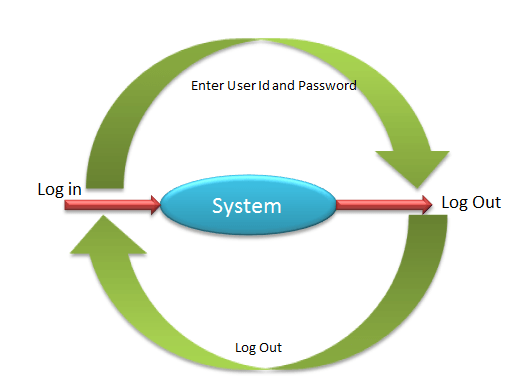
Consider the example below. A system allows employees to log into an application. The current state of the employee is “Out”, and it becomes “In” once the employee signs into the system. Under the “In” state, an employee can view, print, and scan documents in the system.
The state machine for that example is shown here, with each arrow labelled by the input that causes the transition.
State Charts
A statechart is an extension of the finite state machine and can be used for complex and real time systems. Statecharts describe various behaviors of the system, they have a definite number of states, and the behavior of the system is analyzed and represented in the form of events for each state. The extension that matters in practice is hierarchy: a statechart allows nested and parallel states, so a machine that would need dozens of flat states can be drawn compactly.
For example, defects are raised in the defect management tool with the status New. Once a defect is fixed by developers, the status has to be changed to Fixed. If a defect is not fixed, the status changes to Re-open. Statecharts should be designed so that an event is called for each state.
That defect lifecycle is drawn below, with each status shown as a state and each workflow action as the event that moves the defect between them.

Unified Modeling Language (UML)
Unified Modeling Language (UML) is a standardized general-purpose modeling language. UML includes a set of graphic notation techniques used to create visual models that can describe very complicated system behavior.
UML has notations such as:
- Activities
- Actors
- Business process
- Components
- Programming language
The activity and state machine diagrams are the ones test generators read most often, as the sample UML model below illustrates.

Model Based Testing Tools
A model on paper generates nothing on its own. A generator is needed to walk the model and emit test paths, and the tool market splits into open-source generators and commercial test-design platforms.
- GraphWalker — an open-source tool that reads models shaped as directed graphs and generates test paths from them, with selectable generators and stop conditions.
- fMBT — an open-source model-based testing tool set from Intel that supports test generation and execution against state models.
- Conformiq — a commercial automated test-design product that derives test cases and scripts from graphical behavioral models.
- MaTeLo and MBTsuite — commercial platforms aimed at statistical usage models and at generating tests into existing automation frameworks.
- Spec Explorer — Microsoft’s model-based testing extension for Visual Studio, widely cited in the protocol-testing literature.
Selection depends less on feature lists than on two questions: which notation the team can actually draw, and whether the tool can emit tests into the automation framework already in use. A generator that produces suites nobody can execute adds a step to the process instead of removing one.
Model Based Testing vs Traditional Test Design
The contrast with hand-written test design is worth setting out, because the two approaches fail in different places rather than one being simply better.
| Aspect | Model Based Testing | Traditional test design |
|---|---|---|
| Source of test cases | Generated automatically from a behavioral model | Written individually by a tester from requirements |
| Effect of a requirement change | Update the model, regenerate the affected tests | Locate and edit each affected test case by hand |
| Coverage | Measured against model criteria such as all-states or all-transitions | Measured against requirements, and dependent on tester judgement |
| Upfront cost | High: modelling skill, tool setup and an adapter layer | Low: a tester can start writing immediately |
| Best fit | Stateful, long-lived systems with a stable specification | Short projects, one-off features and exploratory work |
| Main failure mode | A wrong or stale model silently generates wrong tests | Gaps and duplicates accumulate across a large suite |
The evolution below places the technique in context: manual test execution gave way to automated execution, and model-based approaches move the automation one level earlier, into test design itself.

Challenges of Model Based Testing
Deployment of MBT in an organization requires a considerable investment of money and effort. The following are the drawbacks of MBT in software engineering:
- Testers need modelling skills that traditional test design does not demand.
- The learning curve is long, and the first project usually costs more than it saves.
- The model itself can be difficult to understand and review, particularly once it grows.
- A model that drifts out of step with the specification generates confident, wrong tests.
- The adapter layer that turns abstract steps into real actions has to be written and maintained separately.
- Model size grows quickly, so an unconstrained state model can produce more paths than any team can execute.
None of these is a reason to avoid the technique, but together they explain why MBT is usually introduced on one stable subsystem first rather than across an entire software testing life cycle at once.
Advantages of Model Based Testing
Set against those costs, the benefits of MBT are:
- Easy test case and test suite maintenance, because the model is edited rather than the individual tests.
- Reduction in cost over the life of a long-running project.
- Improved test coverage, since the generator explores paths a person would skip.
- Different generated suites can run on any number of machines in parallel.
- Early defect detection, because ambiguities surface while the model is being built, before any code is executed.
- An increase in the number of defects found for the same testing effort.
- Time savings on test design once the model and adapter exist.
- Improved tester job satisfaction, as effort shifts from repetitive scripting to modelling and analysis.
Testers construct mental models anyway while they work, and MBT simply moves those mental models onto paper where they can be reviewed, versioned and reused. Where the technique fits alongside the other approaches available is set out in types of software testing.
