
Java Math – ceil() Floor() Methods
 Editorial Team
⚡ Smart Summary
Java Math Class (java.lang.Math) supplies static methods for absolute value, rounding, ceiling, floor, minimum, maximum, exponential, logarithmic, and trigonometric operations. These built-in functions replace manual calculation, enabling accurate scientific computation directly within any Java program.
What is the Java Math Class?
Java has had several advanced usage applications, including working with complex calculations in physics, architecture and structural design, working with maps and corresponding latitudes and longitudes, and more.
All such applications require complex calculations and equations that are tedious to perform manually. Programmatically, such calculations would involve the usage of logarithms, trigonometry, exponential equations, and similar operations.

Now, you cannot have all the log or trigonometry tables hard-coded somewhere in your application or data. The data would be enormous and complex to maintain.
Java provides a very useful class for this purpose. It is the Math Java class (java.lang.Math). This class provides methods for performing operations like exponential, logarithm, roots, and trigonometric equations too.
The two most fundamental elements in mathematics are “e” (the base of the natural logarithm) and “pi” (the ratio of the circumference of a circle to its diameter). These two constants are often required in the above calculations and operations. Hence, the Math class in Java provides these two constants as double fields:
- Math.E – having a value of 2.718281828459045
- Math.PI – having a value of 3.141592653589793
Let us have a look at the table below that shows the Basic methods and their descriptions:
| Method | Description | Arguments |
|---|---|---|
| abs | Returns the absolute value of the argument | Double, float, int, long |
| round | Returns the closest int or long (as per the argument) | double or float |
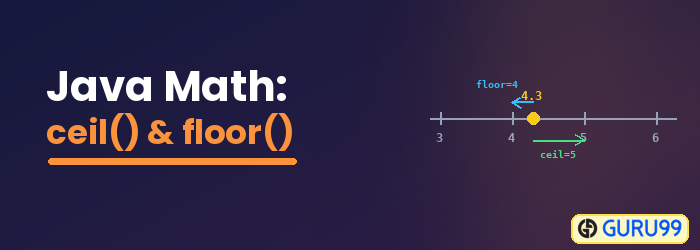
| ceil | Math ceil function in Java returns the smallest integer that is greater than or equal to the argument | Double |
| floor | Java floor method returns the largest integer that is less than or equal to the argument | Double |
| min | Returns the smallest of the two arguments | Double, float, int, long |
| max | Returns the largest of the two arguments | Double, float, int, long |
Below is the code implementation of the above methods.
Note: There is no need to explicitly import java.lang.Math, as it is imported implicitly. All its methods are static.
Integer variables:
int i1 = 27;
int i2 = -45;
Double (decimal) variables:
double d1 = 84.6;
double d2 = 0.45;
Java Math abs() method with Example
The Java Math abs() method returns the absolute value of the argument.
public class Guru99 {
 public static void main(String args[]) {
  int i1 = 27;
  int i2 = -45;
  double d1 = 84.6;
  double d2 = 0.45;
  System.out.println("Absolute value of i1: " + Math.abs(i1));
  System.out.println("Absolute value of i2: " + Math.abs(i2));
  System.out.println("Absolute value of d1: " + Math.abs(d1));
  System.out.println("Absolute value of d2: " + Math.abs(d2));
 }
}
Expected Output:
Absolute value of i1: 27
Absolute value of i2: 45
Absolute value of d1: 84.6
Absolute value of d2: 0.45
Java Math.round() method with Example
The Math.round() method in Java returns the closest int or long as per the argument. Below is an example of the Math.round Java method.
public class Guru99 {
 public static void main(String args[]) {
  double d1 = 84.6;
  double d2 = 0.45;
  System.out.println("Round off for d1: " + Math.round(d1));
  System.out.println("Round off for d2: " + Math.round(d2));
 }
}
Expected Output:
Round off for d1: 85
Round off for d2: 0
Java Math.ceil() and Math.floor() method with Example
The Math.ceil() and Math.floor() methods in Java are used to return the smallest and largest integer that are greater than or equal to (and less than or equal to) the argument, respectively. Below is the Math floor and ceiling Java example.
public class Guru99 {
 public static void main(String args[]) {
  double d1 = 84.6;
  double d2 = 0.45;
  System.out.println("Ceiling of '" + d1 + "' = " + Math.ceil(d1));
  System.out.println("Floor of '" + d1 + "' = " + Math.floor(d1));
  System.out.println("Ceiling of '" + d2 + "' = " + Math.ceil(d2));
  System.out.println("Floor of '" + d2 + "' = " + Math.floor(d2));
 }
}
We will get the below output of the Math.ceil in Java example.
Expected Output:
Ceiling of '84.6' = 85.0
Floor of '84.6' = 84.0
Ceiling of '0.45' = 1.0
Floor of '0.45' = 0.0
Java Math.min() and Math.max() method with Example
The Java Math.min() method returns the smallest of the two arguments, while Math.max() returns the largest of the two arguments.
public class Guru99 {
 public static void main(String args[]) {
  int i1 = 27;
  int i2 = -45;
  double d1 = 84.6;
  double d2 = 0.45;
  System.out.println("Minimum out of '" + i1 + "' and '" + i2 + "' = " + Math.min(i1, i2));
  System.out.println("Maximum out of '" + i1 + "' and '" + i2 + "' = " + Math.max(i1, i2));
  System.out.println("Minimum out of '" + d1 + "' and '" + d2 + "' = " + Math.min(d1, d2));
  System.out.println("Maximum out of '" + d1 + "' and '" + d2 + "' = " + Math.max(d1, d2));
 }
}
Expected Output:
Minimum out of '27' and '-45' = -45
Maximum out of '27' and '-45' = 27
Minimum out of '84.6' and '0.45' = 0.45
Maximum out of '84.6' and '0.45' = 84.6
Java Math Exponential and Logarithmic Methods
Beyond the basic methods, the Java Math class also provides exponential and logarithmic operations. The table below shows these methods and their descriptions.
| Method | Description | Arguments |
|---|---|---|
| exp | Returns the base of natural log (e) to the power of the argument | Double |
| log | Returns the natural log of the argument | double |
| pow | Takes 2 arguments as input and returns the value of the first argument raised to the power of the second argument | Double |
| floor | Java math floor returns the largest integer that is less than or equal to the argument | Double |
| sqrt | Returns the square root of the argument | Double |
Below is the code implementation of the above methods (the same variables are used as above).
public class Guru99 {
 public static void main(String args[]) {
  double d1 = 84.6;
  double d2 = 0.45;
  System.out.println("exp(" + d2 + ") = " + Math.exp(d2));
  System.out.println("log(" + d2 + ") = " + Math.log(d2));
  System.out.println("pow(5, 3) = " + Math.pow(5.0, 3.0));
  System.out.println("sqrt(16) = " + Math.sqrt(16));
 }
}
Expected Output:
exp(0.45) = 1.568312185490169
log(0.45) = -0.7985076962177716
pow(5, 3) = 125.0
sqrt(16) = 4.0
Java Math Trigonometric Methods
The Java Math class further supports trigonometric operations. The table below shows these methods and their descriptions.
| Method | Description | Arguments |
|---|---|---|
| sin | Returns the sine of the specified argument | Double |
| cos | Returns the cosine of the specified argument | double |
| tan | Returns the tangent of the specified argument | Double |
| atan2 | Converts rectangular coordinates (x, y) to polar (r, theta) and returns theta | Double |
| toDegrees | Converts the argument to degrees | Double |
| sqrt | Returns the square root of the argument | Double |
| toRadians | Converts the argument to radians | Double |
The default arguments are in radians. Below is the code implementation.
public class Guru99 {
 public static void main(String args[]) {
  double angle_30 = 30.0;
  double radian_30 = Math.toRadians(angle_30);
  System.out.println("sin(30) = " + Math.sin(radian_30));
  System.out.println("cos(30) = " + Math.cos(radian_30));
  System.out.println("tan(30) = " + Math.tan(radian_30));
  System.out.println("Theta = " + Math.atan2(4, 2));
 }
}
Expected Output:
sin(30) = 0.49999999999999994
cos(30) = 0.8660254037844387
tan(30) = 0.5773502691896257
Theta = 1.1071487177940904
Now, with the above methods, you can also design your own scientific calculator in Java.
