
JMeter Distributed Testing: Master-Slave Configuration
 Thomas Hamilton
⚡ Smart Summary
Distributed testing in JMeter uses a master-slave configuration to generate load from multiple machines against a single target server. This walkthrough explains the client-server model and the exact steps to configure, run, and troubleshoot a remote JMeter test.
What is Distributed Testing?
Distributed Testing is a kind of testing that uses multiple systems to perform Stress Testing. Distributed testing is applied for testing websites and server applications when they are working with multiple clients simultaneously.
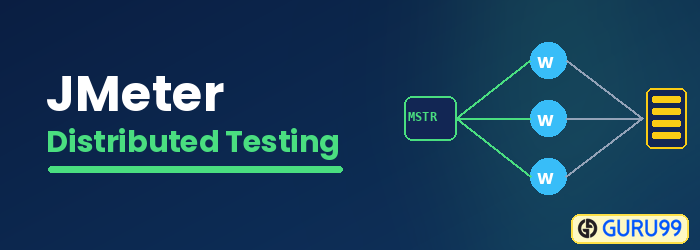
Distributed testing uses a client-server model, as shown in the figure below:

- Master: the system running the JMeter GUI, which controls each slave.
- Slave: the system running JMeter-server, which receives a command from the master and sends a request to a server under test.
- Target: the web server under test, which gets requests from the slaves.
Remote Test Example
Precondition:
- The firewalls on the systems are turned off. In some cases, the firewall may still be blocking the traffic. You should disable the Windows firewall or Linux firewall.
- All the machines should be on the same subnet. If machines are not on the same subnet, they may not recognize each other in the network.
- Use the same version of JMeter to avoid unanticipated errors/issues.
Here is the roadmap for this testing:
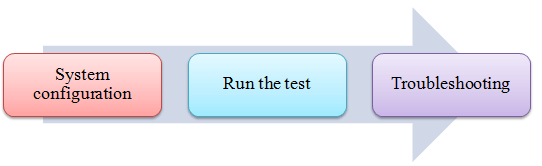
Step 1) System configuration
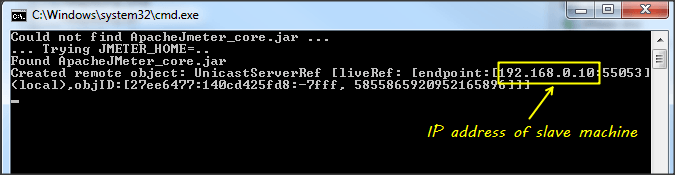
Set up the slave systems: go to the jmeter/bin directory and execute the file “jmeter-server.bat”.
Assume that a slave machine has the IP address 192.168.0.10. On Windows, you should see a window appear like the following figure:
On the master systems, go to the /bin directory and edit the file jmeter.properties, then add the slave machine IP as below:

Step 2) Run the test
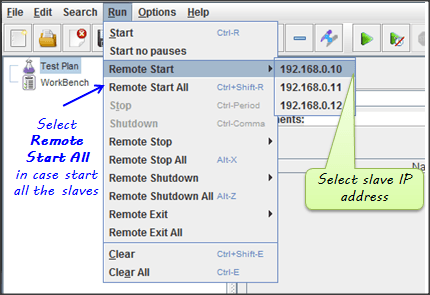
At this point, you are ready to start load testing. On the master machine, run the JMeter GUI and open the test plan.
Click Run on the menu bar, then select Remote start -> select the IP address of the slave machine.
Step 3) Troubleshooting
If you are unable to run the test from the above machine and see the below error, simply ask the owner of a slave machine to run the jmeter-server.bat file.

Disable the firewall on both the master and slave machines to fix this error.
Limitation
There are some basic limitations for distributed testing. Here is a list of the known items:
- The server and all clients must be on the same subnet.
- Distributed testing requires the target server to have large processing power. The target server could be easily overloaded in case it gets too many requests from distributed JMeter tests.
- A single JMeter slave system can typically handle a limited number of threads, ranging from 100 to 300 threads, depending on the hardware configuration and the complexity of the test plan.
- The distributed JMeter tests are complex and difficult for a beginner to build.
