
All About Internal Order in SAP
 Zinnia Sage
⚡ Smart Summary
Internal Order in SAP captures individual jobs within a controlling area, supporting action-oriented planning, monitoring, and cost allocation. It collects costs separately for activities such as trade fairs and settles them to responsible cost centers for accurate analysis.
What is an Internal Order in SAP?
An Internal Order in SAP is a Controlling (CO) object used to plan, collect, monitor, and settle the costs of a specific job, task, or activity within a controlling area. It acts as a temporary cost object that captures costs related to a single event or measure separately from the regular cost centers.
Internal orders give controllers a detailed view of where money is spent, support flexible planning and budgeting, and allow costs to be settled to a receiver such as a cost center or a fixed asset once the activity is complete. This makes them ideal for tracking short-lived or one-time initiatives.
Why Internal Order is Required?
Internal orders describe individual jobs within a controlling area. Orders support action-oriented planning, monitoring, and allocation of costs. You can use internal orders to:
- Monitor internal jobs settled to cost centers (overhead orders)
- Monitor internal jobs settled to fixed assets (investment orders)
- Offsetting postings of accrued costs calculated in CO (accrual orders)
- Display the cost controlling parts of Sales and Distribution that do not affect the core business of the company (orders with revenues)
We can use overhead orders for detailed controlling for a particular object or activity. All costs related to this object or activity are assigned to the relevant order. We can use orders as internal cost objects.
For example, if the company participates in 2 trade fairs to target new clients.
Without Orders, we post costs for the two trade fairs directly to the cost center responsible for supporting these events. As external costs and internal activities have the same cost elements on the same cost center, we cannot easily determine which event created which costs. This means that we cannot make any further analyses for comparison purposes.
A further advantage is the wide variety of planning and budgeting functions provided for orders.
With Orders, each event receives its own overhead order, so the costs are collected separately. The settlement function allocates the order costs to the cost center responsible for supporting the trade fairs, which provides you with the organizational view of the costs. This enables us to analyze and compare the results of the trade fairs, even after the settlement has been made.
How to Create an Internal Order
Once you understand why internal orders matter, the next step is to create one in the SAP system. Follow the steps below.
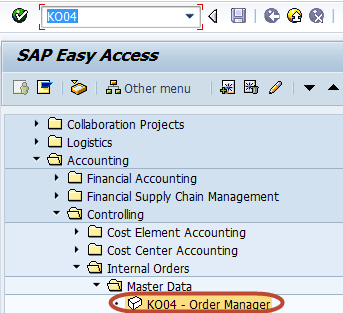
Step 1) Enter Transaction code KO04 (Order Manager) in the SAP Command Field.
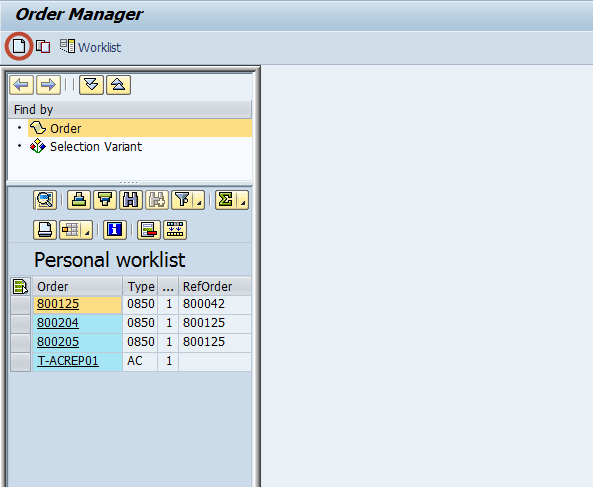
Step 2) In the next screen, press the ‘Create’ button in the application toolbar to create a new internal order.
Step 3) In the next dialog box, select the order type to be created.

Step 4) In the next screen, enter the following data:
- Enter the Company Code
- Enter the Business area
- Enter the Object Class of the Order
- Enter the Profit Center
- Enter the Cost Center responsible for the internal order

Step 5) Press the ‘Save’ button in the SAP standard toolbar to create the internal order.

Step 6) Check the status bar for the newly created internal order number.

