
How Object Identification works in QTP/UFT?
 Thomas Hamilton
What is Object Identification?
QTP also uses a “human” like technology for object identification. During Record, Time QTP tries to learn the properties of a GUI object on which operation is performed. During Run-Time, Micro Focus UFT compares the stored object properties with actual properties of the object available on screen and uniquely identifies an object independent of its location on a screen
The stored object and together with its properties is called TEST Object
During Run-Time, the actual object available on the application under test is called Run-Time Object
This is HP UFT’s “Test Object Model”
What is Object Repository?
Information about the Test Objects is stored in Object Repository
Add-ins help in instructing Quick Test in advance of the nature of the object to be recorded so it as to reduce the time required to learn its properties
Following video tutorial demonstrates how QTP identifies a GUI Object (on-screen)
Click here if the video is not accessible
QTP stores Object and its properties in the Object Repository to identify them during run-time. An Object could have a large number of properties associated with it. For example, in Web Environment, a Button could have the following properties associated.
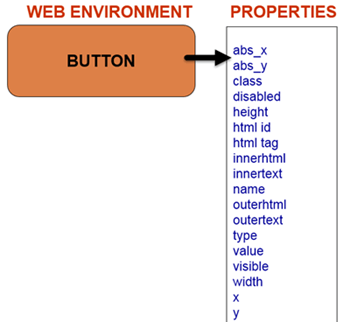
If QTP will try and remember all the available properties for an object, size of Object Repository will bloat and script execution time will increase drastically. To avoid this, QTP by default does not store all the properties of an object but a limited no of typical properties for an object which helps in its unique identification. This choice of properties(to be saved during record time) for various environments and objects is stored in Object Identification
Object Description, Mandatory & Assistive Properties
An object property and its value are called Object Description. The Object Description is used to uniquely identify the corresponding Object. For example, for a WebButton property “name” and its value “Login” together can be termed as Object Description for that Web Button.
To access, In QTP in Tools Menu, select Object Identification. In Object Recognition Dialog Box you can see a drop down of all the environments installed and loaded.
You can select an environment and QTP auto-populates list of all the supported objects belonging to that environment. On the right QTP lists the properties that will be stored for the object. The list is divided into
- Mandatory properties will be stored by default for that object
- Assistive properties In case during record time of script QTP can NOT create a unique description of the object it will store the assistive properties
To understand this better consider the example of a Web Image.

- QTP will store a value of alt, HTML tag, image type, properties mandatory even if it can uniquely identify it using the alt property alone.
- In case it cannot create unique description using mandatory property, QTP will store assistive property. In this case, QTP will store the class property.
- If this property helps create a unique description of the object, QTP will not store the file name, height property. If a class property is not sufficient to create a unique description, QTP will store filename property. If filename property creates a unique description QTP will not store height property and so on.
- Suppose during Record Time, QTP has only stored class property. At Runtime, QTP will forget the distinction between mandatory and assistive properties and compare all the recorded properties.
- Even if any one of the properties does not match its stored value, Script fails
