Java Reflection API Tutorial with Example
 James Hartman
⚡ Smart Summary
Java Reflection API analyzes and modifies the capabilities of a class at runtime, including its fields, methods, and constructors. This resource explains the java.lang.reflect package, the key methods of java.lang.Class, and four examples that read the metadata of a class, variable, method, and constructor.
What is Reflection in Java?
Java Reflection is the process of analyzing and modifying all the capabilities of a class at runtime. The Reflection API in Java is used to manipulate a class and its members, which include fields, methods, constructors, etc., at runtime.
One advantage of the Reflection API in Java is that it can manipulate the private members of the class too.
The java.lang.reflect package provides many classes to implement reflection. The methods of the java.lang.Class class are used to gather the complete metadata of a particular class.
Class in java.lang.reflect Package
Following is a list of various Java classes in the java.lang.reflect package to implement reflection:
- Field: This class is used to gather declarative information such as the data type, access modifier, name, and value of a variable.
- Method: This class is used to gather declarative information such as the access modifier, return type, name, parameter types, and exception type of a method.
- Constructor: This class is used to gather declarative information such as the access modifier, name, and parameter types of a constructor.
- Modifier: This class is used to gather information about a particular access modifier.
Methods used in java.lang.Class
- public String getName(): Returns the name of the class.
- public Class getSuperclass(): Returns the super class reference.
- public Class[] getInterfaces(): Returns an array of interfaces implemented by the specified class.
- public int getModifiers(): Returns an integer value representing the modifiers of the specified class, which needs to be passed as a parameter to the “public static String toString(int i)” method that returns the access specifier for the given class.
How to get complete information about a class
To get information about variables, methods, and constructors of a class, we need to create an object of the class. The following example shows different ways to create an object of class “Class”:
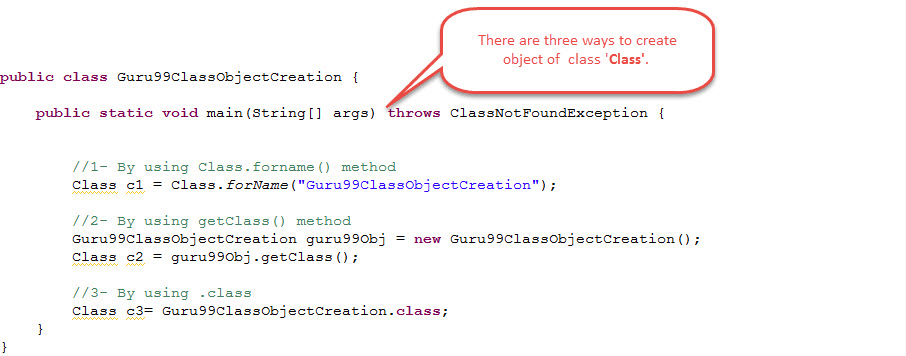
public class Guru99ClassObjectCreation {
    public static void main(String[] args) throws ClassNotFoundException {
        // 1 - By using Class.forName() method
        Class c1 = Class.forName("Guru99ClassObjectCreation");
        // 2 - By using getClass() method
        Guru99ClassObjectCreation guru99Obj = new Guru99ClassObjectCreation();
        Class c2 = guru99Obj.getClass();
        // 3 - By using .class
        Class c3 = Guru99ClassObjectCreation.class;
    }
}
Example 1: How to get Metadata of Class
The following example shows how to get metadata such as the class name, super class name, implemented interfaces, and access modifiers of a class.
We will get the metadata of the below class named Guru99Base.class:

import java.io.Serializable;
public abstract class Guru99Base implements Serializable, Cloneable {
}
- The name of the class is: Guru99Base
- Its access modifiers are: public and abstract
- It has implemented interfaces: Serializable and Cloneable
- Since it has not extended any class explicitly, its super class is: java.lang.Object
The below class will get the metadata of Guru99Base.class and print it:

import java.lang.reflect.Modifier;
public class Guru99GetclassMetaData {
    public static void main(String[] args) throws ClassNotFoundException {
        // Create Class object for Guru99Base.class
        Class<Guru99Base> guru99ClassObj = Guru99Base.class;

        // Print name of the class
        System.out.println("Name of the class is : " + guru99ClassObj.getName());

        // Print super class name
        System.out.println("Name of the super class is : " + guru99ClassObj.getSuperclass().getName());

        // Get the list of implemented interfaces using getInterfaces() method
        Class[] guru99InterfaceList = guru99ClassObj.getInterfaces();

        // Print the implemented interfaces using a for-each loop
        System.out.print("Implemented interfaces are : ");
        for (Class guru99class1 : guru99InterfaceList) {
            System.out.print(guru99class1.getName() + " ");
        }
        System.out.println();

        // Get access modifiers using getModifiers() and Modifier.toString()
        int guru99AccessModifier = guru99ClassObj.getModifiers();
        System.out.println("Access modifiers of the class are : " + Modifier.toString(guru99AccessModifier));
    }
}
- Print the name of the class using the getName() method.
- Print the name of the super class using the getSuperclass().getName() method.
- Print the names of the implemented interfaces.
- Print the access modifiers used by the class.


Example 2: How to get Metadata of Variable
The following example shows how to get the metadata of a variable.
Here, we are creating a class named Guru99VariableMetaData.class with some variables:
package guru;
public class Guru99VariableMetaData {
    public static int guru99IntVar1 = 1111;
    static int guru99IntVar2 = 2222;
    static String guru99StringVar1 = "guru99.com";
    static String guru99StringVar2 = "Learning Reflection API";
}
Steps to get the metadata about the variables in the above class:
- Create the class object of the above class, i.e., Guru99VariableMetaData.class, as below:
Guru99VariableMetaData guru99ClassVar = new Guru99VariableMetaData();
Class guru99ClassObjVar = guru99ClassVar.getClass();
- Get the metadata in the form of a Field array using the getFields() or getDeclaredFields() methods as below:
Field[] guru99Field1 = guru99ClassObjVar.getFields();
Field[] guru99Field2 = guru99ClassObjVar.getDeclaredFields();
The getFields() method returns the metadata of the public variables from the specified class as well as from its super class.
The getDeclaredFields() method returns the metadata of all the variables from the specified class only.
- Get the name of the variables using the “public String getName()” method.
- Get the data type of the variables using the “public Class getType()” method.
- Get the value of the variable using the “public xxx get(Field)” method. Here, xxx could be a byte, short, or any type of value we want to fetch.
- Get the access modifiers of the variables using the getModifiers() and Modifier.toString(int i) methods.
Here, we are writing a class to get the metadata of the variables present in the class Guru99VariableMetaData.class:

package guru;
import java.lang.reflect.Field;
import java.lang.reflect.Modifier;

public class Guru99VariableMetaDataTest {
    public static void main(String[] args) throws IllegalArgumentException, IllegalAccessException {
        // Create Class object for Guru99VariableMetaData.class
        Guru99VariableMetaData guru99ClassVar = new Guru99VariableMetaData();
        Class guru99ClassObjVar = guru99ClassVar.getClass();

        // Get the metadata of all the fields of the class
        Field[] guru99Field1 = guru99ClassObjVar.getDeclaredFields();

        // Print name, data types, access modifiers and values of the variables
        for (Field field : guru99Field1) {
            System.out.println("Variable name : " + field.getName());
            System.out.println("Datatype of the variable : " + field.getType());

            int guru99AccessModifiers = field.getModifiers();
            System.out.println("Access Modifiers of the variable : " + Modifier.toString(guru99AccessModifiers));
            System.out.println("Value of the variable : " + field.get(guru99ClassVar));
            System.out.println();
        }
    }
}
- Created a class object for Guru99VariableMetaData.class.
- Got all the metadata of the variables in a Field array.
- Printed all the variable names in the class Guru99VariableMetaData.class.
- Printed all the data types of the variables in the class.
- Printed all the access modifiers of the variables in the class.
- Printed the values of all the variables in the class.


Example 3: How to get Metadata of Method
The following example shows how to get the metadata of a method.
Here, we are creating a class named Guru99MethodMetaData.class with some methods:

package guru;
import java.sql.SQLException;
public class Guru99MethodMetaData {

    public void guru99Add(int firstElement, int secondElement, String result)
    throws ClassNotFoundException, ClassCastException {
        System.out.println("Demo method for Reflection API");
    }
    public String guru99Search(String searchString)
    throws ArithmeticException, InterruptedException {
        System.out.println("Demo method for Reflection API");
        return null;
    }
    public void guru99Delete(String deleteString)
    throws SQLException {
        System.out.println("Demo method for Reflection API");
    }
}
Steps to get the metadata about the methods in the above class:
- Create the class object of the above class, i.e., Guru99MethodMetaData.class, as below:
Guru99MethodMetaData guru99ClassVar = new Guru99MethodMetaData();
Class guru99ClassObjVar = guru99ClassVar.getClass();
- Get method information in a Method array using the getMethods() and getDeclaredMethods() methods as below:
Method[] guru99Method1 = guru99ClassObjVar.getMethods();
Method[] guru99Method2 = guru99ClassObjVar.getDeclaredMethods();
The getMethods() method returns the metadata of the public methods from the specified class as well as from its super class. The getDeclaredMethods() method returns the metadata of all the methods from the specified class only.
- Get the name of the method using the getName() method.
- Get the return type of the method using the getReturnType() method.
- Get access modifiers of the methods using the getModifiers() and Modifier.toString(int i) methods.
- Get method parameter types using the getParameterTypes() method, which returns a Class array.
- Get thrown exceptions using the getExceptionTypes() method, which returns a Class array.
Here, we are writing a class to get the metadata of the methods present in the class Guru99MethodMetaData.class:

package guru;
import java.lang.reflect.Method;
import java.lang.reflect.Modifier;

public class Guru99MethodMetaDataTest {

    public static void main(String[] args) {
        // Create Class object for Guru99MethodMetaData.class
        Class guru99ClassObj = Guru99MethodMetaData.class;

        // Get the metadata of all the methods using getDeclaredMethods()
        Method[] guru99Methods = guru99ClassObj.getDeclaredMethods();

        for (Method method : guru99Methods) {
            System.out.println("Name of the method : " + method.getName());
            System.out.println("Return type of the method : " + method.getReturnType());

            int guru99ModifierList = method.getModifiers();
            System.out.println("Method access modifiers : " + Modifier.toString(guru99ModifierList));

            Class[] guru99ParamList = method.getParameterTypes();
            System.out.print("Method parameter types : ");
            for (Class class1 : guru99ParamList) {
                System.out.print(class1.getName() + " ");
            }
            System.out.println();

            Class[] guru99ExceptionList = method.getExceptionTypes();
            System.out.print("Exception thrown by method : ");
            for (Class class1 : guru99ExceptionList) {
                System.out.print(class1.getName() + " ");
            }
            System.out.println();
        }
    }
}
- Created a class object for Guru99MethodMetaData.class.
- Got all the metadata of all the methods in a Method array.
- Printed all the method names present in the class.
- Printed the return types of the methods in the class.
- Printed all the access modifiers of the methods in the class.
- Printed the parameter types of the methods.
- Printed the exceptions thrown by the methods.


Example 4: How to get Metadata of Constructors
The following example shows how to get the metadata of constructors.
Here, we are creating a class named Guru99Constructor.class with different constructors:

package guru;

import java.rmi.RemoteException;
import java.sql.SQLException;

public class Guru99Constructor {

    public Guru99Constructor(int no) throws ClassCastException, ArithmeticException { }
    public Guru99Constructor(int no, String name) throws RemoteException, SQLException { }
    public Guru99Constructor(int no, String name, String address) throws InterruptedException { }
}
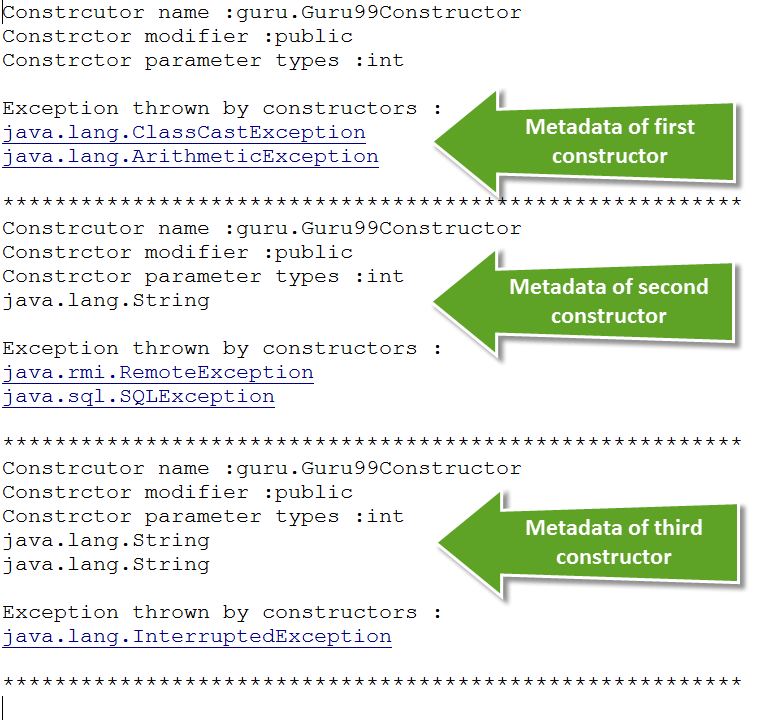
Here, we are writing a class to get the metadata of the constructors present in the class Guru99Constructor.class:

package guru;
import java.lang.reflect.Constructor;
import java.lang.reflect.Modifier;
public class Guru99ConstructorMetaDataTest {

    public static void main(String[] args) {
        // Create Class object for Guru99Constructor.class
        Class guru99Class = Guru99Constructor.class;

        // Get all the constructor information in the Constructor array
        Constructor[] guru99ConstructorList = guru99Class.getConstructors();

        for (Constructor constructor : guru99ConstructorList) {
            System.out.println("Constructor name : " + constructor.getName());

            int guru99Modifiers = constructor.getModifiers();
            System.out.println("Constructor modifier : " + Modifier.toString(guru99Modifiers));

            Class[] guru99ParamList = constructor.getParameterTypes();
            System.out.print("Constructor parameter types : ");
            for (Class class1 : guru99ParamList) {
                System.out.print(class1.getName() + " ");
            }
            System.out.println();

            Class[] guru99ExceptionList = constructor.getExceptionTypes();
            System.out.print("Exception thrown by constructors : ");
            for (Class class1 : guru99ExceptionList) {
                System.out.print(class1.getName() + " ");
            }
            System.out.println();
        }
    }
}
- Created a class object for Guru99Constructor.class.
- Got all the metadata of all the constructors in a Constructor array.
- Printed all the constructors’ names present in the class.
- Printed all the access modifiers of the constructors in the class.
- Printed the parameter types of the constructors.
- Printed the exceptions thrown by the constructors.