
Conditional Statements in JavaScript: if, else, and else if
 James Hartman
⚡ Smart Summary
Conditional statements in JavaScript decide which block of code runs by testing a condition, and the if, if…else, and if…else if…else forms cover almost every branching decision that a beginner script will ever need.
JavaScript Conditional Statements
There are mainly three types of conditional statements in JavaScript.
- if Statement: An ‘if’ statement executes code based on a condition.
- if…else Statement: The if…else statement consists of two blocks of code; when a condition is true, it executes the first block of code and when the condition is false, it executes the second block of code.
- if…else if…else Statement: When multiple conditions need to be tested and different blocks of code need to be executed based on which condition is true, the if…else if…else statement is used.
Each of the three forms is examined below with its syntax and a runnable example. The same rules apply whether the script sits inside the page or in an external file, and whether the condition is written at the top level or inside a function.
How to Use Conditional Statements
Conditional statements are used to decide the flow of execution based on different conditions. If a condition is true, you can perform one action and if the condition is false, you can perform another action.
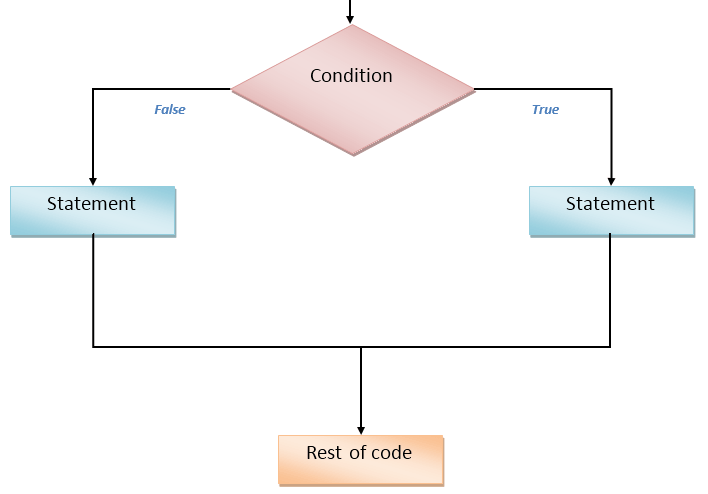
The diagram below shows that idea as a fork in the road: a single condition is evaluated once, and control travels down the true branch or the false branch, never both.
If Statement
Syntax:
if(condition)
{
	lines of code to be executed if condition is true
}
You can use if statement if you want to check only a specific condition. When the expression inside the parentheses evaluates to true, the block runs; when it evaluates to false, the interpreter skips straight past it and the script carries on with the next statement.
Try this yourself:
<html>
<head>
	<title>IF Statments!!!</title>
	<script type="text/javascript">
		var age = prompt("Please enter your age");
		if(age>=18)
		document.write("You are an adult <br />");
		if(age<18)
		document.write("You are NOT an adult <br />");
	</script>
</head>
<body>
</body>
</html>
The example asks the visitor for an age, then tests that value twice: once for 18 and above, once for below 18. Because two separate if statements are used rather than an else, both conditions are evaluated every time the page loads.
Modern equivalent: the code above is kept exactly as published. In current JavaScript the same logic is normally written with let or const instead of var, with console.log() or textContent instead of document.write(), and without the type="text/javascript" attribute, which HTML5 makes optional.
If…Else Statement
Syntax:
if(condition)
{
	lines of code to be executed if the condition is true
}
else
{
	lines of code to be executed if the condition is false
}
You can use the if...else statement if you have to check one condition and execute a different block of code for each outcome. Exactly one of the two blocks always runs, so no separate second test is required.
Try this yourself:
<html>
<head>
	<title>If...Else Statments!!!</title>
	<script type="text/javascript">
		// Get the current hours
		var hours = new Date().getHours();
		if(hours<12)
		document.write("Good Morning!!!<br />");
		else
		document.write("Good Afternoon!!!<br />");
	</script>
</head>
<body>
</body>
</html>
Here new Date().getHours() returns the current hour of the browser clock as a number from 0 to 23. Any value below 12 produces the morning greeting, and every other value falls through to the else branch.
If…Else If…Else Statement
Syntax:
if(condition1)
{
	lines of code to be executed if condition1 is true
}
else if(condition2)
{
	lines of code to be executed if condition2 is true
}
else
{
	lines of code to be executed if condition1 is false and condition2 is false
}
You can use the if...else if...else statement if you want to check more than two conditions. The conditions are evaluated from top to bottom, execution stops at the first one that is true, and the final else acts as a catch-all when none of them match.
Try this yourself:
<html>
<head>
	<script type="text/javascript">
		var one = prompt("Enter the first number");
		var two = prompt("Enter the second number");
		one = parseInt(one);
		two = parseInt(two);
		if (one == two)
			document.write(one + " is equal to " + two + ".");
		else if (one<two)
			document.write(one + " is less than " + two + ".");
		else
			document.write(one + " is greater than " + two + ".");
	</script>
</head>
<body>
</body>
</html>
Note the two calls to parseInt(). Values returned by prompt() are strings, so comparing them without conversion would compare text rather than numbers and would report “9” as greater than “10”.
Ternary Operator: A Shorthand for if…else
When an if...else block only chooses between two values, the conditional (ternary) operator expresses the same decision as a single expression. It is the one JavaScript operator that takes three operands: a condition, a question mark, the value used when the condition is truthy, a colon, and the value used when it is falsy.
// if...else form
let message;
if (age >= 18) {
  message = "adult";
} else {
  message = "minor";
}

// same decision as a ternary expression
let label = age >= 18 ? "adult" : "minor";
Use the ternary operator when it improves readability, not merely to save lines:
- Good fit: picking one of two values to assign, return, or drop into a template string.
- Poor fit: branches that run several statements, call functions for their side effects, or need their own local variables.
- Avoid nesting: a ternary inside a ternary is far harder to read than an
else ifchain.
switch Statement vs if…else if…else
A long else if chain that keeps comparing the same variable against different fixed values is usually clearer as a switch statement. The switch evaluates its expression once, then jumps to the matching case; break stops execution falling through into the next case, and default plays the role of the final else.
switch (day) {
  case "Sat":
  case "Sun":
    document.write("Weekend");
    break;
  default:
    document.write("Weekday");
}
The two structures are not interchangeable in every situation:
| Point of comparison | if…else if…else | switch |
|---|---|---|
| Kind of test | Any boolean expression, including ranges such as hours<12 |
Equality against fixed values only |
| Comparison used | Whatever operator you write | Strict comparison, so "5" does not match 5 |
| Readability | Best for a few unrelated conditions | Best for many values of one variable |
| Common bug | Forgetting the trailing else |
Forgetting break, which lets execution fall through |
Truthy and Falsy Values in JavaScript Conditions
A condition does not have to be a comparison. JavaScript converts whatever it finds inside the parentheses to a boolean first, which is why if (name) is valid code. Only six values convert to false: false, 0, the empty string, null, undefined, and NaN. Everything else is truthy, including the string "0", an empty array, and an empty object.
Most conditional bugs in beginner scripts come from a short list of mistakes:
- Assignment instead of comparison:
if (x = 5)assigns and is always truthy;if (x === 5)compares. - Loose equality surprises:
==converts types before comparing, so"" == 0is true. Prefer===. - Missing braces: without
{}only the next single statement belongs to the branch, exactly as in the examples above. - Unconverted input: values from
prompt()and form fields are strings untilparseInt()orNumber()converts them. - Unreachable branches: in an
else ifchain, place the narrowest condition first, or a broader earlier test will always win.
