
SAP USR40: How to set Password Restrictions
 Jessica Blake
⚡ Smart Summary
SAP USR40 is the table used to set password restrictions in SAP by blacklisting impermissible passwords. Combined with login profile parameters, it enforces minimum length, expiration, and prohibited patterns to strengthen account security across the system.
Strong password rules are a first line of defense for any SAP system. This walkthrough explains how to set password restrictions using table USR40 and the related login profile parameters that control password length, expiration, and prohibited patterns.
What is USR40 in SAP?
USR40 is the SAP table that stores impermissible passwords—the words and patterns that users are not allowed to set. It is a core part of SAP password policy, working alongside the login/* profile parameters that govern password length and expiration. Security administrators maintain the table with transaction SM30.
By listing weak or predictable values such as a company name, “password”, or common number sequences, USR40 forces users to choose stronger credentials. Because entries support wildcards, a single row can block an entire family of passwords. Maintaining USR40 is a simple but effective step in hardening SAP security and meeting audit and compliance requirements.
Specifying Impermissible Passwords
You can prevent users from choosing passwords that you do not want to allow. To prohibit the use of a password, enter it in table USR40. You can maintain table USR40 with Transaction SM30. In USR40, you can specify impermissible passwords generically if you want. There are two wildcard characters:
- ? stands for a single character
- * stands for a sequence of any combination characters of any length.
123* in table USR40 prohibits any password that begins with the sequence “123.”
*123* prohibits any password that contains the sequence “123.”
AB? prohibits all passwords that begin with “AB” and have one additional character: “ABA”, “ABB”, “ABC” and so on.
How to Set Password Restrictions in USR40
To set restriction for password follow the below procedure:-
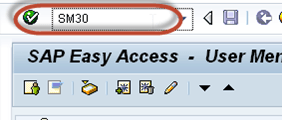
Step 1) Execute T-code SM30.
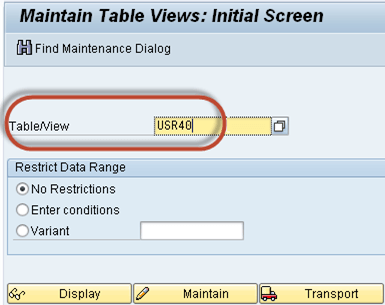
Step 2) Enter the table name USR40 in “Table/View” field.
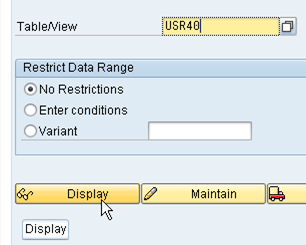
Step 3) Click Display button.
Step 4) Enter password expression string.
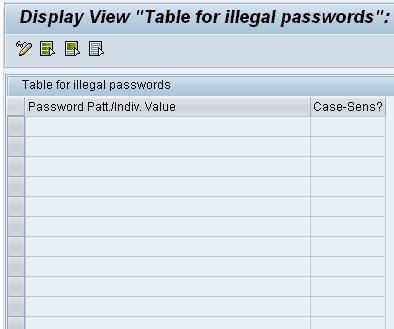
That’s it for password management!
Key Password Profile Parameters in SAP
You can use the following system profile parameters to specify the minimum length of a password and the frequency with which users must change their password.
- login/min_password_lng: minimum password length.Default value: Three characters. You can set it to any value between 3 and 8.
- login/password_expiration_time: number of days after which a password expires To allow users to keep their passwords without limit, leave the value set to the default 0.
Modern SAP systems offer several more parameters that let you enforce complexity. Maintain these in the instance profile (RZ10) alongside the USR40 blacklist:
| Parameter | Purpose |
|---|---|
| login/min_password_lng | Minimum number of characters in a password |
| login/min_password_digits | Minimum number of digits required |
| login/min_password_letters | Minimum number of letters required |
| login/min_password_specials | Minimum number of special characters required |
| login/password_expiration_time | Days before a password must be changed |
| login/password_history_size | Number of previous passwords that cannot be reused |
Best Practices for SAP Password Security
Combine table restrictions and profile parameters into a single, enforceable policy. The following practices keep passwords strong and compliant:
- Blacklist predictable values: Add company names, seasons, and common sequences to USR40 using wildcards.
- Enforce complexity: Require a mix of letters, digits, and special characters through the login parameters.
- Rotate passwords: Set a sensible expiration time so credentials do not remain valid indefinitely.
- Prevent reuse: Use login/password_history_size to stop users cycling back to old passwords.
- Layer your defenses: Combine password rules with logon-attempt limits to block brute-force attacks.
