Pricing Procedure in SAP MM & SAP SD

⚡ Smart Summary

Pricing Procedure in SAP MM and SAP SD determines prices in purchasing and sales documents by linking access sequences, condition types, and calculation schemas. It assigns the correct schema based on vendor and purchasing organization schema groups for price determination.

  • 💰 Pricing Procedure Defined: Determines prices in purchasing and sales documents using calculation schemas.
  • 🔑 Access Sequence: Tells the system where to search condition values across prioritized condition tables.
  • 🧩 Condition Types: Assigned to the access sequence to handle different calculation needs.
  • 🏢 Schema Groups: The schema is assigned via vendor and purchasing organization schema group combinations.
  • ⚙️ Customizing Path: Maintain pricing through SPRO under Materials Management, Purchasing, Conditions.

Pricing Procedure in SAP MM and SAP SD

What is Pricing Procedure?

Pricing procedure in the MM module is a way to determine prices in purchasing documents. It gives us the functionality to assign different calculation types for different needs. Defining a pricing procedure can be done by creating an access sequence and assigning it to condition types. The access sequence tells the system where to look for the condition values. It can search multiple condition tables based on our settings. Tables have different priority and different key fields.

Determination of the SAP MM or SAP SD Pricing Procedure is practically assigning the calculation schema to a combination of vendor schema group and purchasing organization schema group. So, you need to enter the vendor schema group on the vendor master, and assign the schema group to the purchasing organization, in order for the system to find the calculation schema to be used in the document.

Pricing Procedure in SAP MM and SAP SD
Price Determination in SAP MM

In order to set up a Price Procedure in purchasing documents, you need access to the customizing features.

How to Maintain Pricing Procedure in SAP MM & SAP SD

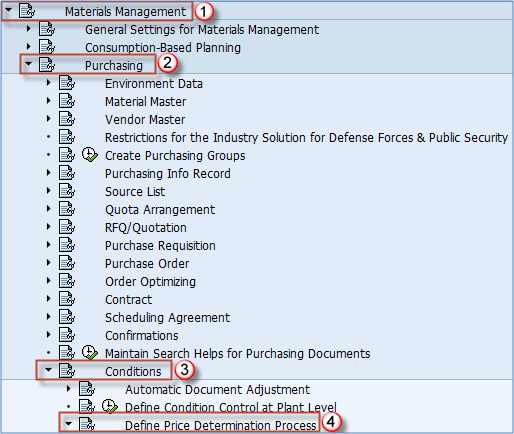
Once the concept is clear, the next step is to configure pricing in the system. The IMG path to the available functions for Pricing in SAP SD is:

Transaction SPRO => Materials Management => Purchasing => Conditions => Define Price determ. process
Pricing Procedure in SAP MM

Pricing Procedure in SAP MM

The following functions can be used to maintain the Pricing in SAP MM. There are more settings concerning the Pricing Procedure determination in SAP SD & SAP MM, but we will cover the most used ones.

Pricing Procedure in SAP MM

SAP MM Pricing Procedure

FAQs

SAP MM pricing determines prices in purchasing documents for vendors, while SAP SD pricing determines prices in sales documents for customers. Both use access sequences, condition types, and calculation schemas, but apply to different business processes.

An access sequence is a search strategy that tells the system where to look for condition values. It scans multiple condition tables in priority order until it finds a valid condition record for the document.

A condition type represents a pricing element such as a base price, discount, surcharge, freight, or tax. Each condition type is linked to an access sequence to determine how its value is calculated.

AI can analyze historical pricing data, recommend optimal condition records, predict margin impact, and suggest schema simplifications. This helps reduce configuration errors and supports dynamic, data-driven pricing decisions across MM and SD.

Yes. AI can flag missing condition records, inconsistent schema assignments, and outlier prices before posting. It augments manual checks, helping teams catch pricing mistakes early and maintain accurate purchasing and sales documents.

Summarize this post with: