How To Create an Infoarea in SAP BW/BI
 Editorial Team
⚡ Smart Summary
An InfoArea in SAP BW is a folder-like node in a tree structure used to organize InfoCubes, DSOs, and InfoObject catalogs into logical groups, with every InfoProvider assigned to exactly one InfoArea.

What is an InfoArea in SAP BI/BW?
InfoAreas are the branches and nodes of a tree structure used to organize InfoCubes and InfoObjects. Each object is assigned to an InfoArea. An InfoArea can be thought of as a folder used to hold related files together.
How to Create an InfoArea in SAP BI/BW
Following is a step-by-step process to create an InfoArea in SAP BI/BW.
Step 1) Go to the transaction code and click the OK button.
- Go to transaction code RSA1 to open the Data Warehousing Workbench.
- Click the OK button.

Step 2) Create an InfoArea.
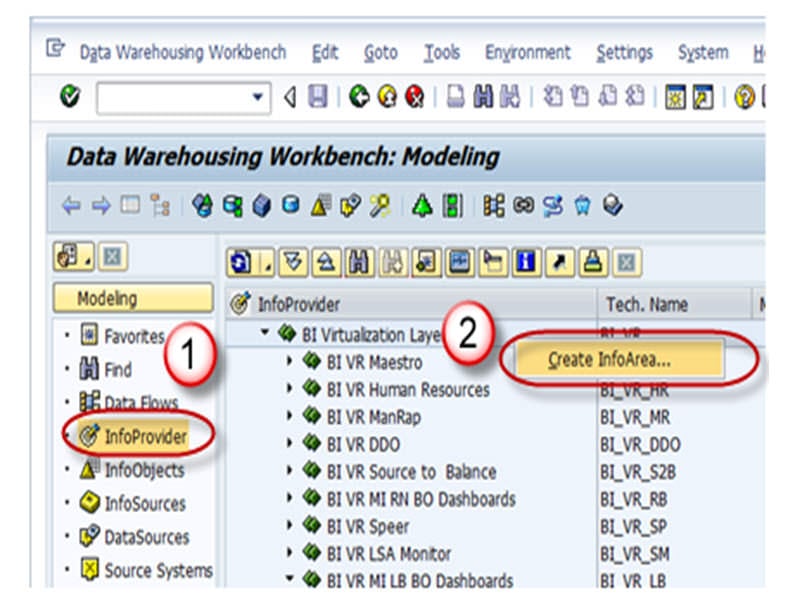
- Navigate to the Modeling tab -> InfoProvider.
- Right click in the Workbench and create an InfoArea.
Step 3) Press the Enter button.
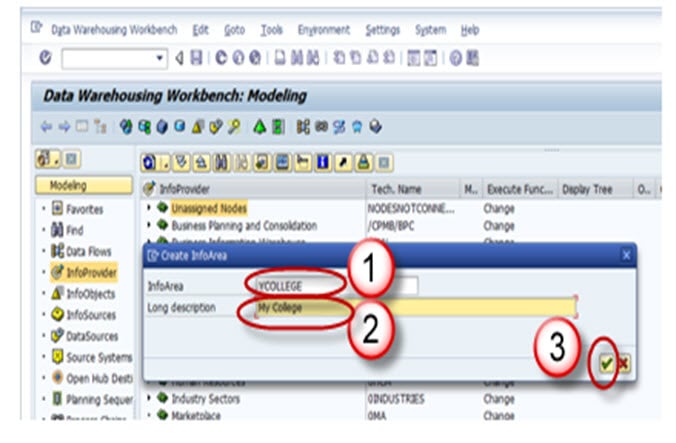
- Enter the Technical Name.
- Enter the Description.
- Press the Enter button.
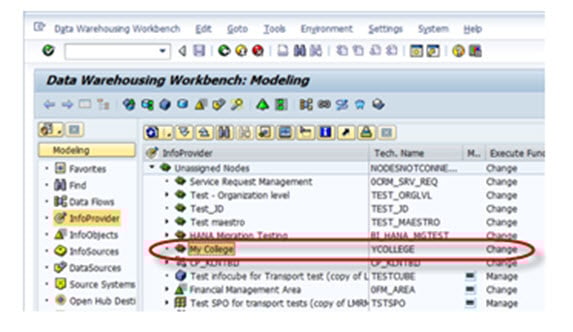
Step 4) The InfoArea is created and appears as shown below.