
Modliszka Tracsamouczek ker
 Zespół redakcyjny
⚡ Inteligentne podsumowanie
Modliszka Tracker to darmowy problem o otwartym kodzie źródłowym tracsystem, którego zespoły programistyczne używają do zgłaszania usterek, przypisywania właścicieli, dołączania dowodów i śledzenia każdej poprawki aż do zamknięcia w wielu projektach i wydaniach.
Co to jest modliszka? Tracker?
Modliszka, wydany pod oficjalną nazwą Modliszka, jest błędem typu open source tracoprogramowanie królewskie, które można wykorzystać do track defektów oprogramowania dla różnych projektów programistycznych. Możesz łatwo pobrać i zainstalować MantisBT do własnego użytku, a projekt oferuje również hostowaną wersję tego samego oprogramowania za pośrednictwem MantisHub. Możesz łatwo dostosować Mantis do swojego procesu tworzenia oprogramowania.
MantisBT to aplikacja PHP, która przechowuje swoje dane w MySQL, PostgreSQL or Microsoft SQL Server, a sam serwer działa na systemie Linux, Windows or macOSAktualna stabilna wersja to MantisBT 2.28.4; starsza gałąź 1.3.x (1.3.20) jest nadal wspierana, ale otrzymuje tylko poprawki zabezpieczeń i krytycznych błędów, więc nowa instalacja powinna rozpocząć się od linii 2.x.
Oto niektóre z najważniejszych cech MantisBT:
- Powiadomienia e-mail: wysyła wiadomości e-mail z aktualizacjami, komentarzami i rozwiązaniami do zainteresowanych stron.
- Kontrola dostępu: Możesz kontrolować dostęp użytkowników na poziomie projektu
- Dostosuj: Możesz łatwo dostosować Mantis do swoich wymagań.
- Wsparcie mobilne: Mantis obsługuje iPhone'a, Android, Windows Platformy telefoniczne.
- Wtyczki: stale rozwijająca się biblioteka wtyczek, która umożliwia dodawanie niestandardowych funkcji do Mantis Issue Tracker.
Pozostała część przewodnika jest zgodna z kolejnością, w jakiej zwykle pracuje nowy zespół: rejestruje pierwszy defekt, następnie tworzy projekt, użytkowników i pola niestandardowe, które pomagają utrzymać porządek w kolejce.
Jak zgłosić problem
Nie musisz niczego instalować, aby wypróbować MantisBT. Oficjalna próbny strona udostępnia bezpłatną, hostowaną instancję próbną MantisHub, a także umożliwia przeglądanie publicznych zasobów zespołu MantisBT tracker w trybie tylko do odczytu. Dobrze sformatowany zgłoś błąd to właśnie sprawia, że reszta przepływu pracy jest użyteczna, więc zacznij od tego.
Krok 1) Zaloguj się do Mantisa
Na ekranie logowania zostaniesz poproszony o podanie nazwy użytkownika i hasła, a także otrzymasz linki umożliwiające rejestrację i odzyskanie utraconego hasła.

Krok 2) Po zalogowaniu się do Mantis Twoja nazwa użytkownika zostanie wyświetlona na górze głównego ekranu Mantis. Teraz możesz zgłosić swój problem do Mantis, klikając opcję „Zgłoś problem” jak pokazano poniżej.

Krok 3) Na następnym ekranie
- Wprowadź kategorię błędu
- Wprowadź powtarzalność
- Wprowadź wagę
- Wprowadź priorytet
- Wprowadź dane platformy
- Wprowadź podsumowanie raportu o błędzie
- Wchodzę Descriptjon
- Wprowadź kroki, aby odtworzyć błąd
- Kliknij opcję Prześlij raport
Ponumerowane odnośniki na poniższym zrzucie ekranu odpowiadają kolejno poszczególnym pozycjom na liście, od kategorii u góry do opcji prześlij raport u dołu formularza.

UWAGA:Pola, które widzisz w swojej wersji Mantis, będą się różnić. Zapoznaj się z naszą sekcją Pola niestandardowe za to samo.
Krok 4) Po wprowadzeniu wszystkich szczegółów w oknie raportu, prześlemy raport, który wkrótce zostanie wyświetlony w oknie głównym. Jak pokazano na poniższym zrzucie ekranu, po kliknięciu „Wyświetl zgłoszenie” zgłoszenie pojawi się na ekranie z identyfikatorem. "0017896" pokazuje również status nowego, a także datę jego utworzenia.
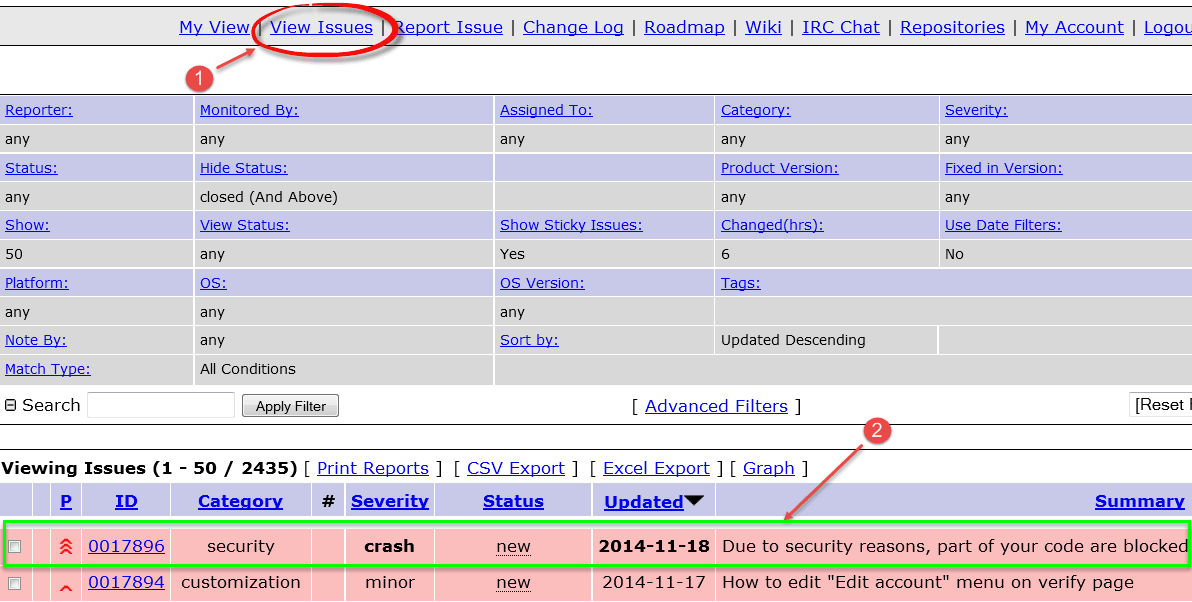
Problemy w narzędziu Mantis są podświetlane zgodnie ze statusem problemu. Na przykład tutaj problem ma status potwierdzony, dlatego jest podświetlony na jasnopomarańczowo.

Dla różnych statusów przypisane są różne kolory. Poniższa tabela zawiera domyślny kolor dostarczany przez MantisBT dla każdego statusu przepływu pracy, który administrator może zmienić za pomocą $g_status_colors ustawienie konfiguracji.
| Status | Domyślny kolor | Co mówi ci ten rząd |
|---|---|---|
| nowych | Jasnoczerwony / różowy | Zgłoszono, ale nikt się jeszcze nie zajął. |
| informacja zwrotna | Fioletowy | Osoba prowadząca sprawę potrzebuje więcej informacji od reportera. |
| przyznał | Orange | Zespół uznaje raport za wiarygodny. |
| Zatwierdzony | Żółty | Druga osoba odtworzyła wadę. |
| przydzielony | Niebieski | Wyznaczony pracownik pracuje nad poprawką. |
| zdecydowany | Zielony | Rozwiązanie zostało już wdrożone i czeka na weryfikację. |
| zamknięte | Szary | Zweryfikowano i zarchiwizowano, nie oczekuje się dalszych działań. |
Odczyt kolejki według koloru to najszybszy sposób, aby zobaczyć, gdzie utknęło wydanie, i jest on bezpośrednio odwzorowany na szerszym cykl życia wady Twoja drużyna już Cię obserwuje.
Krok 5) Po kliknięciu #id problemu 0017896, pokaże bardziej szczegółowe informacje o problemie, takie jak osoba raportująca projekt, jego status, data przesłania i ostatniej aktualizacji.

Krok 6) Oprócz tego możesz dodać plik, dokumenty, obrazy do swojego błędu, jak pokazano poniżej –

Krok 7) Możesz również dodać komentarze odnoszące się do Twojego problemu, tak jak pokazano na zrzucie ekranu poniżej.

Krok 8) Możesz kliknąć historię na górze raportu o problemie, aby zobaczyć historię problemu. Ta historia problemu zawiera szczegóły, takie jak data utworzenia problemu, data dodania pliku do problemu lub informacja o dodaniu notatki do problemu.

Krok 9) Po przesłaniu zgłoszenia programista otrzymuje wiadomość e-mail.
Poniższe powiadomienie to wiadomość wysyłana przez Mantis w momencie zmiany właściciela zgłoszenia. Zawiera ona informacje o autorze zgłoszenia, osobie obsługującej zgłoszenie, projekcie, kategorii, powadze, priorytecie i statusie w postaci zwykłego tekstu.


Jak dodać projekt
Każdy problem w Mantis jest częścią projektu, więc następnym zadaniem jest utworzenie problemu dla testowanego produktu.
Krok 1) W zakładce Zarządzaj przejdź do Zarządzaj projektami
- Wprowadź nazwę projektu
- Wybierz status
- Wchodzę Descriptjon
- Kliknij Dodaj projekt
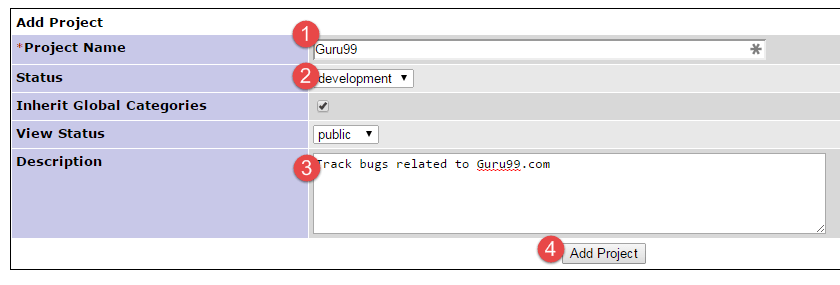
Krok 2) Projekt został stworzony.

Jak utworzyć użytkownika
Po uruchomieniu projektu reporterzy, programiści i menedżerowie, którzy będą nad nim pracować, potrzebują konta.
Krok 1) Przejdź do Zarządzaj > Zarządzaj użytkownikami. Kliknij „Utwórz nowe konto”.

Krok 2) Wprowadź dane konta, a następnie utwórz użytkownika
- Nazwa użytkownika
- Prawdziwe imię
- Poziom dostępu
- Kliknij opcję Utwórz użytkownika
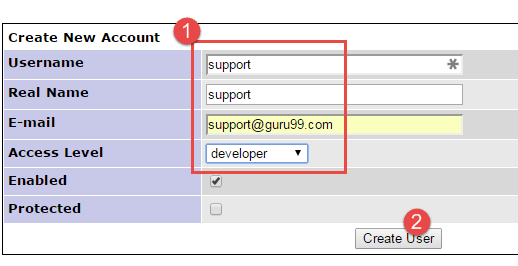
Krok 3) Na następnym ekranie przypisz użytkownika do żądanego projektu.

Krok 4) Aktualizuj preferencje dotyczące poczty e-mail i inne ustawienia konta zgodnie z potrzebami

Krok 5) Dane logowania są wysyłane użytkownikowi e-mailem.

Jak utworzyć pole niestandardowe
Jeśli standardowy formularz raportu nie obejmuje wszystkich elementów, których potrzebuje Twój proces, Mantis umożliwia zdefiniowanie dodatkowych pól i dołączenie ich do poszczególnych projektów.
Krok 1) Utwórz pole
- Przejdź do Zarządzaj polami niestandardowymi
- Wprowadź nazwę pola
- Kliknij przycisk „Nowe pole niestandardowe”

Krok 2) Skonfiguruj zachowanie pola
- Wybierz Typ pola
- Wprowadź dane specyficzne dla pola
- Kliknij Aktualizuj pole niestandardowe

Krok 3) Pole niestandardowe zostało utworzone

Krok 4) Kliknij ponownie pole niestandardowe i połącz pole niestandardowe ze swoim projektem

Krok 5) W sekcji Zgłoś problem widoczne jest nowe pole niestandardowe

Pola niestandardowe, projekty i poziomy dostępu razem dają małemu zespołowi taką samą kontrolę, jaką ma większy zespół pluskwa tracnarzędzia królewskie zapewnić, nie opuszczając proces zarządzania defektami Ty już biegasz.
